cancel
Showing results for 
Search instead for 
Did you mean: 

Learn from the best! Meet the four finalists headed to the FINALS of the Power BI Dataviz World Championships! Register now

Reply
jxp73
Frequent Visitor

Text Filter for Multiple Tables

Friends,


I have a column "awardfy". It is in each table for of my top sponsors, DoD, NSF, NIH etc. I have a cross analysis page where I would like to be able to filter by that awardfy (its a text column). That way I can come departments by award totals by year


Thank you! 


1 ACCEPTED SOLUTION
v-lionel-msft
Community Support
Community Support

Hi @jxp73 ,

First of all, let me describe my understanding .

You have multiple tables, each of which has the same column "awardfy".

Now you want to use the column “awardfy”  as a filter.

What you want to calculate is “award total for each department for year”.
Is that right?

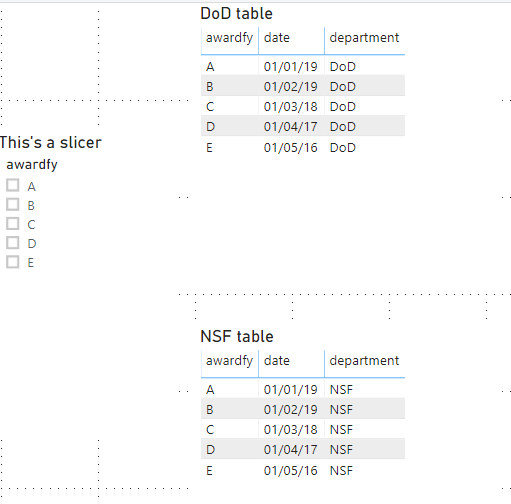
This is my replicated data model, but I still don't understand the relationship between your filter column “awardfy”   and the formula you're asking for.
So please give me a sample data model, and it would be nice to show me the result what you ultimately want to achieve.

a2.PNG

Best regards,
Lionel Chen


If this post helps, then please consider Accept it as the solution to help the other members find it more quickly.

View solution in original post

2 REPLIES 2
v-lionel-msft
Community Support
Community Support

Hi @jxp73 ,

First of all, let me describe my understanding .

You have multiple tables, each of which has the same column "awardfy".

Now you want to use the column “awardfy”  as a filter.

What you want to calculate is “award total for each department for year”.
Is that right?

This is my replicated data model, but I still don't understand the relationship between your filter column “awardfy”   and the formula you're asking for.
So please give me a sample data model, and it would be nice to show me the result what you ultimately want to achieve.

a2.PNG

Best regards,
Lionel Chen


If this post helps, then please consider Accept it as the solution to help the other members find it more quickly.

SivaMani
Resident Rockstar
Resident Rockstar

@jxp73 ,


Please do check out this blog - https://docs.microsoft.com/en-us/power-bi/desktop-drillthrough


Thanks,

Siva

Helpful resources

Announcements
Join our Fabric User Panel

Join our Fabric User Panel

Share feedback directly with Fabric product managers, participate in targeted research studies and influence the Fabric roadmap.

February Power BI Update Carousel

Power BI Monthly Update - February 2026

Check out the February 2026 Power BI update to learn about new features.

FabCon Atlanta 2026 carousel

FabCon Atlanta 2026

Join us at FabCon Atlanta, March 16-20, for the ultimate Fabric, Power BI, AI and SQL community-led event. Save $200 with code FABCOMM.