Join us at FabCon Atlanta from March 16 - 20, 2026, for the ultimate Fabric, Power BI, AI and SQL community-led event. Save $200 with code FABCOMM.
Register now!The Power BI Data Visualization World Championships is back! Get ahead of the game and start preparing now! Learn more
Hello,
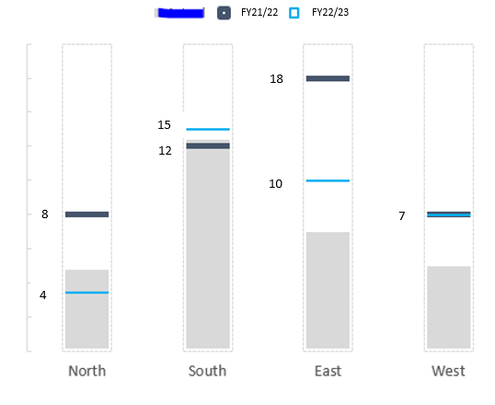
I am trying to figure out a way to create a simple chart showing target duration changes from the last fiscal year to this current fiscal year. There are five categories for these target durations that I'd like to place on my x axis. My goal is to show the change in target durations with markers only, e.g. +1 day, -4 days, etc. I have columns for target durations for FY21/22 and FY22/23. I would love my chart to look somewhat like the below, is there any idea on how I can achieve this in PowerBI?
- This isn't my chart and I wouldn't need the grey spaces shown on the column chart, this is just the best picture I could find online to give an example.
Thank you!
Solved! Go to Solution.
@Anonymous , Check if a bullet chart can help
https://appsource.microsoft.com/en-us/product/power-bi-visuals/wa104380755?tab=overview
I explored a bullet graph, but I don't need to show the actual performance measure, rather the single comparative measures for each category and the change from previous fiscal year to the current fiscal year.
@Anonymous , Check if a bullet chart can help
https://appsource.microsoft.com/en-us/product/power-bi-visuals/wa104380755?tab=overview
The Power BI Data Visualization World Championships is back! Get ahead of the game and start preparing now!
| User | Count |
|---|---|
| 39 | |
| 37 | |
| 35 | |
| 34 | |
| 27 |
| User | Count |
|---|---|
| 137 | |
| 97 | |
| 74 | |
| 66 | |
| 65 |