I'm really struggling to create a target completion date column. I've come close but still coming up short. Only 30 items can be completed per day and the target date should exclude weekends and Federal holidays. The below code is creating a target date. However, it's not factoring in the prevouse rows items or exclduing weekend/holidays.
I have two examples below:
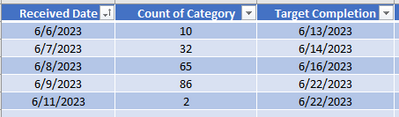
1)Manual Table; the 6th only has 10 items which means 20 items from the 7th would be worked today.
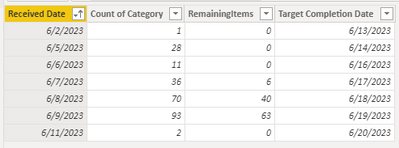
2) Power Bi Table: the 2nd should have a target of today. However, the 5th and 6th would have the same target date since the total count is <30.
1) Manual table:
2) Power BI Table:
TargetCompletionTable =
VAR Dates =
VALUES('Past SLA'[Received Date])
VAR TargetTable =
ADDCOLUMNS (
Dates,
"TotalItems",
CALCULATE (
SUM('Past SLA'[Count of Category]),
ALLEXCEPT('Past SLA', 'Past SLA'[Received Date])
)
)
VAR TargetTableWithCompletedToday =
ADDCOLUMNS (
TargetTable,
"CompletedToday",
IF([TotalItems] <= 30, [TotalItems], 30)
)
VAR TargetTableWithRemainingItems =
ADDCOLUMNS (
TargetTableWithCompletedToday,
"RemainingItems",
MAX([TotalItems] - [CompletedToday], 0)
)
VAR TargetTableWithDaysNeeded =
ADDCOLUMNS (
TargetTableWithRemainingItems,
"DaysNeeded",
RANKX(Dates, [Received Date], , ASC, Dense) - 1
)
VAR AccumulatedItemsTable =
ADDCOLUMNS (
TargetTableWithDaysNeeded,
"AccumulatedItems",
CALCULATE (
SUM('Past SLA'[Count of Category]),
FILTER (
ALL('Past SLA'[Received Date]),
'Past SLA'[Received Date] <= EARLIER('Past SLA'[Received Date])
)
)
)
RETURN
SELECTCOLUMNS (
TargetTableWithDaysNeeded,
"Received Date", [Received Date],
"Count of Category", [TotalItems],
"RemainingItems", [RemainingItems],
"Target Completion Date",
IF (
MAXX(FILTER(AccumulatedItemsTable, [Received Date] <= EARLIER([Received Date])), [AccumulatedItems]) > 30,
TODAY() + [DaysNeeded] + 1,
TODAY() + [DaysNeeded]
)
)


