
cancel
Showing results for 
Search instead for 
Did you mean: 

The Power BI Data Visualization World Championships is back! Get ahead of the game and start preparing now! Learn more

Reply
danb
Resolver I
Resolver I

Taking Difference between two columns in a Table Visual (Values from different tables)

Good Morning!

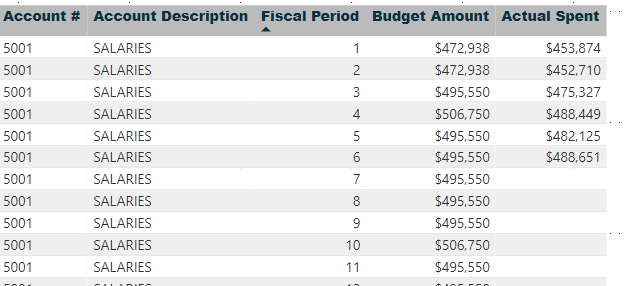
I feel a bit foolish having to ask this question however I am stumped. I have a table visual that I am trying to layer out a budget and then the actual amount spent per account # per period. There are two different tables (my actual spent and original budget tables). I have them connected via account numbers a Fiscal Period. 


I have them in a Table visual as such:

Before.png


I am trying to add a "$ Delta" and "% Delta" for the difference between the Budget Amount and Actual Spend. I have tried various measures however I am doing something wrong. Here is an example of one formula:

Formula.png


The problem is when i add this measure in it blows out the dataset. I can see one row where I see what I am looking for (framed in red) however a whole bunch of extra rows show up as well. 

Error.png


Thanks in advance! 


Dan


1 ACCEPTED SOLUTION

@Icey  - thank you for your response. You are spot on and the issue is being caused by the relationship (or lack thereof). I actually went down the path of merging the two tables together into a new table and solved the issue that way. 


Dan

View solution in original post

2 REPLIES 2
Icey
Community Support
Community Support

Hi @danb ,

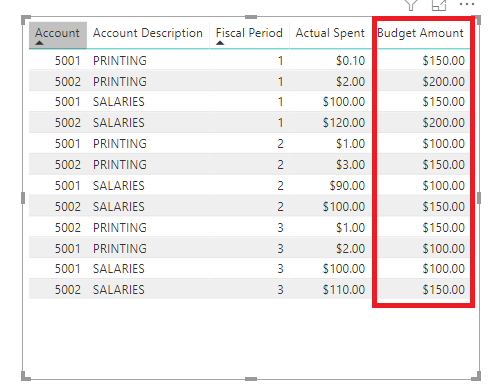
I make a sample. If your data structure is similar to mine,the measure you create is meaningless. Because the value of 'Budget Amount' is the whole 'Fiscal Period' and the value of 'Actual Spent' is the specific value of each 'Account Description'. They are not one-to-one correspondence in the Table visual. Then you can tell me what do you want to do, so that I can help you better.

Taking Difference between two columns in a Table Visual (Values from different tables) 2 .PNG

Best Regards,

Icey Zhang


If this post helps, then please consider Accept it as the solution to help the other members find it more quickly.

@Icey  - thank you for your response. You are spot on and the issue is being caused by the relationship (or lack thereof). I actually went down the path of merging the two tables together into a new table and solved the issue that way. 


Dan

Helpful resources

Announcements
Power BI DataViz World Championships

Power BI Dataviz World Championships

The Power BI Data Visualization World Championships is back! Get ahead of the game and start preparing now!

December 2025 Power BI Update Carousel

Power BI Monthly Update - December 2025

Check out the December 2025 Power BI Holiday Recap!

FabCon Atlanta 2026 carousel

FabCon Atlanta 2026

Join us at FabCon Atlanta, March 16-20, for the ultimate Fabric, Power BI, AI and SQL community-led event. Save $200 with code FABCOMM.