Join us at FabCon Atlanta from March 16 - 20, 2026, for the ultimate Fabric, Power BI, AI and SQL community-led event. Save $200 with code FABCOMM.
Register now!The Power BI Data Visualization World Championships is back! Get ahead of the game and start preparing now! Learn more
Hello
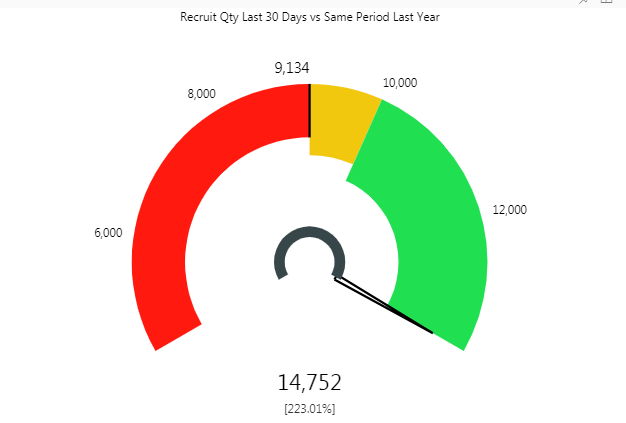
We use the Tachometer and the percentage call out value has not been displaying correctly recently (incorrect calculation - see below - we want 14,752 as a percentage difference to 9,134). The agency who prepared the visual for us says the percentage calculation is in the code and they cannot correct it. How can I solve this? Thank you.
As I tested, I seems the percentage calculation is using Value divided by End Value. I don't think it will be your expected chart if you put the 14752 field into Value and put the 9134 into End Value. I suggest you contact the support of this visual:
https://www.annik.com/pbisupport/
Regards,
range 40
range2 112
target 8
end value 160
The percent will be 5% but the tachometer shows me 5.59000%
CALLOUT PERCENT
-- 100% : End Value
why?????????
how can i solve? plzzzz
The Power BI Data Visualization World Championships is back! Get ahead of the game and start preparing now!
| User | Count |
|---|---|
| 152 | |
| 130 | |
| 109 | |
| 79 | |
| 54 |