cancel
Showing results for 
Search instead for 
Did you mean: 

Did you hear? There's a new SQL AI Developer certification (DP-800). Start preparing now and be one of the first to get certified. Register now

Reply
harshanand007
Regular Visitor

Tachometer Visual Display

Hi, 


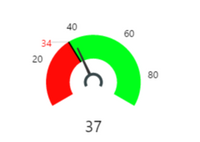
I am trying to use Tactometer in Direct Query. Want to display sales amount that is in $. I have tried modeling the sales column with format as "$". But, not able to see the same in display. Can someone help me with this issue. 


 I want to display the value with $ sign. Here it should  be $37.I want to display the value with $ sign. Here it should be $37.

Thanks,

harshanand007

1 ACCEPTED SOLUTION
v-caliao-msft
Microsoft Employee
Microsoft Employee

Hi @harshanand007,


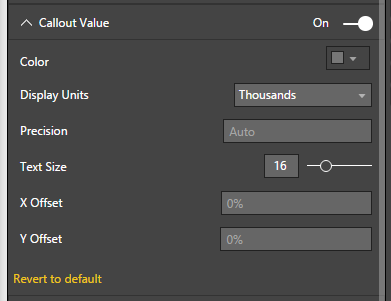
I have tested it on my local environment, we also cannot format the value into Currency. It seems that there is no such a property to format it.
Capture.PNG


Since this is a custom visual, you could contact author by the email address PBISupport@annik.com


Regards,

Charlie Liao

View solution in original post

4 REPLIES 4
Chamara
Advocate I
Advocate I

This works in the latest version (v 3.0.1) of Tachometer. No need to change any settings. Formatting options are automatically picked up from metadata.


Hi,I have tried to use the version, but I haven't obtained the right result. I use the currency  euro , my values is 1.345.000,45€ and I see 1,345k on the tachometer. Can help me?

v-caliao-msft
Microsoft Employee
Microsoft Employee

Hi @harshanand007,


I have tested it on my local environment, we also cannot format the value into Currency. It seems that there is no such a property to format it.
Capture.PNG


Since this is a custom visual, you could contact author by the email address PBISupport@annik.com


Regards,

Charlie Liao

Thanks @v-caliao-msft

Helpful resources

Announcements
April Power BI Update Carousel

Power BI Monthly Update - April 2026

Check out the April 2026 Power BI update to learn about new features.

Fabric SQL PBI Data Days

Data Days 2026 coming soon!

Sign up to receive a private message when registration opens and key events begin.

New to Fabric survey Carousel

New to Fabric Survey

If you have recently started exploring Fabric, we'd love to hear how it's going. Your feedback can help with product improvements.

Power BI DataViz World Championships carousel

Power BI DataViz World Championships - June 2026

A new Power BI DataViz World Championship is coming this June! Don't miss out on submitting your entry.