This time we’re going bigger than ever. Fabric, Power BI, SQL, AI and more. We're covering it all. You won't want to miss it.
Learn moreLevel up your Power BI skills this month - build one visual each week and tell better stories with data! Get started
Hello,
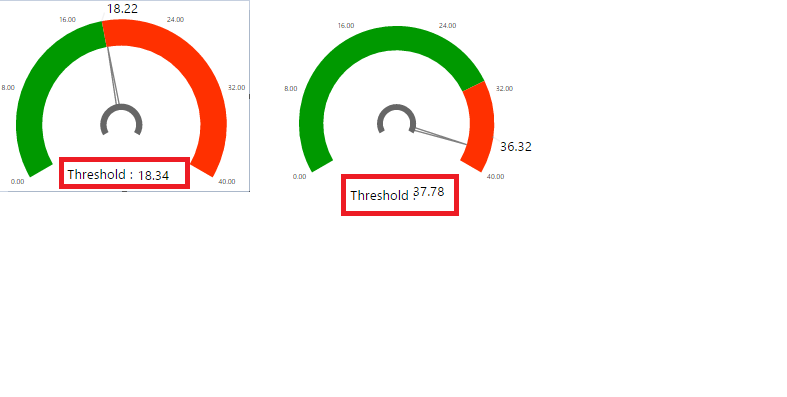
This post is regarding Tachometer visual. I want to display the Threshold value along with text as "Threshold:" , but i was unable to concatenate using measure hence added separate text field "Threshold:" before the values.
but when the values change, the alignment also changes. Please find the screenshot below for your reference and let me know if there is any work around for this issue ?
Instead, you may try Callout Value > Y Offset in the Format section of the Visualizations pane.
Hi @v-chuncz-msft,
I have tried Callout Value -> Y offset -> I have set this value to 10.
Still it doesnot work. I am facing the alignment issue since the text box field with value "Threshold:" is fixed.
Is there any work around to concatenate the callout value with "Threshold:" ?
Hi @v-chuncz-msft,
I have tried Callout Value -> Y offset -> I have set this value to 10.
Still it doesnot work. I am facing the alignment issue since the text box field with value "Threshold:" is fixed.
Is there any work around to concatenate the callout value with "Threshold:" ?
Check out the April 2026 Power BI update to learn about new features.
Sign up to receive a private message when registration opens and key events begin.
If you have recently started exploring Fabric, we'd love to hear how it's going. Your feedback can help with product improvements.
| User | Count |
|---|---|
| 30 | |
| 23 | |
| 22 | |
| 16 | |
| 15 |
| User | Count |
|---|---|
| 61 | |
| 35 | |
| 28 | |
| 22 | |
| 21 |