cancel
Showing results for 
Search instead for 
Did you mean: 

Get Fabric Certified for FREE during Fabric Data Days. Don't miss your chance! Request now

Reply
Anonymous
Not applicable

Tabular editor

Hi there!


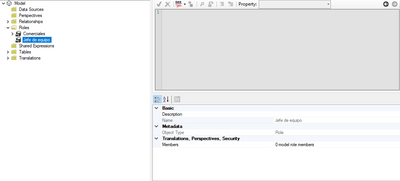
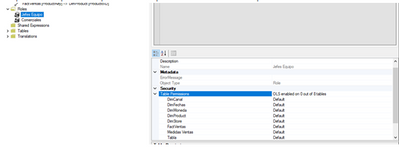
I am actually trying to use the OLS. Well, i created the roles as if they were normal RLS ones, but when i try in tabular editor to select the Table permissions they don´t appear. I´m quite new using this tool and I don´t really get why this happends. I´m using a pro trial account.


Here are  the screenshot of what I see and what I want to see:

RaulTorres_1-1624448227609.png


RaulTorres_0-1624448185298.png

Thank you for your time, if anyone knows please let me know.


1 ACCEPTED SOLUTION
amitchandak
Super User
Super User

@Anonymous , on the latest version of both, when I clicked on tabular editor from external tools, I get the second option.


Hope you opened it from power bi external tools

Share with Power BI Enthusiasts: Full Power BI Video (20 Hours) YouTube
Microsoft Fabric Series 60+ Videos YouTube
Microsoft Fabric Hindi End to End YouTube

View solution in original post

4 REPLIES 4
Anonymous
Not applicable

I already solved, it was a version problem. Thank you all for your time!!

v-yingjl
Community Support
Community Support

Hi @Anonymous ,

Please make sure you have opened Tabular Editor for the corresponding report using 'External tools' as @ amitchandak mentioned to set Object Level Security.

s.png


For more details about OLS in tabular editor, please refer:

  1. Announcing public preview of Object-Level Security in Power BI 
  2. Configure-ols-in-power-bi-using-tabular-editor 
  3. Object Level Security #OLS in Tabular Editor in Power BI (22-4) 


Best Regards,
Community Support Team _ Yingjie Li
If this post helps, then please consider Accept it as the solution to help the other members find it more quickly.

amitchandak
Super User
Super User

@Anonymous , on the latest version of both, when I clicked on tabular editor from external tools, I get the second option.


Hope you opened it from power bi external tools

Share with Power BI Enthusiasts: Full Power BI Video (20 Hours) YouTube
Microsoft Fabric Series 60+ Videos YouTube
Microsoft Fabric Hindi End to End YouTube
Anonymous
Not applicable

Hello @Anonymous 
You can refer to these links.
Link1 
Link2 

Helpful resources

Announcements
November Power BI Update Carousel

Power BI Monthly Update - November 2025

Check out the November 2025 Power BI update to learn about new features.

Fabric Data Days Carousel

Fabric Data Days

Advance your Data & AI career with 50 days of live learning, contests, hands-on challenges, study groups & certifications and more!

FabCon Atlanta 2026 carousel

FabCon Atlanta 2026

Join us at FabCon Atlanta, March 16-20, for the ultimate Fabric, Power BI, AI and SQL community-led event. Save $200 with code FABCOMM.

Top Solution Authors
Top Kudoed Authors