cancel
Showing results for 
Search instead for 
Did you mean: 

The Power BI Data Visualization World Championships is back! Get ahead of the game and start preparing now! Learn more

Reply
Anonymous
Not applicable

Tabular Source : Memory Allocation Failure

Hello, 


One of my client encounter a memory issue when developing her report and I can't get why. 

For the context her Power BI report is connected to a Tabular stored on On-Prem server and the access is through Connect Live. 


The viz that fails is a "huge" table with 47 columns. It's obviously too much but I want to understand why it's failing.

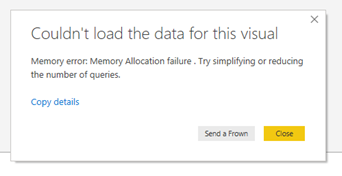
Sometimes she gets this error (not always) : 

errorpbi.PNG

The point that I don't understand is, as far as I know, a tabular is directly loaded in memory. So if we can access it, this means there is now memory issue. Am I right there ? 

So if this viz fails, is it because there is a limitation in Power BI itself, considering rows or columns number ? 


Thank for your insights. 


1 ACCEPTED SOLUTION
zoloturu
Memorable Member
Memorable Member

Hi @Anonymous ,


When we receive a Memory Allocation issue either at Power BI Desktop either at Analysis Services Tabular then it is not a limit of them it is a limit of machine where they are running (your PC, server etc.).


When Power BI connected to a source Live or via DirectQuery then each visual sends a request to a source and a result is returned to a visual, but it can't cause memory issue here. In your case your huge visual sends a DAX request to Tabular which consume too much RAM (memory) at a machine where Tabular is running. 


In order to solve this you have 4 options:

  1. Upgrade RAM of machine
  2. Decrease number of rows and/or number of columns in this visual
  3. Optimize and reduce data in Tabular model. The goal is to reduce amount of data stored in RAM. It is separate science and huge topic, actually
  4. Check the query which was sent by a visual to Tabular and try to optimize a model to make this query lighter. Use DAX Studio or SQL Server Profiler to connect to Tabular and trace it


Regards,
Ruslan Zolotukhin (zoloturu)
BI Engineer at Akvelon Inc. / Kharkiv Power BI User Group Leader / DAX & Power BI Trainer
-------------------------------------------------------------------
Did I answer your question? Mark my post as a solution!
It was useful? Press Thumbs Up!

You are from Ukraine? If yes then welcome to Power BI User Group - KhPUG website. Other country? Check and find proper one - Power BI User Groups

View solution in original post

3 REPLIES 3
zoloturu
Memorable Member
Memorable Member

Hi @Anonymous ,


When we receive a Memory Allocation issue either at Power BI Desktop either at Analysis Services Tabular then it is not a limit of them it is a limit of machine where they are running (your PC, server etc.).


When Power BI connected to a source Live or via DirectQuery then each visual sends a request to a source and a result is returned to a visual, but it can't cause memory issue here. In your case your huge visual sends a DAX request to Tabular which consume too much RAM (memory) at a machine where Tabular is running. 


In order to solve this you have 4 options:

  1. Upgrade RAM of machine
  2. Decrease number of rows and/or number of columns in this visual
  3. Optimize and reduce data in Tabular model. The goal is to reduce amount of data stored in RAM. It is separate science and huge topic, actually
  4. Check the query which was sent by a visual to Tabular and try to optimize a model to make this query lighter. Use DAX Studio or SQL Server Profiler to connect to Tabular and trace it


Regards,
Ruslan Zolotukhin (zoloturu)
BI Engineer at Akvelon Inc. / Kharkiv Power BI User Group Leader / DAX & Power BI Trainer
-------------------------------------------------------------------
Did I answer your question? Mark my post as a solution!
It was useful? Press Thumbs Up!

You are from Ukraine? If yes then welcome to Power BI User Group - KhPUG website. Other country? Check and find proper one - Power BI User Groups

Anonymous
Not applicable

Hello @zoloturu,


Thank you very much for this reqlly precise answer ! 

MFelix
Super User
Super User

Hi @Anonymous ,


Taking into account the specifications of each model without knowing the full details is difficult to assist however believe that the best option you have is to click on send a frown, that will send out an e-mail to PBI support with all the details and they will reach out to you and explain waht is going on.


Another option is to replicate this post on the issues part of the forum and the msft team will for sure get back to you.


Regards

Miguel Félix


Did I answer your question? Mark my post as a solution!

Proud to be a Super User!

Check out my blog: Power BI em Português


Helpful resources

Announcements
Power BI DataViz World Championships

Power BI Dataviz World Championships

The Power BI Data Visualization World Championships is back! Get ahead of the game and start preparing now!

December 2025 Power BI Update Carousel

Power BI Monthly Update - December 2025

Check out the December 2025 Power BI Holiday Recap!

FabCon Atlanta 2026 carousel

FabCon Atlanta 2026

Join us at FabCon Atlanta, March 16-20, for the ultimate Fabric, Power BI, AI and SQL community-led event. Save $200 with code FABCOMM.