Join us in Barcelona for FabCon and SQLCon, September 28 - October 1, 2026.
This is best Fabric, Power BI, SQL and AI community event. How do we know? The last event sold out! Save €200 with code FABCMTY200.
Register now- Power BI forums
- Get Help with Power BI
- Desktop
- Service
- Report Server
- Power Query
- Mobile Apps
- Developer
- DAX Commands and Tips
- Custom Visuals Development Discussion
- Health and Life Sciences
- Power BI Spanish forums
- Translated Spanish Desktop
- Training and Consulting
- Instructor Led Training
- Dashboard in a Day for Women, by Women
- Galleries
- Data Stories Gallery
- Themes Gallery
- Contests Gallery
- QuickViz Gallery
- Quick Measures Gallery
- Visual Calculations Gallery
- Fabric Apps Gallery
- Notebook Gallery
- Translytical Task Flow Gallery
- TMDL Gallery
- R Script Showcase
- Webinars and Video Gallery
- Ideas
- Custom Visuals Ideas (read-only)
- Issues
- Issues
- Events
- Upcoming Events
July 28 - August 9 | Final Round of the Power BI Dataviz World Championships. This is your chance. Learn more
- Power BI forums
- Forums
- Get Help with Power BI
- Desktop
- Re: Tabular Editor - Calculation groups
- Subscribe to RSS Feed
- Mark Topic as New
- Mark Topic as Read
- Float this Topic for Current User
- Bookmark
- Subscribe
- Printer Friendly Page

- Mark as New
- Bookmark
- Subscribe
- Mute
- Subscribe to RSS Feed
- Permalink
- Report Inappropriate Content
Tabular Editor - Calculation groups
Hi Team,
When I started to use Calculation groups and enabeled Tabular Editor + created one calculation group in my data model, I started to experience one issue.
Prior any implementation of calculation groups, I could use default count,distinct count, etc. calculation when I drag and drop it to my canvas.
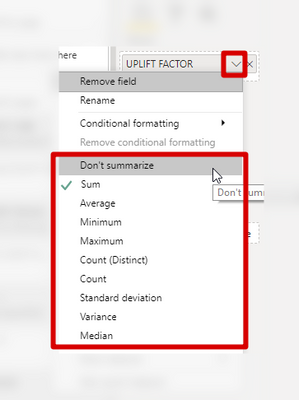
After creating one calculation group and using it in my model, I am not able to use any default calculation anymore. Please see the printscreen of the same drop down for same column bellow. The same is applicable for any other column in data model.
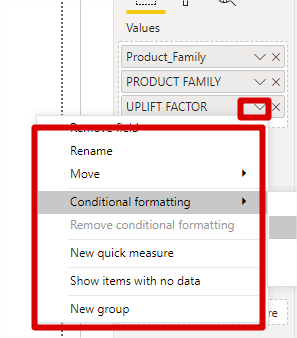
Thanks for your help,
J.
Solved! Go to Solution.


- Mark as New
- Bookmark
- Subscribe
- Mute
- Subscribe to RSS Feed
- Permalink
- Report Inappropriate Content
It is not a bug, it is by design.
Calculation groups are not compatible with implicit measures.
It is described in the documentation, too:
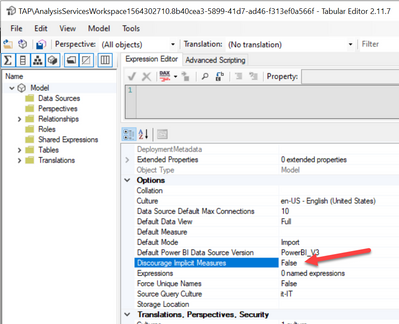
When you enable calculation groups, Tabular Editor enables the Model option Discourage Implicit Measure.
If you remove all the calculation groups, you can restore that property to False to enable implicit measures again.
However, it is a best practice to only expose explicit measures in a Tabular model.
If you use Tabular Editor, you can find macros to quickly create measures from numeric columns:
https://github.com/otykier/TabularEditor/wiki/Useful-script-snippets
- Mark as New
- Bookmark
- Subscribe
- Mute
- Subscribe to RSS Feed
- Permalink
- Report Inappropriate Content
- Mark as New
- Bookmark
- Subscribe
- Mute
- Subscribe to RSS Feed
- Permalink
- Report Inappropriate Content
@marcorusso Thank you so much for posting this solution. I clicked on create calculation group in TE 2 by mistake, which I removed but completely forgot about it. Later on when my numbers stopped auto aggregations and I couldn't figure out why. Took quite a time to figure that the property needs to be set to False, thanks to your post.
- Mark as New
- Bookmark
- Subscribe
- Mute
- Subscribe to RSS Feed
- Permalink
- Report Inappropriate Content
It is not a bug, it is by design.
Calculation groups are not compatible with implicit measures.
It is described in the documentation, too:
When you enable calculation groups, Tabular Editor enables the Model option Discourage Implicit Measure.
If you remove all the calculation groups, you can restore that property to False to enable implicit measures again.
However, it is a best practice to only expose explicit measures in a Tabular model.
If you use Tabular Editor, you can find macros to quickly create measures from numeric columns:
https://github.com/otykier/TabularEditor/wiki/Useful-script-snippets
- Mark as New
- Bookmark
- Subscribe
- Mute
- Subscribe to RSS Feed
- Permalink
- Report Inappropriate Content
Wait, why?
Pardon my ignorance, but I find implicit measures genuinely assist me in assessing the precise filters and calculations applied in a visual. You mentioned in your "7 Reasons DAX is not easy" video that as a functional language, it can be difficult to assess the execution sequence of DAX code. It seems like the GUI experience afforded by implicit measures provides an intuitive and simple means of assessing execution order.
Personally, I wish could convert cards (and possibly other visuals) with their associated filters directly to DAX code in a single click, as is possible with the SQL query view available in Access.

- Mark as New
- Bookmark
- Subscribe
- Mute
- Subscribe to RSS Feed
- Permalink
- Report Inappropriate Content
i just ran into this issue myself this morning when trying to modify a report with a basic mom and yoy calculation group.
gald i found this post by googling error: DiscourageImplicitMeasures
thank you for helping me understand this a bit more in tabEd
- Mark as New
- Bookmark
- Subscribe
- Mute
- Subscribe to RSS Feed
- Permalink
- Report Inappropriate Content
Hi Marco,
Thank you very much for you detail explanation of the designed behaviour.
Would you be please so kind to just add few print screens how to restore the property to False in order to get the implicit measure working again?
Thank you,
J.
- Mark as New
- Bookmark
- Subscribe
- Mute
- Subscribe to RSS Feed
- Permalink
- Report Inappropriate Content


- Mark as New
- Bookmark
- Subscribe
- Mute
- Subscribe to RSS Feed
- Permalink
- Report Inappropriate Content
Hi @Anonymous ,
Based on your description, I can reproduce it in my environment. Seems like a normal phenomenon if the there has sigma field in the table after creating a calculation group but not certain. Need further confirmation whether it is a bug or how it works. I would suggest you to create a support ticket for faster help if it is urgent for you.

Best Regards,
Yingjie Li
If this post helps then please consider Accept it as the solution to help the other members find it more quickly.


- Mark as New
- Bookmark
- Subscribe
- Mute
- Subscribe to RSS Feed
- Permalink
- Report Inappropriate Content
- Mark as New
- Bookmark
- Subscribe
- Mute
- Subscribe to RSS Feed
- Permalink
- Report Inappropriate Content
@amitchandak, unfortunatelly the column which I specified on the print screen is really column and not meausre.
Please see the print screen of the column from the table bellow.

The problem which was specified in my first post influence any column which I try to use in my calculations.
The common factor for this issue is installed tabular editor and used calculated group in the Data model.
Thanks,
J.
Helpful resources

FabCon & SQLCon – Barcelona 2026
Join us in Barcelona for FabCon and SQLCon, the Fabric, Power BI, SQL, and AI community event. Save €200 with code FABCMTY200.

Fabric Community Sticker Challenge - Barcelona 2026
If you love stickers, then you will definitely want to check out our community sticker challenge, Barcelona edition!

Power BI Monthly Update - July 2026
Check out the July 2026 Power BI update to learn about new features.

Power BI DataViz World Championships - June 2026
A new Power BI DataViz World Championship is coming this June! Don't miss out on submitting your entry.

| User | Count |
|---|---|
| 25 | |
| 23 | |
| 19 | |
| 17 | |
| 14 |


| User | Count |
|---|---|
| 24 | |
| 20 | |
| 20 | |
| 19 | |
| 19 |


