cancel
Showing results for 
Search instead for 
Did you mean: 

The Power BI Data Visualization World Championships is back! Get ahead of the game and start preparing now! Learn more

Reply
Anonymous
Not applicable

Tables relatationship not working as expected.

I have five tables and they are related to each other like this:
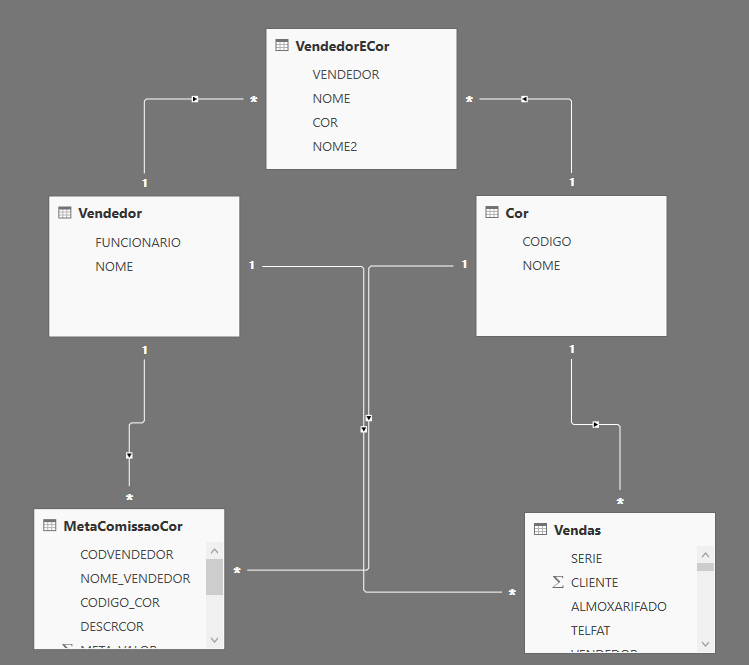
relationship.png


The table Vendas contains informations about sales, MetaComissaoCor is about goals. The table Vendedor contains informations about sellers, the table Cor has sales category and the table VendedorECor contains information about a seller and the categories he works.

I have to create two visuals. the first one is a matrix with categories by name, its goal and its accomplished. And the other one is a slicer that filter the matrix by a seller.

The problem is that the slicer does not work, it only shows the grand total value and filter the seller's categories.


These are my visulas without any values selected in the slicer, you can notice that META_VALOR (MetaComissaoCor) and VRTOTITEMLIQ (Vendas)  have the same values for all NOMES2 (VendedorECor). But it is not true, the goals and accomplished are different in each category.notfiltred.png
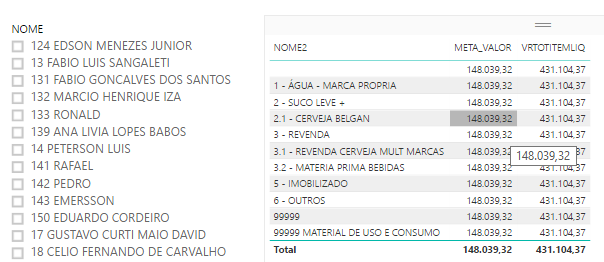
And if I apply any filter on my slicer the matrix only shows, as expected, the selected seller's categories (NOMES2) . But the values continue unchanged, like this:filtred.png


What do I have to change on my tables relationship to fix this problem?


3 REPLIES 3
Anonymous
Not applicable

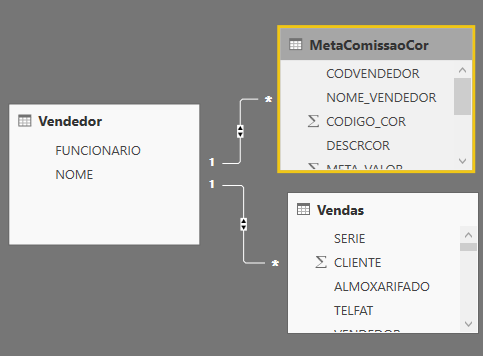
I was able to simplify my problem to this: 

simple.png


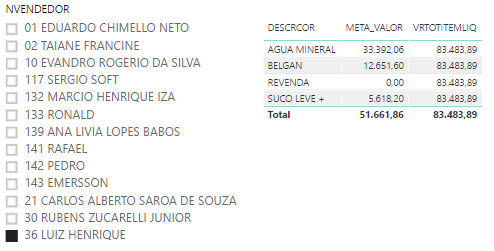
So now I'm able to filter META_VALOR (MetaComissaoCor) on my matrix, but the VRTOTITEMLIQ (Vendas) column is not being filtered. 

simplematrix.png


What can I do to fix my new problem?

vanessafvg
Super User
Super User

@Anonymous you need to understand the direction the arrows are going in.  probably best to change some of your relationship  type to bi  (both) directional and not single direction so that you can filter correctly


If I took the time to answer your question and I came up with a solution, please mark my post as a solution and /or give kudos freely for the effort 🙂 Thank you!

Proud to be a Super User!


Anonymous
Not applicable

@vanessafvg, thank you for helping me. I did not known abou the arrows directions. Now I known why it is not working. But, I don't known how can I fix it. Can you help me?

Helpful resources

Announcements
Power BI DataViz World Championships

Power BI Dataviz World Championships

The Power BI Data Visualization World Championships is back! Get ahead of the game and start preparing now!

December 2025 Power BI Update Carousel

Power BI Monthly Update - December 2025

Check out the December 2025 Power BI Holiday Recap!

FabCon Atlanta 2026 carousel

FabCon Atlanta 2026

Join us at FabCon Atlanta, March 16-20, for the ultimate Fabric, Power BI, AI and SQL community-led event. Save $200 with code FABCOMM.