cancel
Showing results for 
Search instead for 
Did you mean: 

Get Fabric Certified for FREE during Fabric Data Days. Don't miss your chance! Request now

Reply
badger123
Resolver I
Resolver I

Tables and slicers

Hello folks,


I have been thinking about how to slice my data for a number of different charts and have come up stuck on how to include and exclude data my report.


phrasetags
french winefrance
french red winefrance
french red winered wine
french red wine vs italian red winefrance
french red wine vs italian red wineitaly
french red wine vs italian red winered wine
spanish red winespain
spanish red winered wine
Is english white wine good?uk
Is english white wine good?white wine


I have phrases in a table visual and I'm trying to find a way to exclude phrases attached to tags that are deselected in a slicer. E.g. if france is the only item selected in the slicer, then only the phrase "french wine" would be showing in the visual, because all the other phrases related to france are also related to other tags. 


Is this possible?

1 ACCEPTED SOLUTION
TeigeGao
Solution Sage
Solution Sage

Hi @badger123 ,

We can use the following method:

First we can create two calculated table using the following DAX query:

tags = VALUES(Table1[tags])
phrase = SUMMARIZE(Table1,Table1[phrase],"tag",CONCATENATEX(Table1,Table1[tags],","))

Then we can create a measure like below:

Measure = var a = CONCATENATEX(ALLSELECTED(tags[tags]),tags[tags],",")
return IF(MIN(phrase[tag]) = a,1,0)

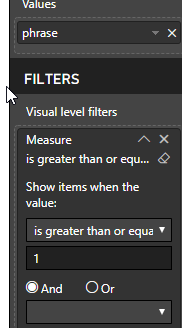
After that we can add this measure as filter:

PBIDesktop_cjYeWYUcUm.png

The result will like below:

PBIDesktop_ygi3awgity.png

Best Regards,

Teige

View solution in original post

5 REPLIES 5
TeigeGao
Solution Sage
Solution Sage

Hi @badger123 ,

We can use the following method:

First we can create two calculated table using the following DAX query:

tags = VALUES(Table1[tags])
phrase = SUMMARIZE(Table1,Table1[phrase],"tag",CONCATENATEX(Table1,Table1[tags],","))

Then we can create a measure like below:

Measure = var a = CONCATENATEX(ALLSELECTED(tags[tags]),tags[tags],",")
return IF(MIN(phrase[tag]) = a,1,0)

After that we can add this measure as filter:

PBIDesktop_cjYeWYUcUm.png

The result will like below:

PBIDesktop_ygi3awgity.png

Best Regards,

Teige

Thanks @TeigeGao ! That works... but only allows one selection. Is it possible to create a measure that allows for multiple selection in slicer?

Hi @badger123 ,

There is no need to create a measure, we can use Ctrl + click to select multiple slicers.

Best Regards,

Teige

gyan09
Frequent Visitor

@badger123 you can do it in below way..Create a slicer for Tags and then create a bar graph as below:


Capture.PNG

Hi @gyan09 , thanks for the quick response. I misexplained what I was trying to achieve in my original post (it was completely contradictary - sorry). I have now amended the problem. Please let me know if you have any ideas!? 🙂 

Helpful resources

Announcements
November Power BI Update Carousel

Power BI Monthly Update - November 2025

Check out the November 2025 Power BI update to learn about new features.

Fabric Data Days Carousel

Fabric Data Days

Advance your Data & AI career with 50 days of live learning, contests, hands-on challenges, study groups & certifications and more!

FabCon Atlanta 2026 carousel

FabCon Atlanta 2026

Join us at FabCon Atlanta, March 16-20, for the ultimate Fabric, Power BI, AI and SQL community-led event. Save $200 with code FABCOMM.

Top Solution Authors
Top Kudoed Authors