Join us at FabCon Atlanta from March 16 - 20, 2026, for the ultimate Fabric, Power BI, AI and SQL community-led event. Save $200 with code FABCOMM.
Register now!The Power BI Data Visualization World Championships is back! Get ahead of the game and start preparing now! Learn more
Hi everyone,
I have a dataset like this:
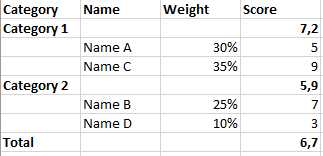
I would like to create a table or a matrix in order to have the score of each category (as if the sum of each name within them is 100%) like this:
with the score of the category 1 is 7.2 = 5*30%/(30%+35%) + 9*35%/(30%+35%)
any idea?
many thanks
Boris
Solved! Go to Solution.
@BMltc , if this option can work, you do not need additional measures. This will show subtotal too as you have more than one column in the row.
thanks @amitchandak , so I need to create an additionnal column just for the score of each subgroup?
@BMltc , if this option can work, you do not need additional measures. This will show subtotal too as you have more than one column in the row.
@BMltc , In a matrix you can right on the measure in visual pane and use % of total or % of sub total
or try measures like
Percent of sub Toal = divide([score], calculate([score], allselected(Table, Table[categorty] =max(Table[category]))))
Percent of Toal = divide([score], calculate([score], allselected(Table)))
The Power BI Data Visualization World Championships is back! Get ahead of the game and start preparing now!
| User | Count |
|---|---|
| 41 | |
| 38 | |
| 36 | |
| 30 | |
| 28 |
| User | Count |
|---|---|
| 129 | |
| 88 | |
| 79 | |
| 68 | |
| 63 |