cancel
Showing results for 
Search instead for 
Did you mean: 

Data Days is here! Join us now for 60+ days of learning, challenges, and connection. Learn more

Reply
Anonymous
Not applicable

Table with mixed Data Types.

Hi Guys,


I need to replicate a table from Excel into PBI.  The problem is, I have columns that have different Data Types, Decimal and %, I also have rows that have different data types Decimal and %, I also have mixed columns with data types decimals and %.  I also need to do condition formatting on column "Data type Percentage".


I've managed to do it, but the values are in text so I cant do the conditiional formatting (I think) or I can slice the data up and format multiple tables to look at one.  But as it's a proof of concept project, I don't want to go down the mashup route.


Feel feel to restructure the data how you want, or even crosstable it, I've tried everything.


Good luck 


and Thanks.


KPIMixed Data TypeData Type PercentageData Type Decimal
KPI1100010%1425
KPI2200015%12334
KPI310%20%4657
KPI4400025%232
1 ACCEPTED SOLUTION

HI, @Anonymous 

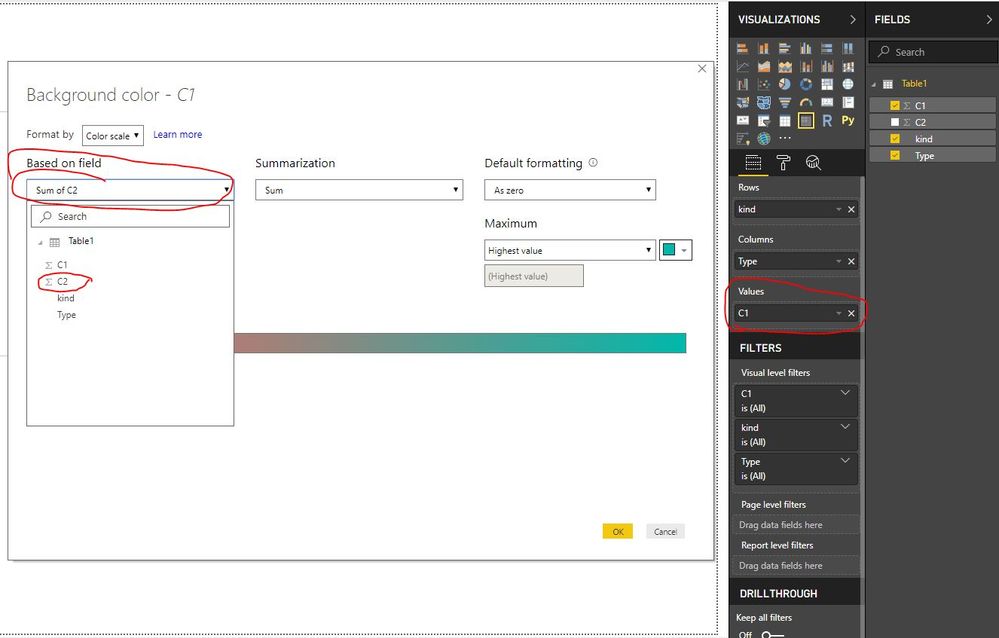
For conditional formatting on Values, You could drag Column1 in Values, and when do conditional formatting, you could based on anther field

3.JPG


Best Regards,

Lin

Community Support Team _ Lin
If this post helps, then please consider Accept it as the solution to help the other members find it more quickly.

View solution in original post

5 REPLIES 5
v-lili6-msft
Community Support
Community Support

hi, @Anonymous 

If you want to show mixed Data Types, It only could be shown as Text format.

You could also FORMAT Function to custom format.


Best Regards,

Lin

Community Support Team _ Lin
If this post helps, then please consider Accept it as the solution to help the other members find it more quickly.
Anonymous
Not applicable

hI,


That's exactly what I did, I used Format "Percent" and Format Standard for Decimals.  The table works well and shows be what I want.


I can't do the conditional formatting bit "Data Type Percentage"  column.


Regards

hi, @Anonymous 

You could use Format Function to add a mixed Data Types column, and then use basic column for conditional formatting.


Best Regards,
Lin


Community Support Team _ Lin
If this post helps, then please consider Accept it as the solution to help the other members find it more quickly.
Anonymous
Not applicable

In the Matrix table, I can only do conditional formatting on Values, but I need conditional formatting on columns, but it doesn't give me the option to.


Or am I missing something.


HI, @Anonymous 

For conditional formatting on Values, You could drag Column1 in Values, and when do conditional formatting, you could based on anther field

3.JPG


Best Regards,

Lin

Community Support Team _ Lin
If this post helps, then please consider Accept it as the solution to help the other members find it more quickly.

Helpful resources

Announcements
Fabric Data Days is here Carousel

Fabric Data Days 2026

Don't miss out on Data Days, June 15 through August 7. Learn Fabric, Power BI, SQL, AI and more.

May Power BI Update Carousel

Power BI Monthly Update - May 2026

Check out the May 2026 Power BI update to learn about new features.

Power BI DataViz World Championships carousel

Power BI DataViz World Championships - June 2026

A new Power BI DataViz World Championship is coming this June! Don't miss out on submitting your entry.