Don't miss your chance to take the Fabric Data Engineer (DP-700) exam on us!
Learn moreWe've captured the moments from FabCon & SQLCon that everyone is talking about, and we are bringing them to the community, live and on-demand. Starts on April 14th. Register now
Hello everyone,
Greetings!!!
I'm looking support for the below topic
- I am having below two tables with one to many relationship activated. I like to have a table visualization that shuould have combination of two
input :
| Table1 |
| Code |
| A |
| B |
| C |
| D |
| Table2 | |
| Code | Description |
| A | Name1 |
| B | Name2 |
| C | Name3 |
| Name4 | |
| Name5 | |
| Name6 |
| Result I am getting in table visualization | |
| Code | Description |
| A | Name1 |
| B | Name2 |
| C | Name3 |
| D | |
| Name4 | |
| Name5 | |
| Name6 |
| Result I Need | |
| Code | Description |
| A | Name1 |
| B | Name2 |
| C | Name3 |
| D |
I learnt that we can use join functin in power query window but i like to undersatand, is there any other method availble in visualizatiom
Thanks,
Santhosh R
Solved! Go to Solution.
Hi,
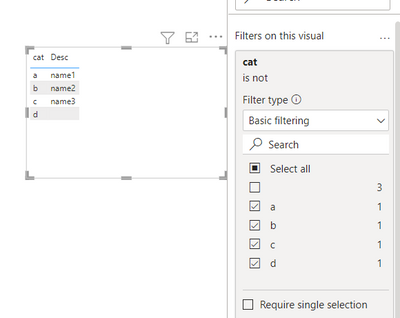
Use table matrix and drag elements from second table.
(Code and Description )
Now use filter pane , go code and untick blanks.
You get the result.
Kindly mark as solution and thumps up for keeping community healthy
@saravanan_p Thats tricky and seems to be simple. @santhoshrama Kindly mark this as solution. Thanks
Hi,
Use table matrix and drag elements from second table.
(Code and Description )
Now use filter pane , go code and untick blanks.
You get the result.
Kindly mark as solution and thumps up for keeping community healthy
Hello,
Thank you..it's a simple & easy solution
If you have recently started exploring Fabric, we'd love to hear how it's going. Your feedback can help with product improvements.
A new Power BI DataViz World Championship is coming this June! Don't miss out on submitting your entry.
Share feedback directly with Fabric product managers, participate in targeted research studies and influence the Fabric roadmap.
| User | Count |
|---|---|
| 52 | |
| 38 | |
| 37 | |
| 19 | |
| 17 |
| User | Count |
|---|---|
| 69 | |
| 65 | |
| 39 | |
| 33 | |
| 23 |