cancel
Showing results for 
Search instead for 
Did you mean: 

The Power BI Data Visualization World Championships is back! Get ahead of the game and start preparing now! Learn more

Reply
Ritaf
Responsive Resident
Responsive Resident

Table visualisation with percentage of row above

Hi,

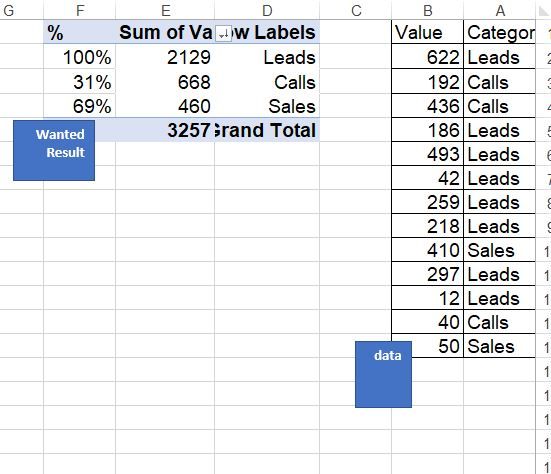
I need to create the logic of the Funnel Chart on the table,
to show category, value an %, in a way that the first row is 100% and others are the percentage of the row above like on the picture I attached. is there is a way to make it happen dynamically?
Link to Pbix sample fiile 
table.JPG


1 ACCEPTED SOLUTION
Anonymous
Not applicable

Hi @Ritaf ,

I updated your sample pbix file(see attachment), please check whether that is what you want.

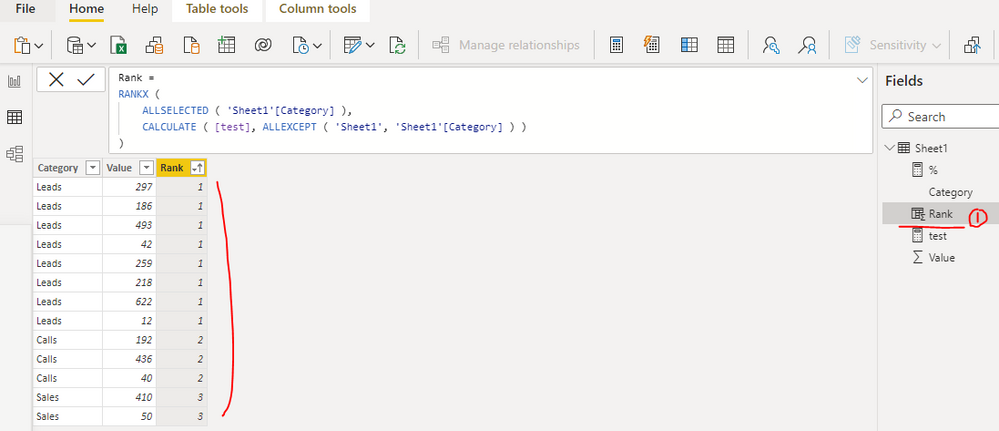
1. Create a calculated column as below to get the rank base on the sum of values group by category

Rank = 
RANKX (
    ALLSELECTED ( 'Sheet1'[Category] ),
    CALCULATE ( [test], ALLEXCEPT ( 'Sheet1', 'Sheet1'[Category] ) )
)

yingyinr_0-1643875729749.png

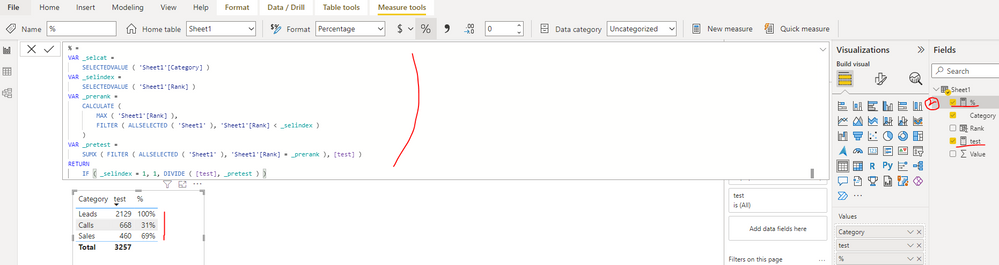
2. Create a measure as below to get the percentage

% = 
VAR _selcat =
    SELECTEDVALUE ( 'Sheet1'[Category] )
VAR _selindex =
    SELECTEDVALUE ( 'Sheet1'[Rank] )
VAR _prerank =
    CALCULATE (
        MAX ( 'Sheet1'[Rank] ),
        FILTER ( ALLSELECTED ( 'Sheet1' ), 'Sheet1'[Rank] < _selindex )
    )
VAR _pretest =
    SUMX ( FILTER ( ALLSELECTED ( 'Sheet1' ), 'Sheet1'[Rank] = _prerank ), [test] )
RETURN
    IF ( _selindex = 1, 1, DIVIDE ( [test], _pretest ) )

yingyinr_1-1643875832364.png

Best Regards

View solution in original post

3 REPLIES 3
lbendlin
Super User
Super User

Power BI has no concept of "Row Above" - you need to help it by providing indexes, or by hard coding the logic (for example "Sales as percentage of Calls".


 If you paste the sample data into a table in your post or use one of the file services it will be easier to work with. 

Ritaf
Responsive Resident
Responsive Resident

Hi, 
Thank you for your response I know that Power BI has no concept of "Row Above", not in visualization at less, and have no doubt that this isn't standard logic. 
There is a link for the sample file:https://drive.google.com/file/d/15dHsxNWd7Fh1Q-dhIaG9uh28r89cmFwr/view
I hope somebody has an idea how to solve it dynamically without measure for each category and "Switch" games.

Anonymous
Not applicable

Hi @Ritaf ,

I updated your sample pbix file(see attachment), please check whether that is what you want.

1. Create a calculated column as below to get the rank base on the sum of values group by category

Rank = 
RANKX (
    ALLSELECTED ( 'Sheet1'[Category] ),
    CALCULATE ( [test], ALLEXCEPT ( 'Sheet1', 'Sheet1'[Category] ) )
)

yingyinr_0-1643875729749.png

2. Create a measure as below to get the percentage

% = 
VAR _selcat =
    SELECTEDVALUE ( 'Sheet1'[Category] )
VAR _selindex =
    SELECTEDVALUE ( 'Sheet1'[Rank] )
VAR _prerank =
    CALCULATE (
        MAX ( 'Sheet1'[Rank] ),
        FILTER ( ALLSELECTED ( 'Sheet1' ), 'Sheet1'[Rank] < _selindex )
    )
VAR _pretest =
    SUMX ( FILTER ( ALLSELECTED ( 'Sheet1' ), 'Sheet1'[Rank] = _prerank ), [test] )
RETURN
    IF ( _selindex = 1, 1, DIVIDE ( [test], _pretest ) )

yingyinr_1-1643875832364.png

Best Regards

Helpful resources

Announcements
Power BI DataViz World Championships

Power BI Dataviz World Championships

The Power BI Data Visualization World Championships is back! Get ahead of the game and start preparing now!

November Power BI Update Carousel

Power BI Monthly Update - November 2025

Check out the November 2025 Power BI update to learn about new features.

FabCon Atlanta 2026 carousel

FabCon Atlanta 2026

Join us at FabCon Atlanta, March 16-20, for the ultimate Fabric, Power BI, AI and SQL community-led event. Save $200 with code FABCOMM.