cancel
Showing results for 
Search instead for 
Did you mean: 

The Power BI Data Visualization World Championships is back! Get ahead of the game and start preparing now! Learn more

Reply
gladies123
Helper I
Helper I

Table visual

Hello Team,

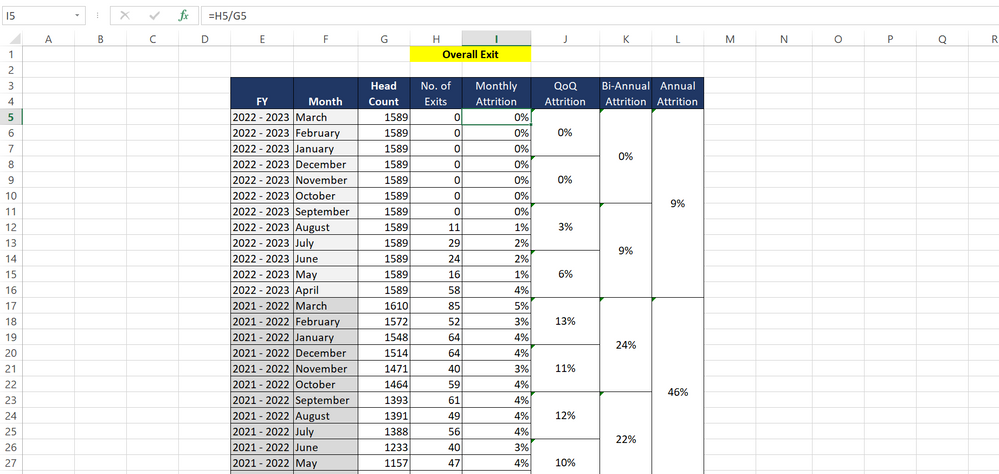
Please find the image , Can we do it in table visual??

Kindly suggest some ideas to achieve this format.

gladies123_0-1655118108133.png

Thanks,

Gladies


1 ACCEPTED SOLUTION
v-xiaotang
Community Support
Community Support

Hi @gladies123 

Thanks for reaching out to us.

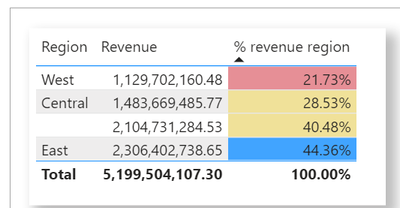
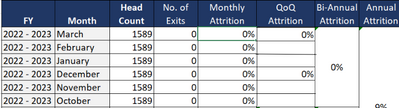
Multiple cells cannot be merged in the table visual. But you can use conditional formatting or display only one value on multiple lines.

(1)

Apply conditional table formatting in Power BI - Power BI | Microsoft Docs

vxiaotang_1-1655360631971.png

(2)

vxiaotang_0-1655360609378.png

Best Regards,

Community Support Team _Tang

If this post helps, please consider Accept it as the solution to help the other members find it more quickly.

View solution in original post

1 REPLY 1
v-xiaotang
Community Support
Community Support

Hi @gladies123 

Thanks for reaching out to us.

Multiple cells cannot be merged in the table visual. But you can use conditional formatting or display only one value on multiple lines.

(1)

Apply conditional table formatting in Power BI - Power BI | Microsoft Docs

vxiaotang_1-1655360631971.png

(2)

vxiaotang_0-1655360609378.png

Best Regards,

Community Support Team _Tang

If this post helps, please consider Accept it as the solution to help the other members find it more quickly.

Helpful resources

Announcements
Power BI DataViz World Championships

Power BI Dataviz World Championships

The Power BI Data Visualization World Championships is back! Get ahead of the game and start preparing now!

December 2025 Power BI Update Carousel

Power BI Monthly Update - December 2025

Check out the December 2025 Power BI Holiday Recap!

FabCon Atlanta 2026 carousel

FabCon Atlanta 2026

Join us at FabCon Atlanta, March 16-20, for the ultimate Fabric, Power BI, AI and SQL community-led event. Save $200 with code FABCOMM.