
cancel
Showing results for 
Search instead for 
Did you mean: 

The Power BI Data Visualization World Championships is back! Get ahead of the game and start preparing now! Learn more

Reply
billyb
Frequent Visitor

Table visual does not produce total figure; "Select an aggregation" is greyed out

Dear all,


Apologies if this issue has been raised before but I could not find it in the forums and it is really doing my head in, please help...


I have a column "Quantity Rev-Act" in table "Jobs" that is correctly defined as whole number both in Power Query and also in the table view.

billyb_1-1698055047711.png


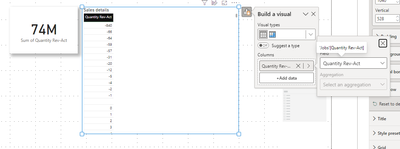
When I create a card visual for this column, it automatically sums it, which I wanted (and expected). However, when I drag it into a table visual, it won't, and I can't even choose the Aggregation option, it's greyed out (please see below screenshot):


billyb_0-1698054704474.png


I've seen this behaviour in a few other pbix I made recently... did I somehow changed an Options setting accidentally? Please help... thanks!


Billy

1 ACCEPTED SOLUTION
Anonymous
Not applicable

Hi @billyb 

You can create a measure

Sum =SUM ( 'Jobs'[Quantity Rev-Act] )

Then put the measure to the table visual.


Best Regards!

Yolo Zhu

If this post helps, then please consider Accept it as the solution to help the other members find it more quickly.


View solution in original post

2 REPLIES 2
Anonymous
Not applicable

Hi @billyb 

You can create a measure

Sum =SUM ( 'Jobs'[Quantity Rev-Act] )

Then put the measure to the table visual.


Best Regards!

Yolo Zhu

If this post helps, then please consider Accept it as the solution to help the other members find it more quickly.


Ah... It worked like a charm. The solution is so simple 🤦🏻‍♂️ Thanks so much Yolo! Much appreciated

Helpful resources

Announcements
Power BI DataViz World Championships

Power BI Dataviz World Championships

The Power BI Data Visualization World Championships is back! Get ahead of the game and start preparing now!

December 2025 Power BI Update Carousel

Power BI Monthly Update - December 2025

Check out the December 2025 Power BI Holiday Recap!

FabCon Atlanta 2026 carousel

FabCon Atlanta 2026

Join us at FabCon Atlanta, March 16-20, for the ultimate Fabric, Power BI, AI and SQL community-led event. Save $200 with code FABCOMM.