cancel
Showing results for 
Search instead for 
Did you mean: 

The Power BI Data Visualization World Championships is back! Get ahead of the game and start preparing now! Learn more

Reply
rswami_4
Helper I
Helper I

Table transformation

I am looking for help to transpose/transform a table so that I could create a useful waterfall chart out of the output.


For example:  The source table looks like this:

WaveCat1Cat2Cat3Cat4
Product 1$11.60$91.51$86.41$18.27
Product 2$32.71$29.30$96.82$84.40
Product 3$83.06$14.36$68.78$83.72
Product 4$77.71$15.72$94.48$40.85
Product 5$94.78$36.84$68.96$12.38
Product 6$0.92$42.69$81.30$23.58
Product 7$8.39$30.20$70.32$96.37
Product 8$18.51$88.55$49.71$72.65
Product 9$71.56$58.05$53.13$27.28


I need to transform it into the following table using DAX or Query editor:

CategoryProductValue
Cat 1Product 1$11.60
Cat 1Product 2$32.71
Cat 1Product 3$83.06
Cat 1Product 4$77.71
Cat 1Product 5$94.78
Cat 1Product 6$0.92
Cat 1Product 7$8.39
Cat 1Product 8$18.51
Cat 1Product 9$71.56
Cat 2Product 1$91.51
Cat 2Product 2$29.30
Cat 2Product 3$14.36
Cat 2Product 4$15.72
Cat 2Product 5$36.84
Cat 2Product 6$42.69
Cat 2Product 7$30.20
Cat 2Product 8$88.55
Cat 2Product 9$58.05
Cat 3Product 1$86.41
Cat 3Product 2$96.82
Cat 3Product 3$68.78
Cat 3Product 4$94.48
Cat 3Product 5$68.96
Cat 3Product 6$81.30
Cat 3Product 7$70.32
Cat 3Product 8$49.71
Cat 3Product 9$53.13
Cat 4Product 1$18.27
Cat 4Product 2$84.40
Cat 4Product 3$83.72
Cat 4Product 4$40.85
Cat 4Product 5$12.38
Cat 4Product 6$23.58
Cat 4Product 7$96.37
Cat 4Product 8$72.65
Cat 4Product 9$27.28


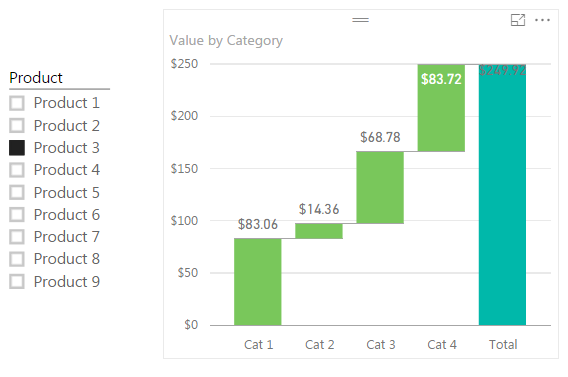
so that I can then create the following waterfall cart with filter out of the transformed table like this:


waterfall with filter.png


Is there a way to do this?

1 ACCEPTED SOLUTION

Hi @rswami_4


You can also do it by this way:


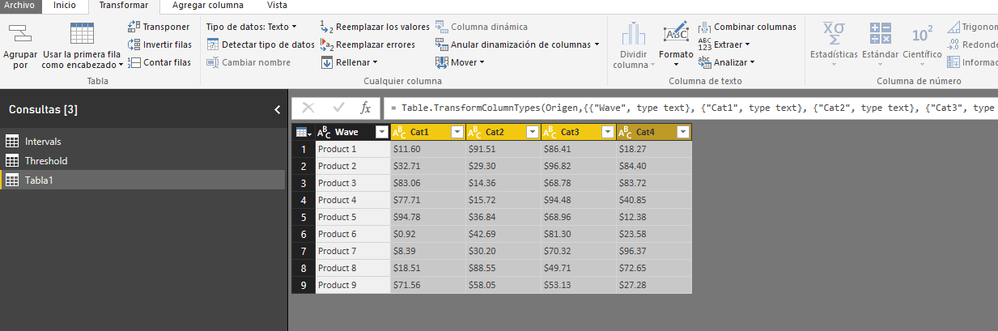
Go to Edit Query


Step 1:


Select your columns Cat 1 to Cat 4Select your columns Cat 1 to Cat 4

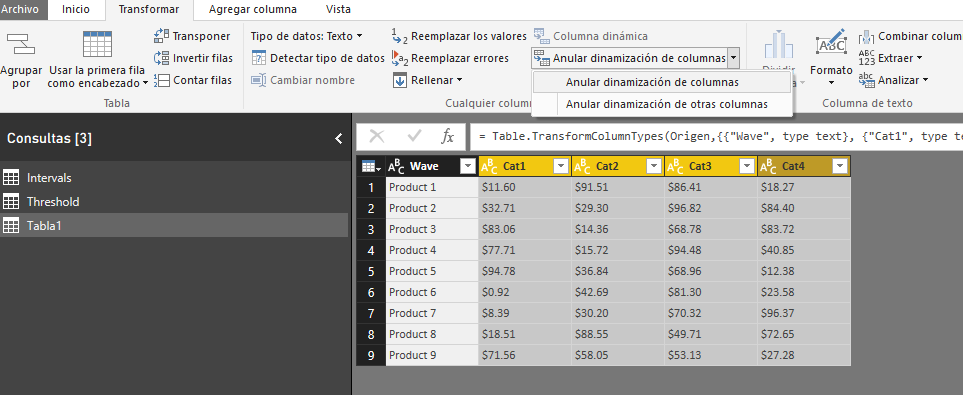
Step 2:

Go to Unpivot ColumnsGo to Unpivot Columns

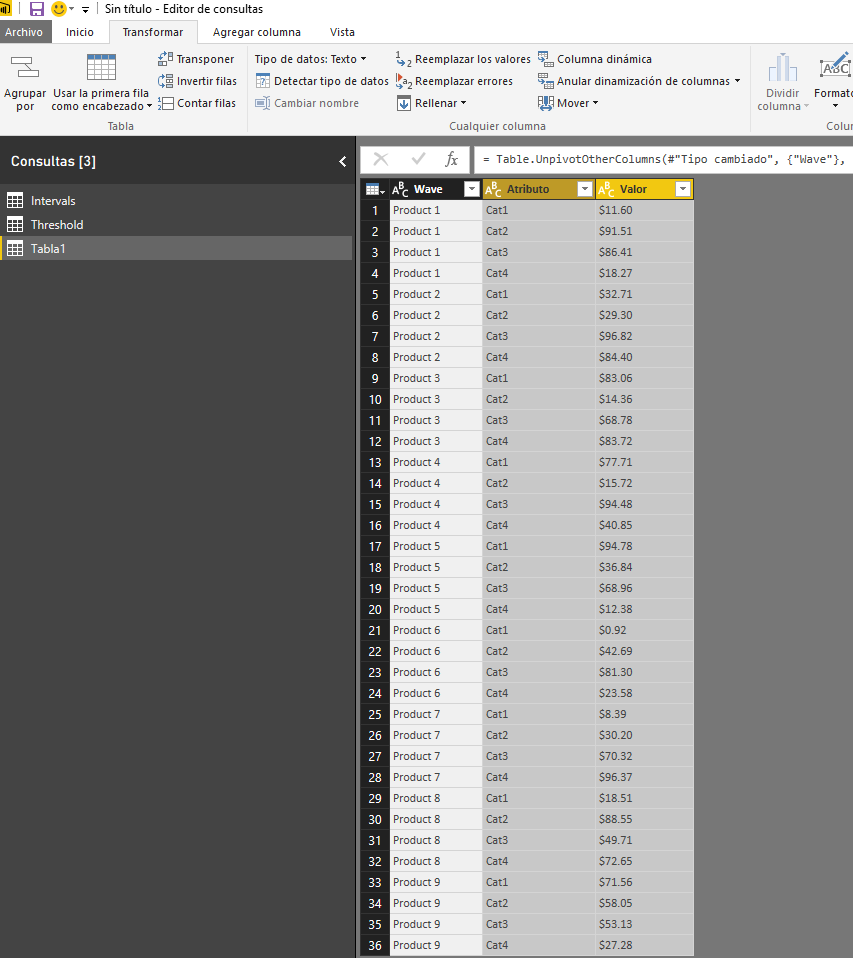
Step 3:


Step 3: ReadyStep 3: Ready


Lima - Peru

View solution in original post

4 REPLIES 4
Greg_Deckler
Community Champion
Community Champion

How about this?


let
    Source = Table.FromRows(Json.Document(Binary.Decompress(Binary.FromText("XZGxCsMwDER/JYSO4bAk25L/onvI1O6F0v5/bcumJNtxueeTlH1f7+/X8/v4LLRu640IOSxNFUKiriwjuiID67Ie25/i5gtDPcEFMvgMY+cjYjhT0n1ByP5uhLjKBrVlfFU+U7H5qrOLUk+0rtrgVAywdKbSSIx3pc4VZ1cZ/QyxM5WbH1C8IDJy8bFoLsiCdIG0JyAelQD2qAYIz6vI5YI2LjuvXVXy0jI31Vp/2ap0v/4j3yAZglNJQOIDKrgNePwA", BinaryEncoding.Base64), Compression.Deflate)), let _t = ((type text) meta [Serialized.Text = true]) in type table [Wave = _t, Cat1 = _t, Cat2 = _t, Cat3 = _t, Cat4 = _t]),
    #"Changed Type" = Table.TransformColumnTypes(Source,{{"Wave", type text}, {"Cat1", type number}, {"Cat2", type number}, {"Cat3", type number}, {"Cat4", type number}}),
    #"Transposed Table" = Table.Transpose(#"Changed Type"),
    #"Promoted Headers" = Table.PromoteHeaders(#"Transposed Table"),
    #"Added Index" = Table.AddIndexColumn(#"Promoted Headers", "Index", 1, 1),
    #"Reordered Columns" = Table.ReorderColumns(#"Added Index",{"Index", "Product 1", "Product 2", "Product 3", "Product 4", "Product 5", "Product 6", "Product 7", "Product 8", "Product 9"}),
    #"Added Custom" = Table.AddColumn(#"Reordered Columns", "Custom", each "Cat" & Text.From([Index])),
    #"Reordered Columns1" = Table.ReorderColumns(#"Added Custom",{"Index", "Custom", "Product 1", "Product 2", "Product 3", "Product 4", "Product 5", "Product 6", "Product 7", "Product 8", "Product 9"}),
    #"Unpivoted Columns" = Table.UnpivotOtherColumns(#"Reordered Columns1", {"Index", "Custom"}, "Attribute", "Value")
in
    #"Unpivoted Columns"


Follow on LinkedIn
@ me in replies or I'll lose your thread!!!
Instead of a Kudo, please vote for this idea
Become an expert!: Enterprise DNA
External Tools: MSHGQM
YouTube Channel!: Microsoft Hates Greg
Latest book!:
DAX For Humans

DAX is easy, CALCULATE makes DAX hard...
rswami_4
Helper I
Helper I

Or the transformation could be done into the following table which will have the same effect:


ProductCategoryValue
Product 1Cat 1$11.60
Product 1Cat 2$91.51
Product 1Cat 3$86.41
Product 1Cat 4$18.27
Product 2Cat 1$32.71
Product 2Cat 2$29.30
Product 2Cat 3$96.82
Product 2Cat 4$84.40
Product 3Cat 1$83.06
Product 3Cat 2$14.36
Product 3Cat 3$68.78
Product 3Cat 4$83.72
Product 4Cat 1$77.71
Product 4Cat 2$15.72
Product 4Cat 3$94.48
Product 4Cat 4$40.85
Product 5Cat 1$94.78
Product 5Cat 2$36.84
Product 5Cat 3$68.96
Product 5Cat 4$12.38
Product 6Cat 1$0.92
Product 6Cat 2$42.69
Product 6Cat 3$81.30
Product 6Cat 4$23.58
Product 7Cat 1$8.39
Product 7Cat 2$30.20
Product 7Cat 3$70.32
Product 7Cat 4$96.37
Product 8Cat 1$18.51
Product 8Cat 2$88.55
Product 8Cat 3$49.71
Product 8Cat 4$72.65
Product 9Cat 1$71.56
Product 9Cat 2$58.05
Product 9Cat 3$53.13
Product 9Cat 4$27.28

Hi @rswami_4


You can also do it by this way:


Go to Edit Query


Step 1:


Select your columns Cat 1 to Cat 4Select your columns Cat 1 to Cat 4

Step 2:

Go to Unpivot ColumnsGo to Unpivot Columns

Step 3:


Step 3: ReadyStep 3: Ready


Lima - Peru

Victor,


Thanks a lot.  This exactly what I was looking for.


Swami

Helpful resources

Announcements
Power BI DataViz World Championships

Power BI Dataviz World Championships

The Power BI Data Visualization World Championships is back! Get ahead of the game and start preparing now!

December 2025 Power BI Update Carousel

Power BI Monthly Update - December 2025

Check out the December 2025 Power BI Holiday Recap!

FabCon Atlanta 2026 carousel

FabCon Atlanta 2026

Join us at FabCon Atlanta, March 16-20, for the ultimate Fabric, Power BI, AI and SQL community-led event. Save $200 with code FABCOMM.