
Join us at FabCon Atlanta from March 16 - 20, 2026, for the ultimate Fabric, Power BI, AI and SQL community-led event. Save $200 with code FABCOMM.
Register now!The Power BI Data Visualization World Championships is back! Get ahead of the game and start preparing now! Learn more
Dear all,
I would like to transform a table in Power BI but I don't find the way to do it. I will clarify my doubt with an example.
1) I load in Power BI a table like the following:
Project | Recruiting amount year X | Awarded amount year X | Contracting amount year Y | Awarded amount year Y |
1 | A | C | E | G |
2 | B | D | F | H |
2) I would like to transform it in order to obtain the following table:
Project | Recruitment status | Year | Amount |
1 | Recruiting | X | A |
1 | Recruiting | Y | E |
1 | Awarded | X | C |
1 | Awarded | Y | G |
2 | Recruiting | X | B |
2 | Recruiting | Y | F |
Could anyone shed a light?
Thank you very much.
Solved! Go to Solution.
This query:
let
Source = Table1,
#"Unpivoted Other Columns" = Table.UnpivotOtherColumns(Source, {"Project"}, "Attribute", "Value"),
#"Renamed Columns" = Table.RenameColumns(#"Unpivoted Other Columns",{{"Attribute", "Recruitment status"}, {"Value", "Amount"}}),
#"Inserted Text After Delimiter" = Table.AddColumn(#"Renamed Columns", "Year", each Text.AfterDelimiter([Recruitment status], " ", {0, RelativePosition.FromEnd}), type text),
#"Extracted Text Before Delimiter" = Table.TransformColumns(#"Inserted Text After Delimiter", {{"Recruitment status", each Text.BeforeDelimiter(_, " ", 0), type text}}),
#"Reordered Columns" = Table.ReorderColumns(#"Extracted Text Before Delimiter",{"Project", "Recruitment status", "Year", "Amount"})
in
#"Reordered Columns"
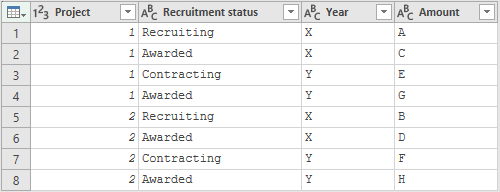
Results in:
Can you explain the logic?
E.g. how does amount E from column Contracting amount year Y end up with recruitment status Recruitment?
This query:
let
Source = Table1,
#"Unpivoted Other Columns" = Table.UnpivotOtherColumns(Source, {"Project"}, "Attribute", "Value"),
#"Renamed Columns" = Table.RenameColumns(#"Unpivoted Other Columns",{{"Attribute", "Recruitment status"}, {"Value", "Amount"}}),
#"Inserted Text After Delimiter" = Table.AddColumn(#"Renamed Columns", "Year", each Text.AfterDelimiter([Recruitment status], " ", {0, RelativePosition.FromEnd}), type text),
#"Extracted Text Before Delimiter" = Table.TransformColumns(#"Inserted Text After Delimiter", {{"Recruitment status", each Text.BeforeDelimiter(_, " ", 0), type text}}),
#"Reordered Columns" = Table.ReorderColumns(#"Extracted Text Before Delimiter",{"Project", "Recruitment status", "Year", "Amount"})
in
#"Reordered Columns"
Results in:
Thank you very much Marcel.
It worked with the example I have given. However, I am trying to adapt the query in case there was any modification of the input table. For example, my real input table is:
| Pla | Concepte | Estat | Codi Actuació | Línia pressupost | Subpla | Nom | 2017 moviment | 2017 adjudicat | 2017 licitació | 2018 moviment | 2018 adjudicat | 2018 licitació | 2019 moviment | 2019 adjudicat | 2019 licitació | Data extracció |
| Pla Tecnològic | Línia Base | Línia Base | A | M | X | F | H | 09/10/2017 | ||||||||
| Pla Tecnològic | Contracte | Adjudicat | B | N | Y | G | I | 09/10/2017 |
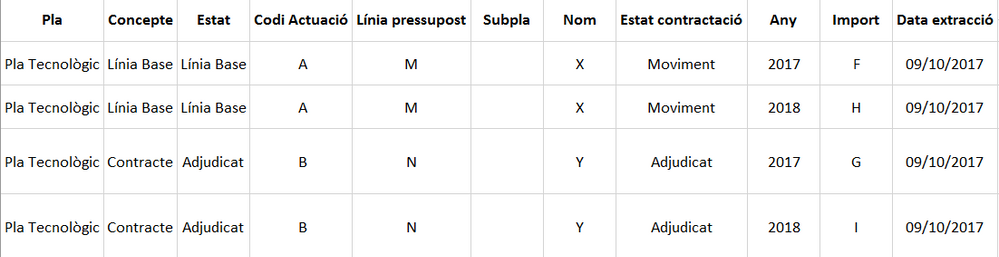
Therefore, the table I would like to obtain would be:
I would really appreciate if you could help me with my real example.
Thank you again!
Sorry,
I insert again the input table as I see it is not clear.
The Power BI Data Visualization World Championships is back! Get ahead of the game and start preparing now!
| User | Count |
|---|---|
| 161 | |
| 132 | |
| 117 | |
| 79 | |
| 53 |