
Advance your Data & AI career with 50 days of live learning, dataviz contests, hands-on challenges, study groups & certifications and more!
Get registeredGet Fabric Certified for FREE during Fabric Data Days. Don't miss your chance! Request now
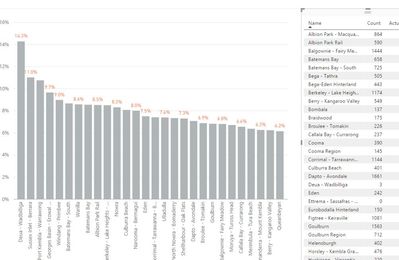
I have a dashboard as follows: -
And a calculated measure. When I select a category from the table, the bar chart filters to the selction but says 100% for the value of the calculated measure and not the actual answer....
I know I am missing something simple here..Could anyone point it out please
Dashboard overview
Calculated measure
After slicing from table selection
Solved! Go to Solution.
I changed my measures to 2 measures: -
DisabledT = SUMX('Disability Total',CALCULATE(SUM('Disability Total'[Count]),FILTER(Disability,Disability[Category] = "Disabled")))
and then
DisabilityT % = [DisabledT] / SUM('Disability Total'[Count])
And now evrutrging works perfcetly across the tables and the charts
Abhijeet
Hi @CAPEconsulting,
I have tested your formula. It worked properly. Did you use any other slicers or filters? What's in the table that you used to filter? If it looks like ""Albion Park - Macquarie Pass" Disabled", the result will be 100%. Could you please post snapshot of that table?
Best Regards!
Dale
I changed my measures to 2 measures: -
DisabledT = SUMX('Disability Total',CALCULATE(SUM('Disability Total'[Count]),FILTER(Disability,Disability[Category] = "Disabled")))
and then
DisabilityT % = [DisabledT] / SUM('Disability Total'[Count])
And now evrutrging works perfcetly across the tables and the charts
Abhijeet
Advance your Data & AI career with 50 days of live learning, contests, hands-on challenges, study groups & certifications and more!
Check out the October 2025 Power BI update to learn about new features.