Learn from the best! Meet the four finalists headed to the FINALS of the Power BI Dataviz World Championships! Register now
Dear all,
@amitchandak @Anonymous
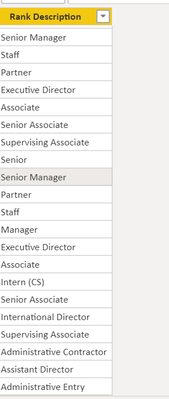
I am using below Dax to create a new table
Solved! Go to Solution.
Try
Distinct(Rank = UNION(DISTINCT(FY20WTD_MTD_YTD[Rank Description]),DISTINCT('YTD FY21'[Rank Description])))
or
distinct(Rank = UNION(all(FY20WTD_MTD_YTD[Rank Description]),all('YTD FY21'[Rank Description])))
Hi, @vjnvinod
You need to apply “distinct” function to the "Rank" table again.
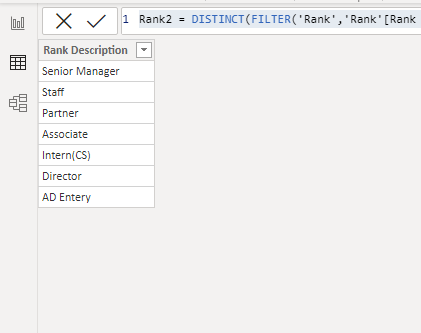
Please create another calculated table based on the table 'Rank':
Rank2 = DISTINCT(FILTER('Rank','Rank'[Rank Description]<>""))
The result ( without any duplicate and blank values) will show as below:
Please check my sample file for more details.
Best Regards,
Community Support Team _ Eason
Try
Distinct(Rank = UNION(DISTINCT(FY20WTD_MTD_YTD[Rank Description]),DISTINCT('YTD FY21'[Rank Description])))
or
distinct(Rank = UNION(all(FY20WTD_MTD_YTD[Rank Description]),all('YTD FY21'[Rank Description])))
A new Power BI DataViz World Championship is coming this June! Don't miss out on submitting your entry.
Share feedback directly with Fabric product managers, participate in targeted research studies and influence the Fabric roadmap.
| User | Count |
|---|---|
| 49 | |
| 34 | |
| 33 | |
| 16 | |
| 16 |
| User | Count |
|---|---|
| 60 | |
| 59 | |
| 39 | |
| 25 | |
| 24 |