
Join us at FabCon Atlanta from March 16 - 20, 2026, for the ultimate Fabric, Power BI, AI and SQL community-led event. Save $200 with code FABCOMM.
Register now!The Power BI Data Visualization World Championships is back! It's time to submit your entry. Live now!
Hi @Suryaann111
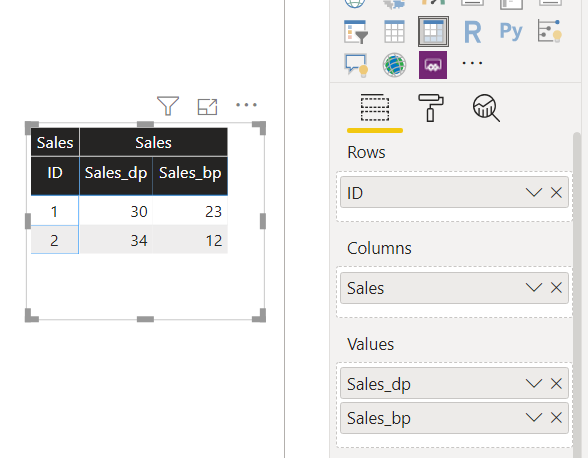
You can use Matrix visual for this.
Also I believe you want to show these values against some dimension. I have taken "ID" as dimension here and the source table schema is:
Create a Calculated Column for your main header i.e. [Sales]="Sales"
Then use Matrix as shown below:
Note: Instead of ID you can use the dimension/attributes you have in your table for which you want o show this data.
Mann
<If this post helps, then please consider Accept it as the solution to help the other members find it more quickly>
The Power BI Data Visualization World Championships is back! It's time to submit your entry.
Check out the January 2026 Power BI update to learn about new features.
| User | Count |
|---|---|
| 61 | |
| 42 | |
| 30 | |
| 26 | |
| 23 |
| User | Count |
|---|---|
| 134 | |
| 113 | |
| 58 | |
| 39 | |
| 35 |