Join us at FabCon Atlanta from March 16 - 20, 2026, for the ultimate Fabric, Power BI, AI and SQL community-led event. Save $200 with code FABCOMM.
Register now!The Power BI Data Visualization World Championships is back! It's time to submit your entry. Live now!
Hi,
I have a column with a number, which is pulled in correctly from Salesforce as a Numeric value and I can do calculations correctly with it.
However when adding that field to a table, for some rows the number is not recognized as such, and appear blank (when summarizing) or if you disable summarize the number will appear, but cannot do conditional formatting on it. It would appear that the table visualization is not recognizing some random numbers in that column as a number. Tried change type to decimal, whole, repull the data, etc... but it made no difference.
Anyone came across this issue?
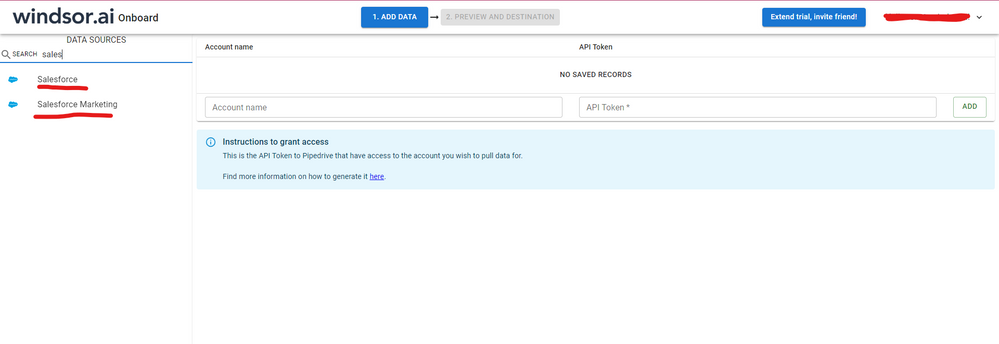
Hi @rmiquel were you able to find a solution? That was a weird issue you were facing. As a workaround, maybe you can try to test your connection with a 3rd party connector and pull this same field through it. I've tried windsor.ai, supermetrics and funnel.io. I stayed with Windsor because it is much cheaper so just to let you know other options. In case you wonder, to make the connection first search for the Salesforce connector in the data sources list:
After that, just grant access to your Salesforce account using your credentials, then on preview and destination page you will see a preview of your Salesforce fields:
There just select the fields you need. It is also compatible with custom fields and custom objects, so you'll be able to export them through windsor. Finally, just select PBI as your data destination and finally just copy and paste the url on PBI --> Get Data --> Web --> Paste the url.
Hi @rmiquel
You may try to update the desktop version to latest. Check the data type in Query Editor. I have tested on my side, but not reproduce the issue. If possible, please share some data sample and detail steps.
Regards,
Cherie
The Power BI Data Visualization World Championships is back! It's time to submit your entry.
Check out the January 2026 Power BI update to learn about new features.
| User | Count |
|---|---|
| 56 | |
| 42 | |
| 39 | |
| 23 | |
| 21 |
| User | Count |
|---|---|
| 144 | |
| 106 | |
| 63 | |
| 38 | |
| 31 |