Join us at FabCon Atlanta from March 16 - 20, 2026, for the ultimate Fabric, Power BI, AI and SQL community-led event. Save $200 with code FABCOMM.
Register now!The Power BI Data Visualization World Championships is back! It's time to submit your entry. Live now!
Hi!
I have a table with revenues and different type of products. The problem is there are some products where the value is 0 hence I would like to take the average revenue value of that product in the table and replace the 0 values with the average
Sorry, I can't make out, based on the table you posted, which 0 values need replacing. Is that the data table? If so, which rows contain the 0 values which need replacing by the average?
Proud to be a Super User!
Paul on Linkedin.
Hi @PaulDBrown
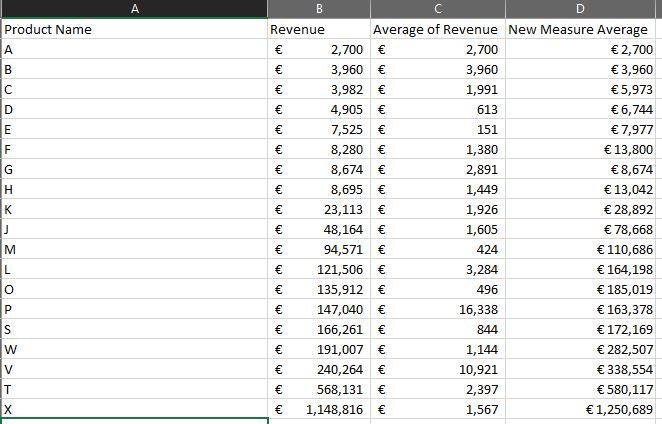
Thank you for your quick support, I have tried the formula into my table it's not bad but it's not showing the excact average amount as per below
Column C is where I took the average revenue of each product name.
Column D is the measure you provided it's slightly different and doesn't reflect the excact average amount from column C.
Where the Product revenue value is 0, I expect the "Average Revenue"(column C) in my table
Thank you
Hi @Austinehype ,
Basically the measure created by @ PaulDBrown should work in the report. Could you please consider sharing a sample file without any sesentive information or sample data for further discussion? In your posted picture could not confirm what is your expected output.
Best Regards,
Community Support Team _ Yingjie Li
If this post helps, then please consider Accept it as the solution to help the other members find it more quickly.
For Example:
Product Revenue
A 3432
B 0 take the average of B
C 754
D 0 take the average of D
A 0 take the average of A
B 246
C 1245
D 321
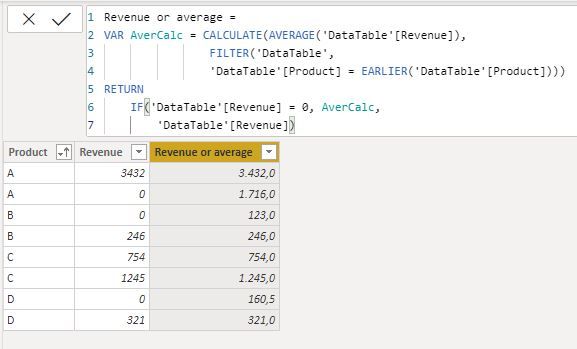
See if this works for you.
A) As a column in your data table:
using this code to create a calculated column:
Revenue or average =
VAR AverCalc = CALCULATE(AVERAGE('DataTable'[Revenue]),
FILTER('DataTable',
'DataTable'[Product] = EARLIER('DataTable'[Product])))
RETURN
IF('DataTable'[Revenue] = 0, AverCalc,
'DataTable'[Revenue])
B) As a measure:
which is done with:
1) Sum of revenue :
Sum of Revenue = SUM('DataTable'[Revenue])
2) Replace 0 with average:
Replace 0 with Average =
VAR AverCalc = CALCULATE(AVERAGE('DataTable'[Revenue]),
ALLEXCEPT('DataTable', 'DataTable'[Product])) //Calculates the average revenue by product
RETURN
IF(ISINSCOPE('DataTable'[Product]),
IF([Sum of Revenue] = 0, AverCalc,
[Sum of Revenue])) //Replaces 0 revenue with corresponding average.
Proud to be a Super User!
Paul on Linkedin.
The Power BI Data Visualization World Championships is back! It's time to submit your entry.
Check out the January 2026 Power BI update to learn about new features.
| User | Count |
|---|---|
| 60 | |
| 49 | |
| 30 | |
| 25 | |
| 23 |
| User | Count |
|---|---|
| 130 | |
| 103 | |
| 58 | |
| 39 | |
| 31 |