Join us at FabCon Atlanta from March 16 - 20, 2026, for the ultimate Fabric, Power BI, AI and SQL community-led event. Save $200 with code FABCOMM.
Register now!The Power BI Data Visualization World Championships is back! Get ahead of the game and start preparing now! Learn more
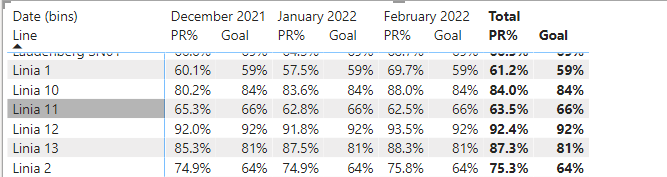
Hi, im having a table with 3 columns. Resource name, It's result goal and its result like below.
The idea i have is to color code PR% column in order to compare faster which result has reached its goal, but i did not manage to do that. Goal is a regular column, where PR% is a measure. So based on example we have Linia 8 with goal 66 and result 75.6 so id like to have 75.6 colored green etc. Am i able to do that?
Second thing is that if i show this in time like below:
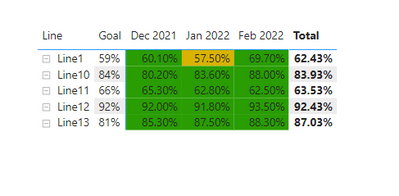
I'd like to avoid replicationg Goal column each month. Is there a way? On top of that id like to have same rule as above with color coding.
Also, if you guys have any experience or better practices to show such thing please share 🙂
Thanks in advance!
Solved! Go to Solution.
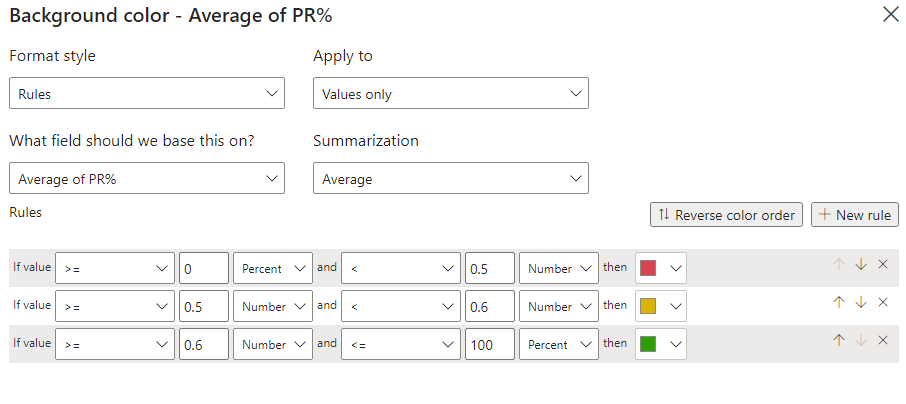
Nvm, i've just substracted goal with result and then provided conditional formatting rules as above
I hope you want this . Find attached file with result
Proud to be a Super User!
Hey, the idea with Goal not duplicating is fine , but the idea of color coding is not based on PR% column... Because of much larger number of Lines, and diferent goals, your rules assumption wont work 😞
Nvm, i've just substracted goal with result and then provided conditional formatting rules as above
The Power BI Data Visualization World Championships is back! Get ahead of the game and start preparing now!
| User | Count |
|---|---|
| 38 | |
| 36 | |
| 33 | |
| 32 | |
| 29 |
| User | Count |
|---|---|
| 129 | |
| 88 | |
| 79 | |
| 68 | |
| 63 |