Join us at FabCon Atlanta from March 16 - 20, 2026, for the ultimate Fabric, Power BI, AI and SQL community-led event. Save $200 with code FABCOMM.
Register now!View all the Fabric Data Days sessions on demand. View schedule
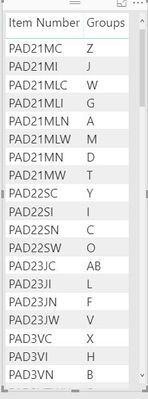
I have a group of data in a table "ItemGroups" with the following format:
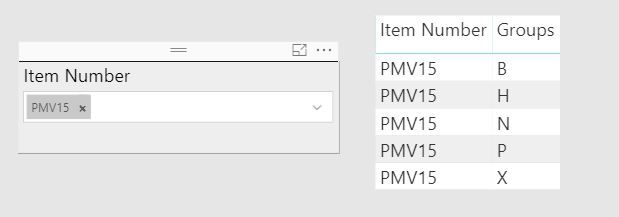
I want to use a slicer to select a single item. Currently, this returns all the groups in which that item number is a part of. What I am looking for is the table visualization to return all item numbers that share the group. In the example below, I want the table visualization to return all item numbers that contain group B (this will include the selection in the slicer), group H, group N, etc.
Can this be done as a visual filter using a measure?
Solved! Go to Solution.
HI @Anonymous,
For original slicer, it is impossible to achieve your requirement.
You need to create new table as source of slicer and coding measure to filter records.
Steps:
1. Create table with 'item number' and 'groups' from original table as select table.(these tables not have relationship)
Selector =
SELECTCOLUMNS ( Table, "Item Number", [Item Number], "Groups", [Groups] )
2. Use Item Number(from selector table) as source column of slicer.
3. Write measure to get selected group list and check original table row content to return tag.
Tag =
VAR selectList =
CALCULATETABLE ( VALUE ( Selector[Groups] ), ALLSELECTED ( Selector ) )
RETURN
IF ( SELECTEDVALUE ( Table[Groups] ) IN selectList, "Y", "N" )
4. Drag above measure to visual level filter with advanced filter mode to filter records who not equal to "Y" tag.
Regards,
Xiaoxin Sheng
HI @Anonymous,
For original slicer, it is impossible to achieve your requirement.
You need to create new table as source of slicer and coding measure to filter records.
Steps:
1. Create table with 'item number' and 'groups' from original table as select table.(these tables not have relationship)
Selector =
SELECTCOLUMNS ( Table, "Item Number", [Item Number], "Groups", [Groups] )
2. Use Item Number(from selector table) as source column of slicer.
3. Write measure to get selected group list and check original table row content to return tag.
Tag =
VAR selectList =
CALCULATETABLE ( VALUE ( Selector[Groups] ), ALLSELECTED ( Selector ) )
RETURN
IF ( SELECTEDVALUE ( Table[Groups] ) IN selectList, "Y", "N" )
4. Drag above measure to visual level filter with advanced filter mode to filter records who not equal to "Y" tag.
Regards,
Xiaoxin Sheng
Check out the November 2025 Power BI update to learn about new features.
Advance your Data & AI career with 50 days of live learning, contests, hands-on challenges, study groups & certifications and more!