cancel
Showing results for 
Search instead for 
Did you mean: 

Learn from the best! Meet the four finalists headed to the FINALS of the Power BI Dataviz World Championships! Register now

Reply
vinoth
Regular Visitor

Table Sorter visual

Hi,

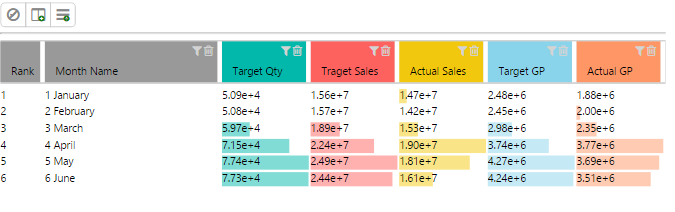
Am using Table sorter custom visual and in that am facing issues with diplay data lables.,


because it is not giving as per i need and it is giving like scientific number , please anyone advise how to fix this issue.


i need it urgenlty to show my dashboard..


Regards,


Vinoth


6 REPLIES 6
Anonymous
Not applicable

It's hard to tell without knowing anything about the data you're trying to display. Is it a measure that's displaying incorrectly? Is it a column? If it's a column how are you aggregating the column? What results are you expecting to see?

Capture.PNG

Hi,

I have added image and the problem while displaying data value it is shwoing like scientific number and below i have mentioned my actual data table for your quick view.


Capture1.PNG

Anonymous
Not applicable

I've been testing it and that just seems to be how the Table Sorter visual displays numbers. There does not appear to be any way to change it. It ignores any formatting you have applied to either measures or columns and just does its own thing. If you don't like that number formatting I guess you'll have to use a different visual.

Hi,


Thanks for your quick response and time being somehow i mangded with other visual but is there any posibility to get this corrected?

because this visual seems very good and if we correct data lable issues this wil be very useful for many peoples to display their trackers with all the persepective.


hence requesting someones help urgently..


Regards,


Vinoth

@vinoth


You can also contact Power BI Custom Visuals Support: pbicvsupport@microsoft.com


Regards,

Anonymous
Not applicable

@vinoth I couldn't say. The description for that visual says it's still in beta, so maybe they'll fix that. There's a Contact Author link below the description on the visuals gallery page. I would recommend providing constructive feedback there.

Helpful resources

Announcements
Join our Fabric User Panel

Join our Fabric User Panel

Share feedback directly with Fabric product managers, participate in targeted research studies and influence the Fabric roadmap.

February Power BI Update Carousel

Power BI Monthly Update - February 2026

Check out the February 2026 Power BI update to learn about new features.

FabCon Atlanta 2026 carousel

FabCon Atlanta 2026

Join us at FabCon Atlanta, March 16-20, for the ultimate Fabric, Power BI, AI and SQL community-led event. Save $200 with code FABCOMM.