Share feedback directly with Fabric product managers, participate in targeted research studies and influence the Fabric roadmap.
Sign up nowGet Fabric certified for FREE! Don't miss your chance! Learn more
Hi,
I have a table here, it has 150 columns, I want to select 45 of them. Is there a way to do this without having to check box one by one? I also don't want to unpivot and join either, since this table has 200,000 rows.
I was thinking if there is a way to past a list into the Table.SelectColumns, maybe put the 45 columns I want as a variable and some how pass it into Table.SelectColumns Step.
let
Source = Csv.Document(File.Contents("XYZ.csv"),[Delimiter=",", Columns=150, Encoding=65001, QuoteStyle=QuoteStyle.None]),
#"Promoted Headers" = Table.PromoteHeaders(Source, [PromoteAllScalars=true]),
#"Removed Other Columns" = Table.SelectColumns(#"Promoted Headers",{"My Columns_1"..."My Columns_45"})
in
#"Removed Other Columns"
I tried something like this but didn't work
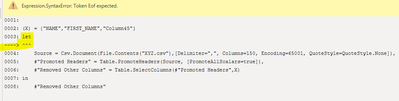
(X ) => {"NAME","TRANSACTION_NUM"..."Column_45"}
let
Source = Csv.Document(File.Contents("XYZ.csv"),[Delimiter=",", Columns=150, Encoding=65001, QuoteStyle=QuoteStyle.None]),
#"Promoted Headers" = Table.PromoteHeaders(Source, [PromoteAllScalars=true]),
#"Removed Other Columns" = Table.SelectColumns(#"Promoted Headers",{X})
in
#"Removed Other Columns"
Solved! Go to Solution.
@peterhui50 not sure why, try this:
let
X = {"NAME","TRANSACTION_NUM"..."Column_45"},
Source = Csv.Document(File.Contents("XYZ.csv"),[Delimiter=",", Columns=150, Encoding=65001, QuoteStyle=QuoteStyle.None]),
#"Promoted Headers" = Table.PromoteHeaders(Source, [PromoteAllScalars=true]),
#"Removed Other Columns" = Table.SelectColumns(#"Promoted Headers",X)
in
#"Removed Other Columns"
Check my latest blog post Comparing Selected Client With Other Top N Clients | PeryTUS I would ❤ Kudos if my solution helped. 👉 If you can spend time posting the question, you can also make efforts to give Kudos to whoever helped to solve your problem. It is a token of appreciation!
⚡Visit us at https://perytus.com, your one-stop-shop for Power BI-related projects/training/consultancy.⚡
Subscribe to the @PowerBIHowTo YT channel for an upcoming video on List and Record functions in Power Query!!
Learn Power BI and Fabric - subscribe to our YT channel - Click here: @PowerBIHowTo
If my solution proved useful, I'd be delighted to receive Kudos. When you put effort into asking a question, it's equally thoughtful to acknowledge and give Kudos to the individual who helped you solve the problem. It's a small gesture that shows appreciation and encouragement! ❤
Did I answer your question? Mark my post as a solution. Proud to be a Super User! Appreciate your Kudos 🙂
Feel free to email me with any of your BI needs.
It worked, but why does this list have to be inside the "let" statement?
@peterhui50 not sure why, try this:
let
X = {"NAME","TRANSACTION_NUM"..."Column_45"},
Source = Csv.Document(File.Contents("XYZ.csv"),[Delimiter=",", Columns=150, Encoding=65001, QuoteStyle=QuoteStyle.None]),
#"Promoted Headers" = Table.PromoteHeaders(Source, [PromoteAllScalars=true]),
#"Removed Other Columns" = Table.SelectColumns(#"Promoted Headers",X)
in
#"Removed Other Columns"
Check my latest blog post Comparing Selected Client With Other Top N Clients | PeryTUS I would ❤ Kudos if my solution helped. 👉 If you can spend time posting the question, you can also make efforts to give Kudos to whoever helped to solve your problem. It is a token of appreciation!
⚡Visit us at https://perytus.com, your one-stop-shop for Power BI-related projects/training/consultancy.⚡
Subscribe to the @PowerBIHowTo YT channel for an upcoming video on List and Record functions in Power Query!!
Learn Power BI and Fabric - subscribe to our YT channel - Click here: @PowerBIHowTo
If my solution proved useful, I'd be delighted to receive Kudos. When you put effort into asking a question, it's equally thoughtful to acknowledge and give Kudos to the individual who helped you solve the problem. It's a small gesture that shows appreciation and encouragement! ❤
Did I answer your question? Mark my post as a solution. Proud to be a Super User! Appreciate your Kudos 🙂
Feel free to email me with any of your BI needs.
@peterhui50 Since x is already a list, you don't need to wrap it in curly brackets:
(X ) => {"NAME","TRANSACTION_NUM"..."Column_45"}
let
Source = Csv.Document(File.Contents("XYZ.csv"),[Delimiter=",", Columns=150, Encoding=65001, QuoteStyle=QuoteStyle.None]),
#"Promoted Headers" = Table.PromoteHeaders(Source, [PromoteAllScalars=true]),
#"Removed Other Columns" = Table.SelectColumns(#"Promoted Headers",X)
in
#"Removed Other Columns"
Check my latest blog post Comparing Selected Client With Other Top N Clients | PeryTUS I would ❤ Kudos if my solution helped. 👉 If you can spend time posting the question, you can also make efforts to give Kudos to whoever helped to solve your problem. It is a token of appreciation!
⚡Visit us at https://perytus.com, your one-stop-shop for Power BI-related projects/training/consultancy.⚡
Subscribe to the @PowerBIHowTo YT channel for an upcoming video on List and Record functions in Power Query!!
Learn Power BI and Fabric - subscribe to our YT channel - Click here: @PowerBIHowTo
If my solution proved useful, I'd be delighted to receive Kudos. When you put effort into asking a question, it's equally thoughtful to acknowledge and give Kudos to the individual who helped you solve the problem. It's a small gesture that shows appreciation and encouragement! ❤
Did I answer your question? Mark my post as a solution. Proud to be a Super User! Appreciate your Kudos 🙂
Feel free to email me with any of your BI needs.
gave me a strange error called Eof Expected
odd...
Share feedback directly with Fabric product managers, participate in targeted research studies and influence the Fabric roadmap.
| User | Count |
|---|---|
| 57 | |
| 53 | |
| 42 | |
| 18 | |
| 14 |
| User | Count |
|---|---|
| 111 | |
| 104 | |
| 36 | |
| 28 | |
| 27 |