cancel
Showing results for 
Search instead for 
Did you mean: 

The Power BI Data Visualization World Championships is back! Get ahead of the game and start preparing now! Learn more

Reply
HS_PDS
Frequent Visitor

Table Resize based off filter selection

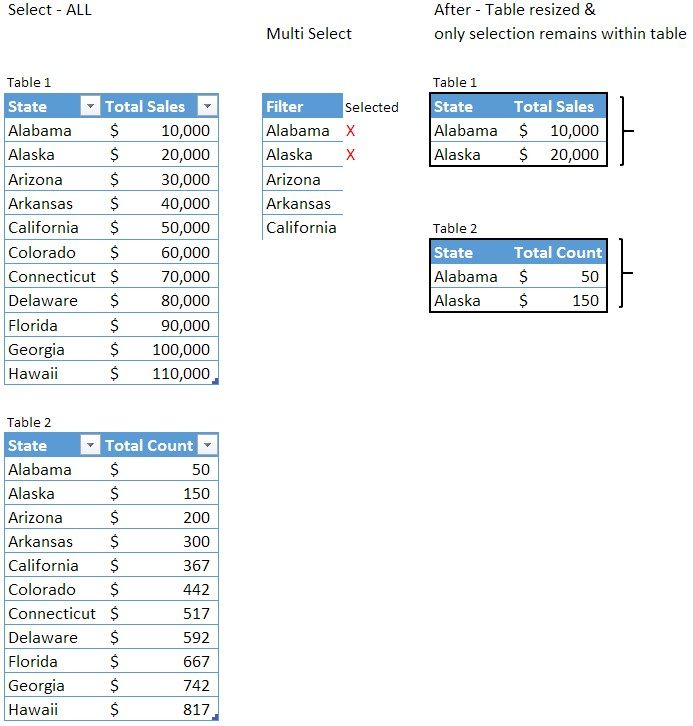
Is it possible to automatically resize a table based off the filter selection(s). For example, if we select two states (Alabama & Alaska) from the filter dropdown , would PBI be able to dynamically resize to only show those two , sans white space?


Basically the end table would be resized to the red outlined table below? Can PBI do anything liek that? 


PBI Table Resize Example.jpg

1 ACCEPTED SOLUTION

Hi @HS_PDS ,

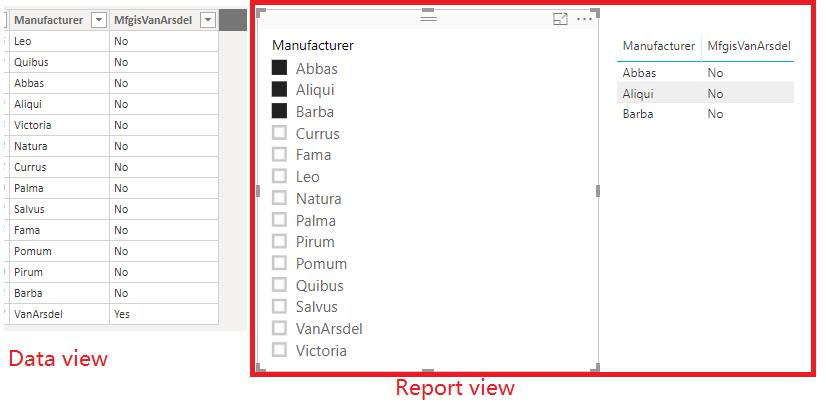
If you create the slicer and select the item in the slicer to filter the data, the actual data tables will not be filtered in data view. Only the visual in the Report view will be filtered by the slicer.

Untitled.png

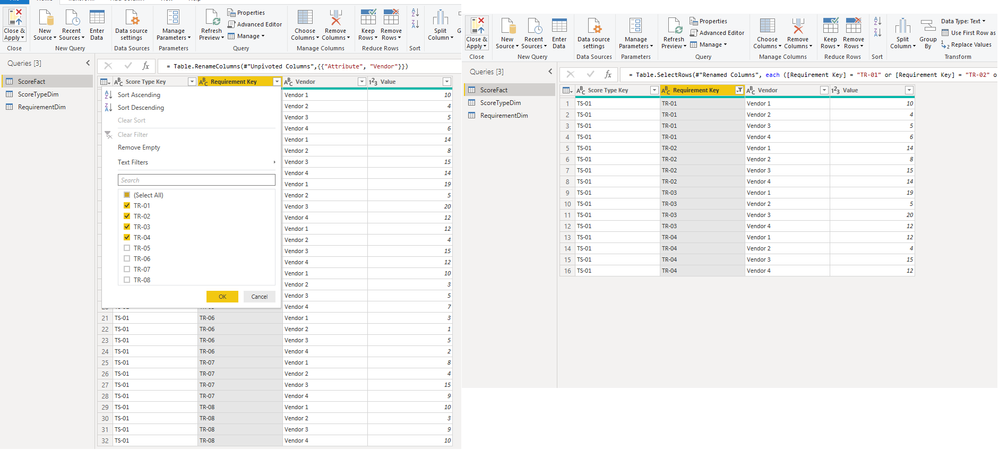
If you want to filtered to the actual table, you could select the options in dropdown in query editor like below.

filter rows.png

Hope this can help you.

Best  Regards,

Cherry


Community Support Team _ Cherry Gao
If this post helps, then please consider Accept it as the solution to help the other members find it more quickly.

View solution in original post

4 REPLIES 4
Anonymous
Not applicable

Hi @HS_PDS  ,

Yes, that is definitely possible.


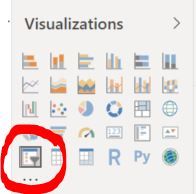
You just need to create a visual called a Slicer.

Capture9.JPG


Then, drag your STATE column in the Field section.


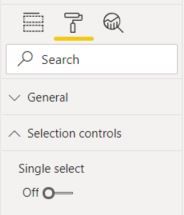
Finally, in the Format Panel > Selection Control > Turn Off Single Select 


Capture.JPG


Let me know how it goes.


Cheers,
Robin

If this post helps, then please consider Accept it as the solution to help the other members find it more quickly.

Thanks for multi - select slicer tip Robin, 


I added that into my report , but was wondering if the actual table dimensions would resize based off the selection. 


Basically the border would resize and remove any whitespace and automatically shift up the table below. Not even sure if PBI has this capabilities or if theres any workarounds 


See the example below: 


PBI Table Resize Example2.jpg

Hi @HS_PDS ,

Have you solved your problem?

If you have solved, please always accept the replies making sense as solution to your question so that people who may have the same question can get the solution directly.

If you still need help, feel free to ask.

Best  Regards,

Cherry


Community Support Team _ Cherry Gao
If this post helps, then please consider Accept it as the solution to help the other members find it more quickly.

Hi @HS_PDS ,

If you create the slicer and select the item in the slicer to filter the data, the actual data tables will not be filtered in data view. Only the visual in the Report view will be filtered by the slicer.

Untitled.png

If you want to filtered to the actual table, you could select the options in dropdown in query editor like below.

filter rows.png

Hope this can help you.

Best  Regards,

Cherry


Community Support Team _ Cherry Gao
If this post helps, then please consider Accept it as the solution to help the other members find it more quickly.

Helpful resources

Announcements
Power BI DataViz World Championships

Power BI Dataviz World Championships

The Power BI Data Visualization World Championships is back! Get ahead of the game and start preparing now!

December 2025 Power BI Update Carousel

Power BI Monthly Update - December 2025

Check out the December 2025 Power BI Holiday Recap!

FabCon Atlanta 2026 carousel

FabCon Atlanta 2026

Join us at FabCon Atlanta, March 16-20, for the ultimate Fabric, Power BI, AI and SQL community-led event. Save $200 with code FABCOMM.