
Join us at FabCon Atlanta from March 16 - 20, 2026, for the ultimate Fabric, Power BI, AI and SQL community-led event. Save $200 with code FABCOMM.
Register now!The Power BI Data Visualization World Championships is back! It's time to submit your entry. Live now!
Dear All,
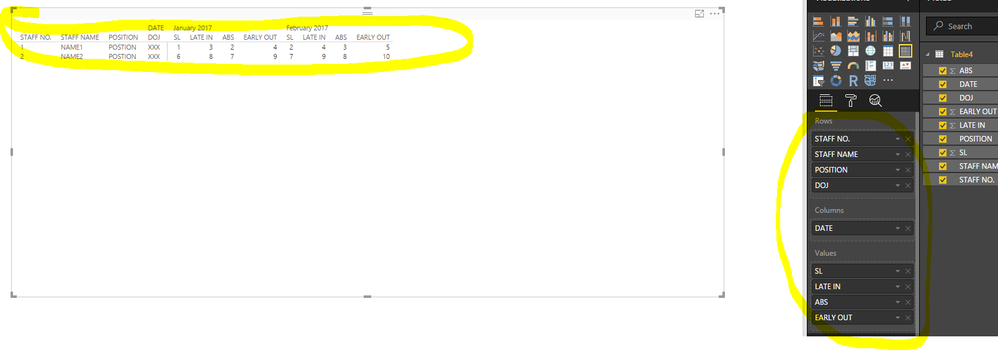
I want to create a table report with columns as shown in the Image below. I was able to create the report, but I feel stuck when I tried to create the columns as below.
I want to display each month as column and want to show 4 columns (SL, ABS, LATE IN, EARLY OUT) under the month column.
How can I do that? Can anyone please suggest me the best way?
Thanks In Advance.
Solved! Go to Solution.
@Shajahan_KP wrote:
Dear All,
I want to create a table report with columns as shown in the Image below. I was able to create the report, but I feel stuck when I tried to create the columns as below.
I want to display each month as column and want to show 4 columns (SL, ABS, LATE IN, EARLY OUT) under the month column.
How can I do that? Can anyone please suggest me the best way?
Thanks In Advance.
Not a Table but a Matrix visual.
@Shajahan_KP wrote:
Dear All,
I want to create a table report with columns as shown in the Image below. I was able to create the report, but I feel stuck when I tried to create the columns as below.
I want to display each month as column and want to show 4 columns (SL, ABS, LATE IN, EARLY OUT) under the month column.
How can I do that? Can anyone please suggest me the best way?
Thanks In Advance.
Not a Table but a Matrix visual.
Dear Eric Zhang,
Thank You very much ![]()
The Power BI Data Visualization World Championships is back! It's time to submit your entry.
Check out the January 2026 Power BI update to learn about new features.
| User | Count |
|---|---|
| 60 | |
| 49 | |
| 30 | |
| 25 | |
| 23 |
| User | Count |
|---|---|
| 132 | |
| 102 | |
| 59 | |
| 39 | |
| 31 |