cancel
Showing results for 
Search instead for 
Did you mean: 

Try your skills in the Power BI Dataviz World Championship! Round one ends June 26. Join now

Reply
Anonymous
Not applicable

Table Relationships

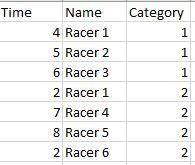
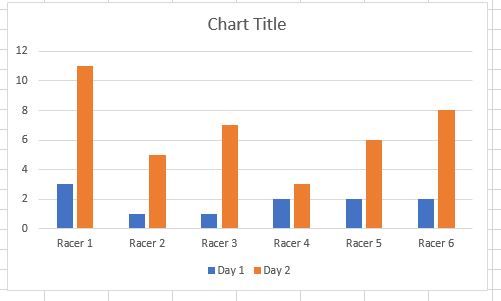
omg4.JPGomg5.JPGomg6.JPG


The first table represents Day 1, the second Day 2.


If I were to import this data in PowerBI in a clustered column chart, I first need to find a relationship between the two tables.


I tried relating by Category, however when I click on say the blue bar for Racer 1, it selects both orange and blue but for that Name only (racer 1) and not the just the blue bar.


How should the relationships be done?

2 ACCEPTED SOLUTIONS
Anonymous
Not applicable

I was able to create the column in both tables.


When I try to merge them: Data->Edit Queries->Edit Queries->Merge Queries->Merge as New->Full Outer Join


It doesn't show the second table and the entry that is created appears as blank.


Do I merge or append?


 Append Worked.

View solution in original post

Hello @Anonymous


you have to use the 'Append' option which corresponds to the SQL UNION ALL operator.

The 'Merge' option is the equivalent of the different types of JOIN which is not what you want to do in this case.


Did I answer your question correctly? Mark my answer as a solution!


Proud to be a Datanaut!  

View solution in original post

3 REPLIES 3
LivioLanzo
Solution Sage
Solution Sage

Hello @Anonymous


within your query, you just need to append both tables together and add an additional column categorizing each table as 'Day 1' for the first table, 'Day 2' for the second table


Did I answer your question correctly? Mark my answer as a solution!


Proud to be a Datanaut!  

Anonymous
Not applicable

I was able to create the column in both tables.


When I try to merge them: Data->Edit Queries->Edit Queries->Merge Queries->Merge as New->Full Outer Join


It doesn't show the second table and the entry that is created appears as blank.


Do I merge or append?


 Append Worked.

Hello @Anonymous


you have to use the 'Append' option which corresponds to the SQL UNION ALL operator.

The 'Merge' option is the equivalent of the different types of JOIN which is not what you want to do in this case.


Did I answer your question correctly? Mark my answer as a solution!


Proud to be a Datanaut!  

Helpful resources

Announcements
Fabric Data Days is here Carousel

Data Days 2026

Don't miss out on Data Days, June 15 through August 7. Learn Fabric, Power BI, SQL, AI and more.

Power BI DataViz World Championships carousel

Power BI DataViz World Championships - June 2026

A new Power BI DataViz World Championship is coming this June! Don't miss out on submitting your entry.