Join us at FabCon Atlanta from March 16 - 20, 2026, for the ultimate Fabric, Power BI, AI and SQL community-led event. Save $200 with code FABCOMM.
Register now!Vote for your favorite vizzies from the Power BI Dataviz World Championship submissions. Vote now!
I have a database is configured like this:
| Project | LatestStage | S1 | S2 |
| P1 | S1 | 01/01/2019 | - |
| P2 | S2 | 01/01/2019 | 01/02/2019 |
I unpivot the S1 and S2 columns:
| Project | LatestStage | Stage | StageDate |
| P1 | S1 | S1 | 04/07/2019 |
| P2 | S2 | S1 | 07/06/2019 |
| P2 | S2 | S2 | 28/06/2019 |
I created a calculated column where it shows the total amount that each project stays in the stage:
| Project | LatestStage | Stage | StageDate | DaysInStage |
| P1 | S1 | S1 | 04/07/2019 | 14 |
| P2 | S2 | S1 | 07/06/2019 | 21 |
| P2 | S2 | S2 | 28/06/2019 | 20 |
My problem: I'm trying to create a table where I show the project, the stage and the number of days that the project is in the stage:
| Project | LatestStage | DaysInStage |
| P1 | S1 | 14 |
| P2 | S2 | 20 |
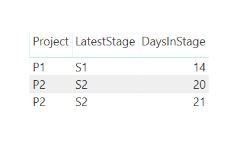
But when I create that table, it show two lines for P2. Showing the same stage, but with diferent values for DaysInStage.
| Project | LatestStage | DaysInStage |
| P1 | S1 | 14 |
| P2 | S2 | 20 |
| P2 | S2 | 21 |
Any idea about how can I solve this?
Best Regards
Solved! Go to Solution.
I think I've found a solution, but I do not know if it's the best.
First I created 4 measures to return the value of DaysInStage according to LatestStage
Days in S1 = CALCULATE(SUM(TabProjects[DAYS IN STAGE]);FILTER(TabProjects;TabProjects[STAGE]="S1"))
And then I used the HASONEFILTER function combined with SWITCH
TEST = IF(
HASONEFILTER(TabProjects[LATEST STAGE]);
SWITCH(
VALUES(TabProjects[LATEST STAGE]);
"S1";[Days in S1];
"S2";[Days in S2]))Apparently, it works...
I think I've found a solution, but I do not know if it's the best.
First I created 4 measures to return the value of DaysInStage according to LatestStage
Days in S1 = CALCULATE(SUM(TabProjects[DAYS IN STAGE]);FILTER(TabProjects;TabProjects[STAGE]="S1"))
And then I used the HASONEFILTER function combined with SWITCH
TEST = IF(
HASONEFILTER(TabProjects[LATEST STAGE]);
SWITCH(
VALUES(TabProjects[LATEST STAGE]);
"S1";[Days in S1];
"S2";[Days in S2]))Apparently, it works...
Hi @Anonymous ,
I am little confuse with your requirements.
Could you be more specific?
When I try to input the data you provided in the table it looks loke this without nay issue.
Thanks,
Tejaswi
Hello @Anonymous
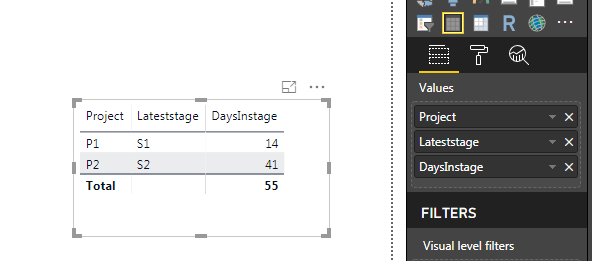
The Project P2 is the S2 stage, but only for 21 days, not 41.
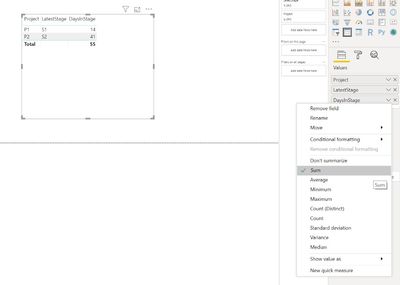
This happens because the DaysInStage value is with the SUM option enabled.
But if I click on "Don't summarize", the table shows the two lines of P2. What I need is that only the project line related to the current stage of it appears.
Best Regards,
Gustavo
Hi @Anonymous ,
I don't know if this solutions will work for you.
I added a Index column in a query editor and converted it to Text.
Than I added this Index column ina Tabe visual and in Visual level filter I took out the value 2 which was P2, S2 and 20.
My output looks like this:
Thanks,
Tejaswi
If my table were simple, it would work. But my project list has more than 10 projects. And in reality they have 8 stages, not 2.
![]()
The Power BI Data Visualization World Championships is back! It's time to submit your entry.
If you love stickers, then you will definitely want to check out our Community Sticker Challenge!
Check out the January 2026 Power BI update to learn about new features.
| User | Count |
|---|---|
| 70 | |
| 55 | |
| 38 | |
| 28 | |
| 22 |
| User | Count |
|---|---|
| 133 | |
| 119 | |
| 54 | |
| 37 | |
| 31 |