

cancel
Showing results for 
Search instead for 
Did you mean: 

The Power BI Data Visualization World Championships is back! Get ahead of the game and start preparing now! Learn more

Reply
MacyMolly
Helper II
Helper II

Table Merge

Hi All,

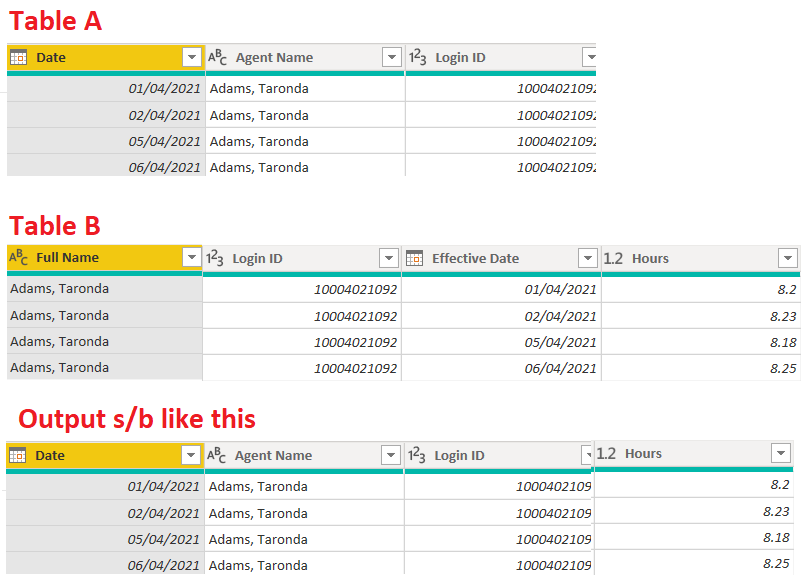
I'm trying to merge two tables. Basically, I just want to fetch the Hours from Table B matching the Login ID and Date. I tried merging Table A and Table B, it creates duplcates. Any help is greately appreciated.


MacyMolly_0-1626391337196.png


1 ACCEPTED SOLUTION
Anonymous
Not applicable

Hi @MacyMolly 

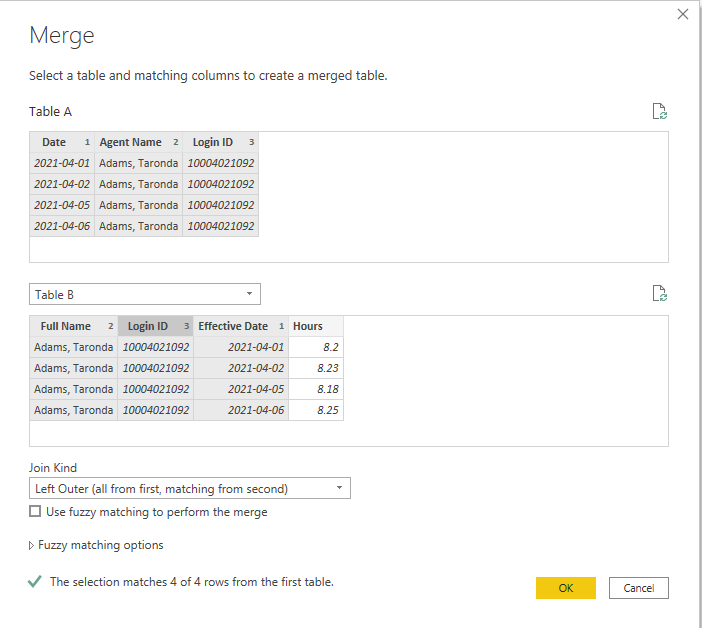
Three columns Date/ Name and ID are all the key in Merge. If you only use one of them as the key in Merge, Power BI will show you all possible results when you expand the column from "Table B". So you will get duplicate results.

Use Ctrl + left click to choose multiple columns one by one as below.

1.png

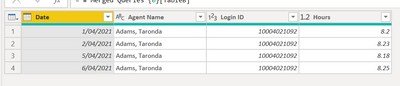
Result is as below.

2.png

Best Regards,

Rico Zhou


If this post helps, then please consider Accept it as the solution to help the other members find it more quickly. 


View solution in original post

6 REPLIES 6
Anonymous
Not applicable

Hi @MacyMolly 

Three columns Date/ Name and ID are all the key in Merge. If you only use one of them as the key in Merge, Power BI will show you all possible results when you expand the column from "Table B". So you will get duplicate results.

Use Ctrl + left click to choose multiple columns one by one as below.

1.png

Result is as below.

2.png

Best Regards,

Rico Zhou


If this post helps, then please consider Accept it as the solution to help the other members find it more quickly. 


johncolley
Solution Sage
Solution Sage

Hi @MacyMolly I think the issue is the many-to-many relationship on the join. Are you able to create a distinct user table for the join - or use a bridging table as explained in this example ?

Hi @johncolley , No Haven't tried doing it and i'm not source how to apply it with my datasets.

Here's a sample of my datasource.

datasource 


Hi @MacyMolly I've created a date bridge table in this pbix. From it you can use your agent, hours and data tables to build visuals. Hope this addresses what you need?


https://www.dropbox.com/s/9g1kpsz0eo0budw/Sample%20datasource%20with%20date%20bridge.pbix?dl=0 

johncolley
Solution Sage
Solution Sage

If you just click the table option it wont duplicate rows like it does when you expand the table. 

johncolley_0-1626392445938.png

Then you get desired result.

johncolley_1-1626392494185.png


Hi @johncolley ,

I have hundreds of agents so i can't just click the "Table" option.
This is what will happen when I expand the table. It creates duplicate rows.


MacyMolly_0-1626413366402.png


Helpful resources

Announcements
Power BI DataViz World Championships

Power BI Dataviz World Championships

The Power BI Data Visualization World Championships is back! Get ahead of the game and start preparing now!

December 2025 Power BI Update Carousel

Power BI Monthly Update - December 2025

Check out the December 2025 Power BI Holiday Recap!

FabCon Atlanta 2026 carousel

FabCon Atlanta 2026

Join us at FabCon Atlanta, March 16-20, for the ultimate Fabric, Power BI, AI and SQL community-led event. Save $200 with code FABCOMM.