Join us at FabCon Atlanta from March 16 - 20, 2026, for the ultimate Fabric, Power BI, AI and SQL community-led event. Save $200 with code FABCOMM.
Register now!View all the Fabric Data Days sessions on demand. View schedule
Hello,
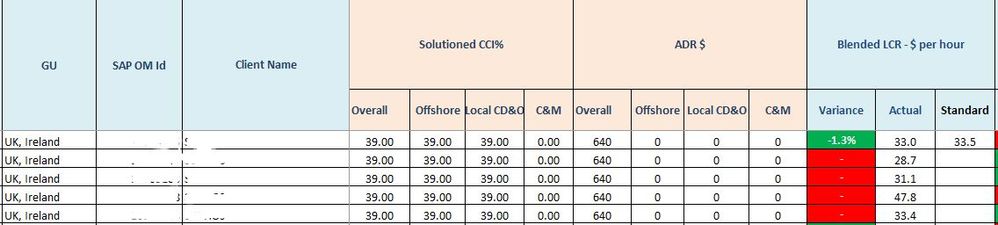
Can you please help to create the below table layout in power bi.
Thanks in advance for any assistance....
Hi @yashish68,
It depends on how is your source data structured and how is the value calculated.
How to Get Your Question Answered Quickly
Regards,
Yuliana Gu
Hi @v-yulgu-msft ,
Thank you for your reply.
In the attahced screenshot, GU, SAPOMID and Client Name are columns present in database where as Overall, Offshore, Local CD& D, C&M are calculated fields based on Solution CCI% and ADR$ columns respectively.
I just want to know whether the table/matrix layout as shown in screenshot is possible or not.
Please let me know if there is any workaround for the same.
Thanks & Regards,
Ashish Yadav
Hi @yashish68,
A Matrix visual might meet your requirement. Also, I think instead of calculated columns, create Overall, Offshore, Local CD& D, C&M via measures would be better. You can place GU, SAPOMID and Client Name in "rows", place Solution CCI% and ADR$ in "columns", and place those measures in "values".
Regards,
Yuliana Gu
Check out the November 2025 Power BI update to learn about new features.
Advance your Data & AI career with 50 days of live learning, contests, hands-on challenges, study groups & certifications and more!