FabCon is coming to Atlanta
Join us at FabCon Atlanta from March 16 - 20, 2026, for the ultimate Fabric, Power BI, AI and SQL community-led event. Save $200 with code FABCOMM.
Register now!- Power BI forums
- Get Help with Power BI
- Desktop
- Service
- Report Server
- Power Query
- Mobile Apps
- Developer
- DAX Commands and Tips
- Custom Visuals Development Discussion
- Health and Life Sciences
- Power BI Spanish forums
- Translated Spanish Desktop
- Training and Consulting
- Instructor Led Training
- Dashboard in a Day for Women, by Women
- Galleries
- Data Stories Gallery
- Themes Gallery
- Contests Gallery
- QuickViz Gallery
- Quick Measures Gallery
- Visual Calculations Gallery
- Notebook Gallery
- Translytical Task Flow Gallery
- TMDL Gallery
- R Script Showcase
- Webinars and Video Gallery
- Ideas
- Custom Visuals Ideas (read-only)
- Issues
- Issues
- Events
- Upcoming Events
The Power BI Data Visualization World Championships is back! Get ahead of the game and start preparing now! Learn more
- Power BI forums
- Forums
- Get Help with Power BI
- Desktop
- Re: Table Matrix Just Show Percentage of Grant Tot...
- Subscribe to RSS Feed
- Mark Topic as New
- Mark Topic as Read
- Float this Topic for Current User
- Bookmark
- Subscribe
- Printer Friendly Page

- Mark as New
- Bookmark
- Subscribe
- Mute
- Subscribe to RSS Feed
- Permalink
- Report Inappropriate Content
Table Matrix Just Show Percentage of Grant Total Column
Hello,
I have a matrix table filled with values in normal number format.
I also have a totals column.
I am just looking to add a percentages of the totals next to the totals column. I do not want to see percentages for each column that exists. Just the totals column.
How can I add this one column addition onto my matrix table?
Solved! Go to Solution.


- Mark as New
- Bookmark
- Subscribe
- Mute
- Subscribe to RSS Feed
- Permalink
- Report Inappropriate Content
Hi mpichardo,
Do you mean someting like this?
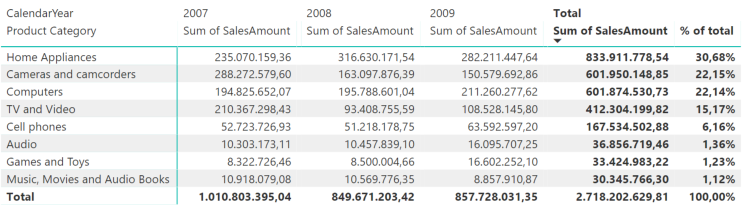
I could not find an "official" way to hide the % column for each year. What is did is just make the column smaller.
Also I changed the formula, to exclude values for the year level.
% of total =
IF (
ISFILTERED ( 'Date'[CalendarYear] );
BLANK ();
DIVIDE (
[Sum of SalesAmount];
CALCULATE ( [Sum of SalesAmount]; ALL ( FactOnlineSales ) )
)
)
Hope this helps.
ITsmart BI and Analytics consultant
- Mark as New
- Bookmark
- Subscribe
- Mute
- Subscribe to RSS Feed
- Permalink
- Report Inappropriate Content
Yes just like that, by the way, your code where did you write that? Into Calculated Column? I am trying to duplicate your formula for my table


- Mark as New
- Bookmark
- Subscribe
- Mute
- Subscribe to RSS Feed
- Permalink
- Report Inappropriate Content
You need to create a measure
- Mark as New
- Bookmark
- Subscribe
- Mute
- Subscribe to RSS Feed
- Permalink
- Report Inappropriate Content
Are you sure its a measure? Everytime I put in the semicolon I get an error I tried calculated column that didn't work either.
- Mark as New
- Bookmark
- Subscribe
- Mute
- Subscribe to RSS Feed
- Permalink
- Report Inappropriate Content
That is probably because the responder is from another country. I believe in Europe they use semicolons. Try to replace the semicolons with commas.
- Mark as New
- Bookmark
- Subscribe
- Mute
- Subscribe to RSS Feed
- Permalink
- Report Inappropriate Content
Yes @vega is right. It is a measure. and you may need to replace the ; with , Sorry about that.
ITsmart BI and Analytics consultant
- Mark as New
- Bookmark
- Subscribe
- Mute
- Subscribe to RSS Feed
- Permalink
- Report Inappropriate Content
Hi mpichardo,
Do you mean someting like this?
I could not find an "official" way to hide the % column for each year. What is did is just make the column smaller.
Also I changed the formula, to exclude values for the year level.
% of total =
IF (
ISFILTERED ( 'Date'[CalendarYear] );
BLANK ();
DIVIDE (
[Sum of SalesAmount];
CALCULATE ( [Sum of SalesAmount]; ALL ( FactOnlineSales ) )
)
)
Hope this helps.
ITsmart BI and Analytics consultant
- Mark as New
- Bookmark
- Subscribe
- Mute
- Subscribe to RSS Feed
- Permalink
- Report Inappropriate Content
How did you exclude the Value header and column subtotals for "% of total"?
- Mark as New
- Bookmark
- Subscribe
- Mute
- Subscribe to RSS Feed
- Permalink
- Report Inappropriate Content
I could not find an "official" way to hide the % column for each year. What is did is just make the column so small that you don't see it.
ITsmart BI and Analytics consultant
- Mark as New
- Bookmark
- Subscribe
- Mute
- Subscribe to RSS Feed
- Permalink
- Report Inappropriate Content
Oops, I forgot I had word-wrap on. Thanks for the quick response though!

Helpful resources

Power BI Dataviz World Championships
The Power BI Data Visualization World Championships is back! Get ahead of the game and start preparing now!

Power BI Monthly Update - December 2025
Check out the December 2025 Power BI Holiday Recap!

FabCon Atlanta 2026
Join us at FabCon Atlanta, March 16-20, for the ultimate Fabric, Power BI, AI and SQL community-led event. Save $200 with code FABCOMM.

| User | Count |
|---|---|
| 41 | |
| 38 | |
| 36 | |
| 30 | |
| 28 |


| User | Count |
|---|---|
| 129 | |
| 88 | |
| 79 | |
| 68 | |
| 63 |


