Don't miss your chance to take exam DP-600 or DP-700 on us!
Request nowLearn from the best! Meet the four finalists headed to the FINALS of the Power BI Dataviz World Championships! Register now
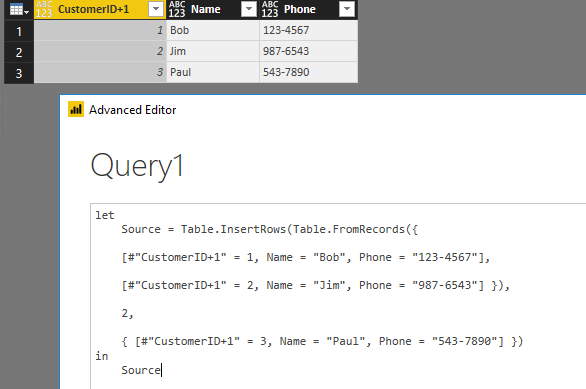
After spending well over an hour chasing a very stubborn SyntaxError, I found out that the Table.InsertRows function in M Query does not work for columns containing a '+' (I mean the plus sign, not the quotes) in the name. While many other functions (I obviously didn't test them all), do work perfectly with a + in the columnname, this one does not.
The difference as far as I can tell is probably that most other functions that take one or more columnnames as an argument, demand the columnname(s) to be written in between double-quotes. The Table.InsertRows function however does not.
I.m.h.o. this is nothing less than a bug, since it never stated that (although maybe it is not considered to be very good programming practice) a '+' sign is not allowed in a column name.
My question therefore is: Can we either allow or disallow the '+' as part of a columnname, but please draw one line for all functions, as I can now change a part of my report again. I know for a fact that I will not use it again. 🙂
Thank you,
Best regards,
Niels
Solved! Go to Solution.
Hi @C4YNelis,
The field name in a record literal has to be an identifier, and vanilla identifiers can't contain plus signs.
However, you can include any characters you want by using an escaped identifier.
[#"Customer+ID" = 2]
Best Regards,
Qiuyun Yu
Dear @v-qiuyu-msft,
I just tried your suggestion and it works like a charm. I never knew it was possible to escape a columnname this way. I thought this was a reserved table syntax.
Thank you for your time and efforts!
Cheers,
Niels
Hi @C4YNelis,
The field name in a record literal has to be an identifier, and vanilla identifiers can't contain plus signs.
However, you can include any characters you want by using an escaped identifier.
[#"Customer+ID" = 2]
Best Regards,
Qiuyun Yu
Hi @C4YNelis,
I have sent a email to consult this issue internally, will update here once I get any information.
Best Regards,
Qiuyun Yu
Share feedback directly with Fabric product managers, participate in targeted research studies and influence the Fabric roadmap.
Check out the February 2026 Power BI update to learn about new features.
| User | Count |
|---|---|
| 53 | |
| 49 | |
| 33 | |
| 16 | |
| 15 |
| User | Count |
|---|---|
| 85 | |
| 70 | |
| 38 | |
| 28 | |
| 25 |