cancel
Showing results for 
Search instead for 
Did you mean: 

Learn from the best! Meet the four finalists headed to the FINALS of the Power BI Dataviz World Championships! Register now

Reply
dtango9
Helper II
Helper II

Table Column Headers

Hello,


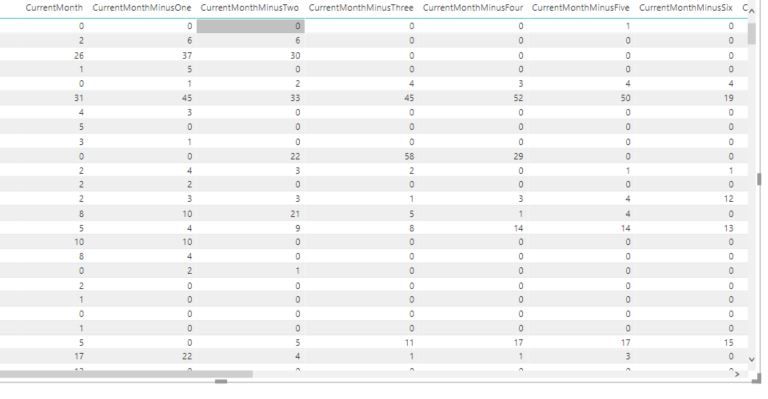
I'm trying to create a Table visualization that has "live" value titles.  The titles right now say "Current Month", "Current Month minus One", "Current Month minus Two", etc. but I would prefer if the titles actually listed the month.  The months will obviously change as the months change because I'm only looking for the last 6 months, but I would like it to read "May", "April", "March" etc but keep current to whatever the last 6 months were.


Thanks!


Capture.JPG

2 REPLIES 2
amitchandak
Super User
Super User

@dtango9 , refer if this can help

https://www.blue-granite.com/blog/create-a-dynamic-title-in-power-bi-updated

Share with Power BI Enthusiasts: Full Power BI Video (20 Hours) YouTube
Microsoft Fabric Series 60+ Videos YouTube
Microsoft Fabric Hindi End to End YouTube
snokku
Helper I
Helper I

Hi @dtango9,


Just an idea, Probably unpivot your data,

sort by Month,

and always take the recent 6 months columns,

Pivot your data again and use Table visual.


Thanks,

Sunil.

Helpful resources

Announcements
Join our Fabric User Panel

Join our Fabric User Panel

Share feedback directly with Fabric product managers, participate in targeted research studies and influence the Fabric roadmap.

February Power BI Update Carousel

Power BI Monthly Update - February 2026

Check out the February 2026 Power BI update to learn about new features.

FabCon Atlanta 2026 carousel

FabCon Atlanta 2026

Join us at FabCon Atlanta, March 16-20, for the ultimate Fabric, Power BI, AI and SQL community-led event. Save $200 with code FABCOMM.