Join us at FabCon Atlanta from March 16 - 20, 2026, for the ultimate Fabric, Power BI, AI and SQL community-led event. Save $200 with code FABCOMM.
Register now!Learn from the best! Meet the four finalists headed to the FINALS of the Power BI Dataviz World Championships! Register now
Hi Experts
Trying to plot the following MA7 day graphs as shown in the image - my issues is the x Axis i cannot get it as shown in the image... The image is from an excel graph..
Sample data
https://www.dropbox.com/s/5gou2apwfo76ast/Test__.123pbix.pbix?dl=0
Expected end result...
Solved! Go to Solution.
Yes, this was indeed surprisingly tricky. You have to consider Feb 29 and incorporate the leap year rules , otherwise the sorting won't work.
see attached.
Hi @Anonymous ,
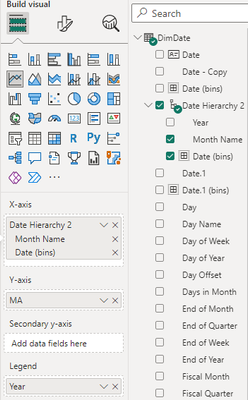
If you want a similar X-axis, you can replace the X-axis field in visual with this:
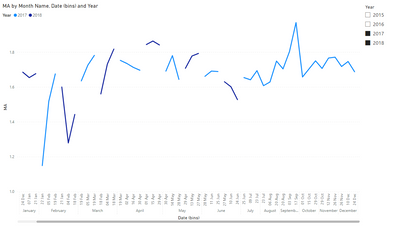
Final output:
Best Regards,
Jianbo Li
If this post helps, then please consider Accept it as the solution to help the other members find it more quickly.
Hi Community support your graph looks nothing like the finished product?
Share feedback directly with Fabric product managers, participate in targeted research studies and influence the Fabric roadmap.
Check out the February 2026 Power BI update to learn about new features.
| User | Count |
|---|---|
| 60 | |
| 53 | |
| 41 | |
| 15 | |
| 13 |
| User | Count |
|---|---|
| 97 | |
| 83 | |
| 35 | |
| 29 | |
| 25 |