cancel
Showing results for 
Search instead for 
Did you mean: 

The Power BI Data Visualization World Championships is back! Get ahead of the game and start preparing now! Learn more

Reply
Anonymous
Not applicable

TOTALYTD without date reference

Hi folks


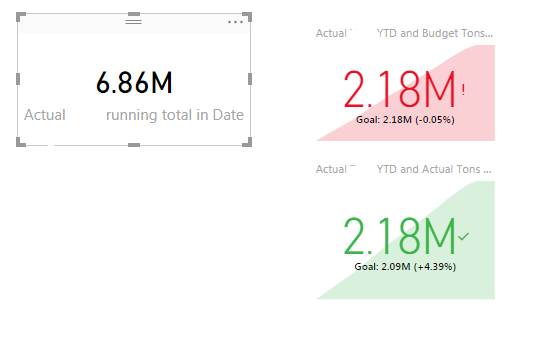
I am stuck with something. Generally, when using TOTALYTD PowerBI needs a date reference e.g. a date axis in the KPI Visual or the line chart. When I want to present the number standalone, e.g. in a Card visual it will return a blank.

I need to show the % difference between the YTD Actual and Budget value as well as previous year in a card visual so that it can be used to trigger meaningful Alerts. The page in the report is filtered to only show the current month.

My measures are:

Actual ValueYTD = 
	VAR ReturnValue =
	TOTALYTD([Actual Value];'PowerBI_Dim_DateDay'[Date])

	RETURN

	IF(MAX('PowerBI_Dim_DateDay'[Date])<=TODAY();
    	ReturnValue)

Actual Value running total in Date =
CALCULATE(
  [Actual Value];
  FILTER(ALL('PowerBI_Dim_DateDay');
   ISONORAFTER('PowerBI_Dim_DateDay'[Date]; MAX('PowerBI_Dim_DateDay'[Date]); DESC)
  )
)


The latter running total I took to avoid the date reference, but as I have two years of data in my model, it shows the YTD for both years instead of only the current year. When using ALLSELECTED it shows the actual value of the current month (as this is filtered on that page)

The first one only shows the correct value in a KPI Visual.

It goes without saying that the difference measure doees not work thus far.
Capture.PNG
Can anoyone help me?

Thanks in advance!


1 ACCEPTED SOLUTION
Stachu
Community Champion
Community Champion

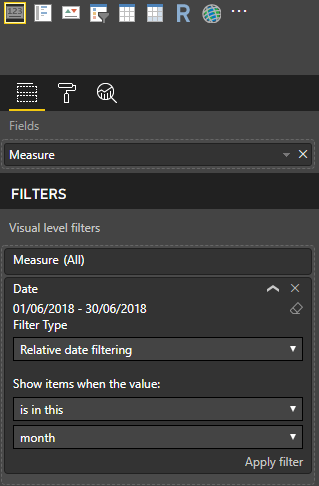
you can add Visual level relative filter set to current month:

Capture.PNG


Did I answer your question? Mark my post as a solution!
Thank you for the kudos 🙂

View solution in original post

2 REPLIES 2
Stachu
Community Champion
Community Champion

you can add Visual level relative filter set to current month:

Capture.PNG


Did I answer your question? Mark my post as a solution!
Thank you for the kudos 🙂

Anonymous
Not applicable

Thank you  @Stachu I did not think about this one.
Removing the page level filter brought back the correct number from the Running Total Measure and applying visual level filters to all the other visuals helped and solved the problem.


Helpful resources

Announcements
Power BI DataViz World Championships

Power BI Dataviz World Championships

The Power BI Data Visualization World Championships is back! Get ahead of the game and start preparing now!

December 2025 Power BI Update Carousel

Power BI Monthly Update - December 2025

Check out the December 2025 Power BI Holiday Recap!

FabCon Atlanta 2026 carousel

FabCon Atlanta 2026

Join us at FabCon Atlanta, March 16-20, for the ultimate Fabric, Power BI, AI and SQL community-led event. Save $200 with code FABCOMM.

Top Solution Authors