Join us in Barcelona for FabCon and SQLCon, September 28 - October 1, 2026.
This is best Fabric, Power BI, SQL and AI community event. How do we know? The last event sold out! Save €200 with code FABCMTY200.
Register now- Power BI forums
- Get Help with Power BI
- Desktop
- Service
- Report Server
- Power Query
- Mobile Apps
- Developer
- DAX Commands and Tips
- Custom Visuals Development Discussion
- Health and Life Sciences
- Power BI Spanish forums
- Translated Spanish Desktop
- Training and Consulting
- Instructor Led Training
- Dashboard in a Day for Women, by Women
- Galleries
- Data Stories Gallery
- Themes Gallery
- Contests Gallery
- QuickViz Gallery
- Quick Measures Gallery
- Visual Calculations Gallery
- Fabric Apps Gallery
- Notebook Gallery
- Translytical Task Flow Gallery
- TMDL Gallery
- R Script Showcase
- Webinars and Video Gallery
- Ideas
- Custom Visuals Ideas (read-only)
- Issues
- Issues
- Events
- Upcoming Events
The Fabric community is upgrading! Read all of the details including the timeline and what you can expect. Learn more
- Subscribe to RSS Feed
- Mark Topic as New
- Mark Topic as Read
- Float this Topic for Current User
- Bookmark
- Subscribe
- Printer Friendly Page


- Mark as New
- Bookmark
- Subscribe
- Mute
- Subscribe to RSS Feed
- Permalink
- Report Inappropriate Content
TOPN
I have an Incidents table with 3 fields: Incident ID, System Name, Functional Area Name.
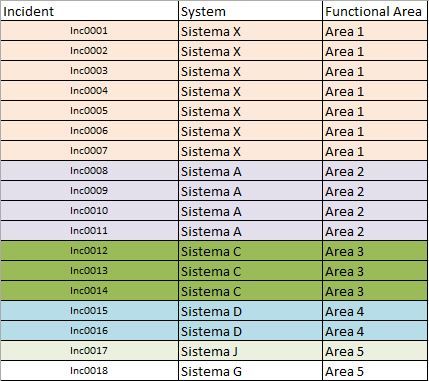
I need to make a chart that shows the TOPN systems with the highest number of incidents (Counter must be done by the ID field).
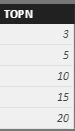
In addition, I would like to make a Dynamic Filter. I created a TopNOptions table with the values 3,5,10,15 and 20. I would like to insert in canvas a TOPNOptions filter and a TOPN BAR Graph X System (The Graph show the number of Systems selected in TOPNOPTION FILTER). Somebody can help me?
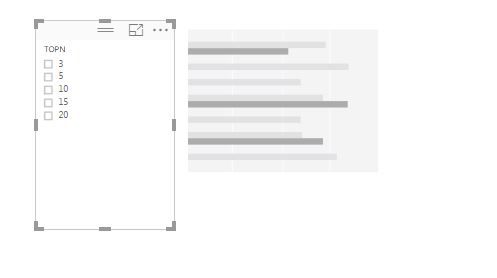
Solved! Go to Solution.


- Mark as New
- Bookmark
- Subscribe
- Mute
- Subscribe to RSS Feed
- Permalink
- Report Inappropriate Content
First, what do we want to rank by ... # of Incidents - let's make a measure for that:
NumIncidents:= COUNTROWS(IncidentsTable)
This assumes of course that the incidents table is one row per incident, if that wasn't the case then you'd want to do a distinctcount on the incidentid
NumIncidents:=DISTINCOUNT( IncidentsTable[IncidentsID] )
Second, we want to rank the systems by the number of incidents - let's make a measure for that
RankSystemsByIncident:=RANKX( ALL( IncidentsTable[System] ), [NumIncidents] )
The piece most people miss here is the ALL() - we don't want to rank the system against itself - we want to rank the system against all the other systems.
Third, we want to return a certain number of systems based on a choice - let's pretend for a second that we just want to return all the systems with their rankings - we would put the systems on the rows and drop the ranking in the values. PowerBI has a TOPN function that you could play around with.
Shoot, I have to run to a meeting but this should get you started 🙂
- Mark as New
- Bookmark
- Subscribe
- Mute
- Subscribe to RSS Feed
- Permalink
- Report Inappropriate Content


- Mark as New
- Bookmark
- Subscribe
- Mute
- Subscribe to RSS Feed
- Permalink
- Report Inappropriate Content
Hi @thliberato,
I am very glad to hear you have resolved your problem. In order to help more people, please mark the corresponding solution as answer. Thanks a lot.
Best Regards,
Angelia
- Mark as New
- Bookmark
- Subscribe
- Mute
- Subscribe to RSS Feed
- Permalink
- Report Inappropriate Content
- Mark as New
- Bookmark
- Subscribe
- Mute
- Subscribe to RSS Feed
- Permalink
- Report Inappropriate Content
Hi @thliberato,
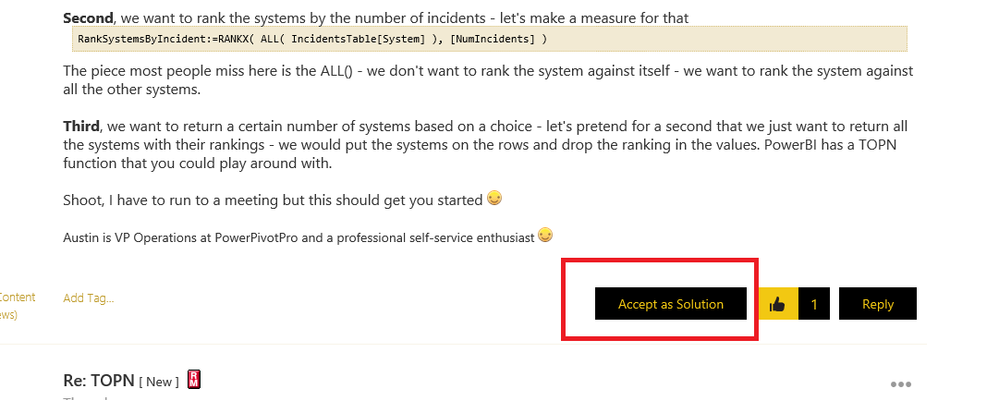
Please review the folloowing screenshot, just click the "Accept as Solution" highlighted in red line.
Best Regards,
Angelia
- Mark as New
- Bookmark
- Subscribe
- Mute
- Subscribe to RSS Feed
- Permalink
- Report Inappropriate Content
First, what do we want to rank by ... # of Incidents - let's make a measure for that:
NumIncidents:= COUNTROWS(IncidentsTable)
This assumes of course that the incidents table is one row per incident, if that wasn't the case then you'd want to do a distinctcount on the incidentid
NumIncidents:=DISTINCOUNT( IncidentsTable[IncidentsID] )
Second, we want to rank the systems by the number of incidents - let's make a measure for that
RankSystemsByIncident:=RANKX( ALL( IncidentsTable[System] ), [NumIncidents] )
The piece most people miss here is the ALL() - we don't want to rank the system against itself - we want to rank the system against all the other systems.
Third, we want to return a certain number of systems based on a choice - let's pretend for a second that we just want to return all the systems with their rankings - we would put the systems on the rows and drop the ranking in the values. PowerBI has a TOPN function that you could play around with.
Shoot, I have to run to a meeting but this should get you started 🙂
- Mark as New
- Bookmark
- Subscribe
- Mute
- Subscribe to RSS Feed
- Permalink
- Report Inappropriate Content
Thank you so much. It worked as expected.
- Mark as New
- Bookmark
- Subscribe
- Mute
- Subscribe to RSS Feed
- Permalink
- Report Inappropriate Content
Hi @thliberato,
I am very glad to hear you have resolved your problem. In order to help more people, please mark the corresponding solution as answer. Thanks a lot.
Best Regards,
Angelia
- Mark as New
- Bookmark
- Subscribe
- Mute
- Subscribe to RSS Feed
- Permalink
- Report Inappropriate Content
- Mark as New
- Bookmark
- Subscribe
- Mute
- Subscribe to RSS Feed
- Permalink
- Report Inappropriate Content
Hi @thliberato,
Please review the folloowing screenshot, just click the "Accept as Solution" highlighted in red line.
Best Regards,
Angelia

Helpful resources

FabCon & SQLCon – Barcelona 2026
Join us in Barcelona for FabCon and SQLCon, the Fabric, Power BI, SQL, and AI community event. Save €200 with code FABCMTY200.

Power BI DataViz World Championships - June 2026
A new Power BI DataViz World Championship is coming this June! Don't miss out on submitting your entry.

| User | Count |
|---|---|
| 27 | |
| 22 | |
| 20 | |
| 18 | |
| 14 |


| User | Count |
|---|---|
| 25 | |
| 20 | |
| 20 | |
| 20 | |
| 20 |


