Get Fabric or SQL Certified for Free.
Get certified for free when you join Fabric Data Days 2026 and dive into Fabric, Power BI, SQL, AI, and other essential data skills.
Join now- Power BI forums
- Get Help with Power BI
- Desktop
- Service
- Report Server
- Power Query
- Mobile Apps
- Developer
- DAX Commands and Tips
- Custom Visuals Development Discussion
- Health and Life Sciences
- Power BI Spanish forums
- Translated Spanish Desktop
- Training and Consulting
- Instructor Led Training
- Dashboard in a Day for Women, by Women
- Galleries
- Data Stories Gallery
- Themes Gallery
- Contests Gallery
- QuickViz Gallery
- Quick Measures Gallery
- Visual Calculations Gallery
- Fabric Apps Gallery
- Notebook Gallery
- Translytical Task Flow Gallery
- TMDL Gallery
- R Script Showcase
- Webinars and Video Gallery
- Ideas
- Custom Visuals Ideas (read-only)
- Issues
- Issues
- Events
- Upcoming Events
July 7 - July 17 | Round 2 of the Power BI Dataviz World Championships. Don't miss your chance! Learn more
- Subscribe to RSS Feed
- Mark Topic as New
- Mark Topic as Read
- Float this Topic for Current User
- Bookmark
- Subscribe
- Printer Friendly Page


- Mark as New
- Bookmark
- Subscribe
- Mute
- Subscribe to RSS Feed
- Permalink
- Report Inappropriate Content
TOPN
I have an Incidents table with 3 fields: Incident ID, System Name, Functional Area Name.
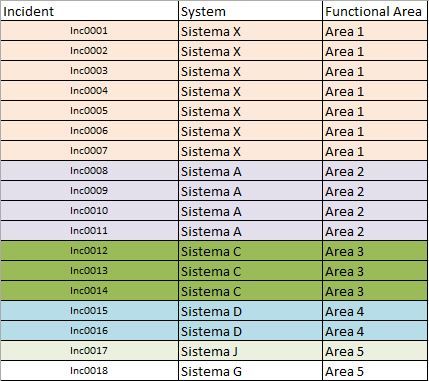
I need to make a chart that shows the TOPN systems with the highest number of incidents (Counter must be done by the ID field).
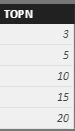
In addition, I would like to make a Dynamic Filter. I created a TopNOptions table with the values 3,5,10,15 and 20. I would like to insert in canvas a TOPNOptions filter and a TOPN BAR Graph X System (The Graph show the number of Systems selected in TOPNOPTION FILTER). Somebody can help me?
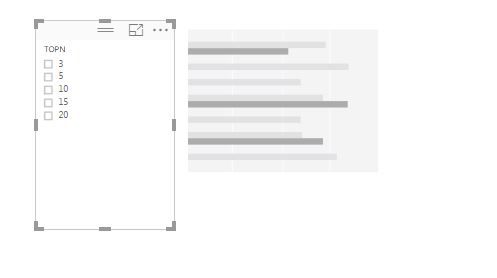
Solved! Go to Solution.


- Mark as New
- Bookmark
- Subscribe
- Mute
- Subscribe to RSS Feed
- Permalink
- Report Inappropriate Content
First, what do we want to rank by ... # of Incidents - let's make a measure for that:
NumIncidents:= COUNTROWS(IncidentsTable)
This assumes of course that the incidents table is one row per incident, if that wasn't the case then you'd want to do a distinctcount on the incidentid
NumIncidents:=DISTINCOUNT( IncidentsTable[IncidentsID] )
Second, we want to rank the systems by the number of incidents - let's make a measure for that
RankSystemsByIncident:=RANKX( ALL( IncidentsTable[System] ), [NumIncidents] )
The piece most people miss here is the ALL() - we don't want to rank the system against itself - we want to rank the system against all the other systems.
Third, we want to return a certain number of systems based on a choice - let's pretend for a second that we just want to return all the systems with their rankings - we would put the systems on the rows and drop the ranking in the values. PowerBI has a TOPN function that you could play around with.
Shoot, I have to run to a meeting but this should get you started 🙂
- Mark as New
- Bookmark
- Subscribe
- Mute
- Subscribe to RSS Feed
- Permalink
- Report Inappropriate Content


- Mark as New
- Bookmark
- Subscribe
- Mute
- Subscribe to RSS Feed
- Permalink
- Report Inappropriate Content
Hi @thliberato,
I am very glad to hear you have resolved your problem. In order to help more people, please mark the corresponding solution as answer. Thanks a lot.
Best Regards,
Angelia
- Mark as New
- Bookmark
- Subscribe
- Mute
- Subscribe to RSS Feed
- Permalink
- Report Inappropriate Content
- Mark as New
- Bookmark
- Subscribe
- Mute
- Subscribe to RSS Feed
- Permalink
- Report Inappropriate Content
Hi @thliberato,
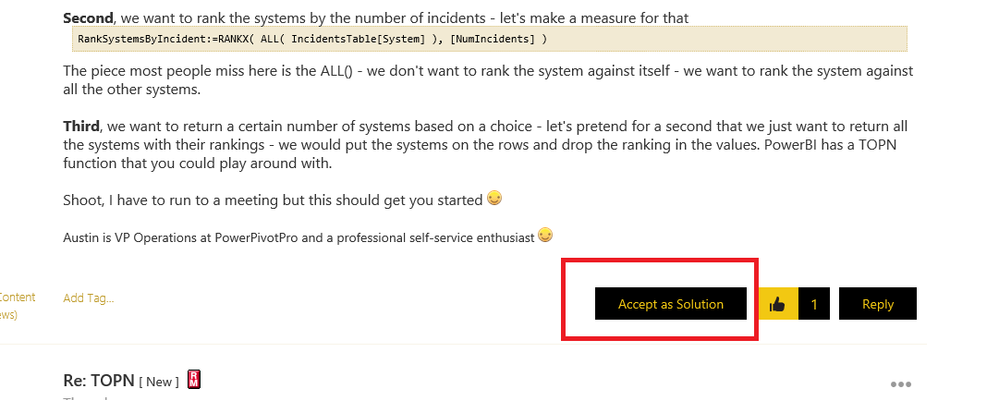
Please review the folloowing screenshot, just click the "Accept as Solution" highlighted in red line.
Best Regards,
Angelia
- Mark as New
- Bookmark
- Subscribe
- Mute
- Subscribe to RSS Feed
- Permalink
- Report Inappropriate Content
First, what do we want to rank by ... # of Incidents - let's make a measure for that:
NumIncidents:= COUNTROWS(IncidentsTable)
This assumes of course that the incidents table is one row per incident, if that wasn't the case then you'd want to do a distinctcount on the incidentid
NumIncidents:=DISTINCOUNT( IncidentsTable[IncidentsID] )
Second, we want to rank the systems by the number of incidents - let's make a measure for that
RankSystemsByIncident:=RANKX( ALL( IncidentsTable[System] ), [NumIncidents] )
The piece most people miss here is the ALL() - we don't want to rank the system against itself - we want to rank the system against all the other systems.
Third, we want to return a certain number of systems based on a choice - let's pretend for a second that we just want to return all the systems with their rankings - we would put the systems on the rows and drop the ranking in the values. PowerBI has a TOPN function that you could play around with.
Shoot, I have to run to a meeting but this should get you started 🙂
- Mark as New
- Bookmark
- Subscribe
- Mute
- Subscribe to RSS Feed
- Permalink
- Report Inappropriate Content
Thank you so much. It worked as expected.
- Mark as New
- Bookmark
- Subscribe
- Mute
- Subscribe to RSS Feed
- Permalink
- Report Inappropriate Content
Hi @thliberato,
I am very glad to hear you have resolved your problem. In order to help more people, please mark the corresponding solution as answer. Thanks a lot.
Best Regards,
Angelia
- Mark as New
- Bookmark
- Subscribe
- Mute
- Subscribe to RSS Feed
- Permalink
- Report Inappropriate Content
- Mark as New
- Bookmark
- Subscribe
- Mute
- Subscribe to RSS Feed
- Permalink
- Report Inappropriate Content
Hi @thliberato,
Please review the folloowing screenshot, just click the "Accept as Solution" highlighted in red line.
Best Regards,
Angelia

Helpful resources

FabCon & SQLCon – Barcelona 2026
Join us in Barcelona for FabCon and SQLCon, the Fabric, Power BI, SQL, and AI community event. Save €200 with code FABCMTY200.

Power BI Monthly Update - July 2026
Check out the July 2026 Power BI update to learn about new features.

Data Days 2026
Join Data Days 2026: 60 days of free live/on-demand sessions, challenges, study groups, and certification opportunities.

Power BI DataViz World Championships - June 2026
A new Power BI DataViz World Championship is coming this June! Don't miss out on submitting your entry.

| User | Count |
|---|---|
| 30 | |
| 25 | |
| 23 | |
| 22 | |
| 13 |


| User | Count |
|---|---|
| 49 | |
| 32 | |
| 19 | |
| 19 | |
| 17 |


