Join us at FabCon Atlanta from March 16 - 20, 2026, for the ultimate Fabric, Power BI, AI and SQL community-led event. Save $200 with code FABCOMM.
Register now!The Power BI Data Visualization World Championships is back! It's time to submit your entry. Live now!
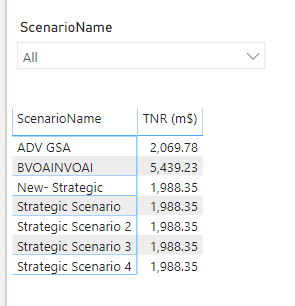
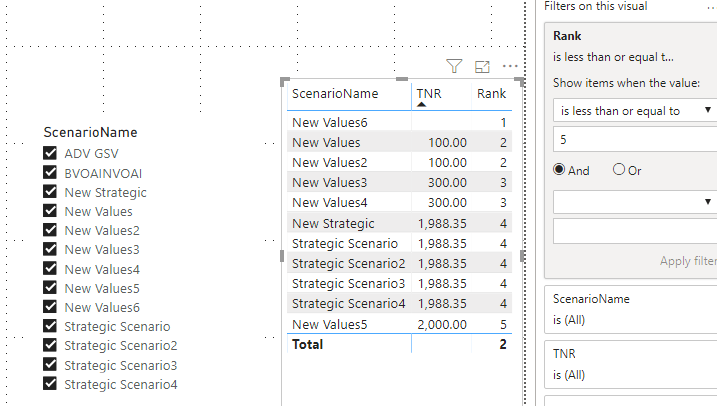
When I am applying a TOP 5 visual level filter am getting 7 values, I think its due to the measure having same values,
so how to show TOP 5 values, it should not be hardcoded, even if i select 10 items in Scenario name slicer, it should show only top 5 among them
Hi @Anonymous ,
Please try this measure:
Rank =
RANKX(
ALLSELECTED(Sheet1),
FIRSTNONBLANK(Sheet1[TNR], 1),
,
ASC,
Dense
)
Best regards,
Lionel Chen
If this post helps, then please consider Accept it as the solution to help the other members find it more quickly.
@Anonymous ,
Click on filter property of that table --> Select ScenarioName --> Filter Type to Top N --> Enter 5 in Show Items value --> By Value option drag your TNR field.
Dont forget to hit THUMBS UP and Accept this as a solution if it helps you!
The Power BI Data Visualization World Championships is back! It's time to submit your entry.
Check out the January 2026 Power BI update to learn about new features.
| User | Count |
|---|---|
| 67 | |
| 44 | |
| 34 | |
| 25 | |
| 23 |
| User | Count |
|---|---|
| 137 | |
| 118 | |
| 58 | |
| 40 | |
| 35 |