cancel
Showing results for 
Search instead for 
Did you mean: 

Level up your Power BI skills this month - build one visual each week and tell better stories with data! Get started

Reply
Anonymous
Not applicable

TOP N with same values

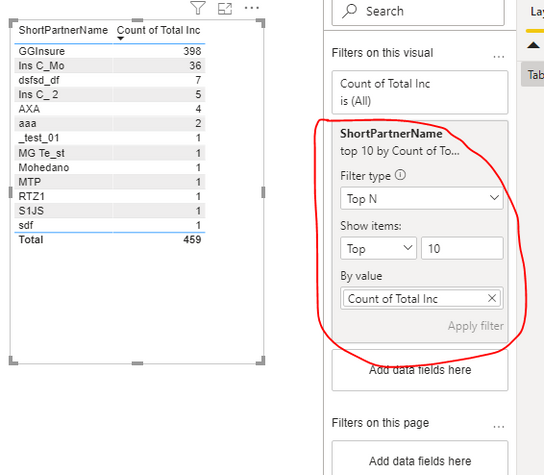
Hi, I have a problem, in my report I have one table, and I should show the top 10 of the partner by count incident:

ruz_lee_1-1599129001363.png

I had thought in the visual filter of the table, use the TOP 10 filter in the field of ShorPartnerName by the metric "Count of Total inc":

ruz_lee_2-1599129214724.png

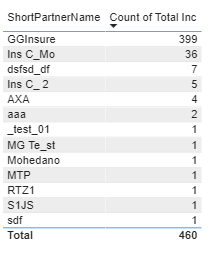
But this way dont work like I would like because the table show more than 10 ShortPartnerName, I undertand that the reason is the repeated values in the metric of "Count of Total inc".

Is there a way to only show only the top 10 in descending order even though there are repeating values?

Thanks.

1 ACCEPTED SOLUTION

@Anonymous You need to create a tie breaker field so all results with the same ranking can be ranked further. So if you have 2 results with the same value (let's say "1") you need to give them a value after the decimal related to how you want to further rank them.


EG: To break the tie alphabetically you need to create a ranking of ShortPartnerName and then divide by 10,100,1000,10000 etc depending on how many you have (if you have less than 100 then divide by 100 so the result will be less than 1, if you have 10000 or if you think it will grow to that many then divide by 10000). You should now have the original rank as an integer value and the alphabetical rank as as a decimal that's less than 1. If you then create a field adding them together, all values of 1 from the original rank will now be 1.01, 1.02 etc and you can use that field as your TopN filter.

View solution in original post

4 REPLIES 4
amitchandak
Super User
Super User

Anonymous
Not applicable

Sorry @amitchandak , Im very new in PowerBi and Im very lost. In this capture, ShortPartnerName is a field and Count Of Total Inc is this measure:

"Count of Total Inc" = DISTINCTCOUNT(vw_GBL_MotorIncident[IncidentDetailsID])+0

ruz_lee_0-1599130844359.png

I don´t know if I have to creaete a field or measure and how I should do it, please, could you give more details? thanks


@Anonymous You need to create a tie breaker field so all results with the same ranking can be ranked further. So if you have 2 results with the same value (let's say "1") you need to give them a value after the decimal related to how you want to further rank them.


EG: To break the tie alphabetically you need to create a ranking of ShortPartnerName and then divide by 10,100,1000,10000 etc depending on how many you have (if you have less than 100 then divide by 100 so the result will be less than 1, if you have 10000 or if you think it will grow to that many then divide by 10000). You should now have the original rank as an integer value and the alphabetical rank as as a decimal that's less than 1. If you then create a field adding them together, all values of 1 from the original rank will now be 1.01, 1.02 etc and you can use that field as your TopN filter.

Anonymous
Not applicable

@PhilWinstonGreat, I did it following your indication and is solved, thanks a lot

Helpful resources

Announcements
April Power BI Update Carousel

Power BI Monthly Update - April 2026

Check out the April 2026 Power BI update to learn about new features.

Fabric SQL PBI Data Days

Data Days 2026 coming soon!

Sign up to receive a private message when registration opens and key events begin.

New to Fabric survey Carousel

New to Fabric Survey

If you have recently started exploring Fabric, we'd love to hear how it's going. Your feedback can help with product improvements.

Power BI DataViz World Championships carousel

Power BI DataViz World Championships - June 2026

A new Power BI DataViz World Championship is coming this June! Don't miss out on submitting your entry.