Join us at FabCon Atlanta from March 16 - 20, 2026, for the ultimate Fabric, Power BI, AI and SQL community-led event. Save $200 with code FABCOMM.
Register now!The Power BI Data Visualization World Championships is back! Get ahead of the game and start preparing now! Learn more
Hi Team,
I need TOP 5 Pecentage but its Wrong output
below is my table Name and Amount and I have calculated as GrandTotal but if select TOP 5 its Wrong Out put 2nd table is Output table
| Name | Amount | %GT of Amount |
| H | 60 | 21.05% |
| J | 50 | 17.54% |
| I | 40 | 14.04% |
| D | 30 | 10.53% |
| F | 30 | 10.53% |
| C | 20 | 7.02% |
| G | 20 | 7.02% |
| B | 15 | 5.26% |
| A | 10 | 3.51% |
| E | 10 | 3.51% |
below is in Power BI out but its Wrong output
| Name | Amount | %GT of Amount |
| H | 60 | 28.57% |
| J | 50 | 23.81% |
| I | 40 | 19.05% |
| D | 30 | 14.29% |
| F | 30 | 14.29% |
But I am epecting is below out
| Name | Amount | %GT of Amount |
| H | 60 | 21.05% |
| J | 50 | 17.54% |
| I | 40 | 14.04% |
| D | 30 | 10.53% |
| F | 30 | 10.53% |
Thanks
Aruna lavi
@Anonymous , If your % total correct,if so then use top N of rank on that to filter
example
Top 5 City Rank = CALCULATE([% of total],TOPN(10,all(Table[Name]),[% of tota],DESC),VALUES(Geography[Table]))
for % of total
divide(sum(Table[Amount]),calculate(sum(Table[Amount]),all(Table)))
If you want to calculate percent with GrandTotal
__Amount = CALCULATE(SUM(Subscription[Amount]),ALL(Subscription))
% Amount = SUM(Subscription[Amount])/[__Amount]
If you want external filters to be applied on your total Calcuation then you need to change your grand total formula to use ALLEXCEPT
__Amount = CALCULATE(SUM(Subscription[Amount]),ALLEXCEPT(Subscription ,Subscription[UserID]))
and use % Amount same formula
Proud to be a Super User!
Hi Farhan,
Thank you replay.
but no lock if select TOP 5 its wrong percentage (if didnt select top N its give good result)
I am used your Measure given good result but its wrong showing after select TOP N
I am selecting TOPN in Power BI
Select Filter panel
then Name expand Filter Type
Then by values is %Amount
its wrong Percentage
please help on this
Thanks
Aruna
Hi Team,
This is Bug in Microsoft Power BI.I have tryed multiple ways but cant fixed(when we required %)
But I have fixed using sql server query and Powe BI(Both required)
Step 1(Sql server Query):
query from DB: we create two extra column 1.Percentage and Rank
Percentage query :CAST(100.0* [Amount] / (SUM([Amount]) OVER (PARTITION BY h_Date )) AS DECIMAL(10,2)) AS %_Amount
Rank Function from DB:ROW_NUMBER() OVER( PARTITION BY h_Date ORDER BY [Amount] DESC) AS RowNumberRank
Step 2(Power BI):
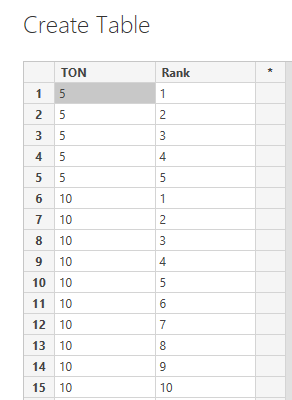
I have create table for TOP N in Power BI below like
Then given Relationship Query dataset and TOP N dataset(Step 1 and Step 2)
if anybody any clarification please contact me.
Thanks
Shanvitha
Could you put the formula you're using?
The Power BI Data Visualization World Championships is back! Get ahead of the game and start preparing now!
Check out the November 2025 Power BI update to learn about new features.
| User | Count |
|---|---|
| 59 | |
| 43 | |
| 42 | |
| 23 | |
| 17 |
| User | Count |
|---|---|
| 190 | |
| 122 | |
| 96 | |
| 66 | |
| 47 |