cancel
Showing results for 
Search instead for 
Did you mean: 

Get Fabric Certified for FREE during Fabric Data Days. Don't miss your chance! Request now

Reply
Onaiggac
Advocate II
Advocate II

TODAY() functions works on desktop but fail in the web app

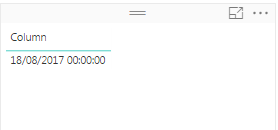
I created a new column with today() expression.

Column = TODAY()

And put it to in a table

Capturar.PNG


When I publish it on the PowerBI web app, it returns an error like this

Capturar.PNG


In red it says something like

"There was an error with the data gateway".


And in the with box it says:

"Was not possible to recover the data for this visual. Try again later.

Try again later or contact the support. If you contact the support, give these details:

Task ID

Request ID

Correlation ID

Hour

Version

"


I think there is something with languages. My PowerBI Desktop is set to Portuguese (Brazil) and the web api (app.powerbi.com) is set to Portuguese.


1 ACCEPTED SOLUTION

I found the problem.

My .pbix (Desktop) uses an account (database account) with default language diferent from the account that is used to access the data from the gateway.

When I change the gateway database account to use the same account that pbix uses, the error was fixed.

View solution in original post

3 REPLIES 3
v-sihou-msft
Microsoft Employee
Microsoft Employee

@Onaiggac


As the error message said, the issue is related to your gateway. You may re-install your data gateway and make sure it's online. If this issue still persists, please create a support ticket.


Regards,

The gatway is fine and online. I have many other reports and they are running as expected.

I dont think TODAY() function use the gateway.


Anyway, I will try to create a support ticket.


Tks.

I found the problem.

My .pbix (Desktop) uses an account (database account) with default language diferent from the account that is used to access the data from the gateway.

When I change the gateway database account to use the same account that pbix uses, the error was fixed.

Helpful resources

Announcements
Fabric Data Days Carousel

Fabric Data Days

Advance your Data & AI career with 50 days of live learning, contests, hands-on challenges, study groups & certifications and more!

October Power BI Update Carousel

Power BI Monthly Update - October 2025

Check out the October 2025 Power BI update to learn about new features.

FabCon Atlanta 2026 carousel

FabCon Atlanta 2026

Join us at FabCon Atlanta, March 16-20, for the ultimate Fabric, Power BI, AI and SQL community-led event. Save $200 with code FABCOMM.

Top Solution Authors