Get certified for free when you join Fabric Data Days 2026 and dive into Fabric, Power BI, SQL, AI, and other essential data skills.
Join nowJuly 7 - July 17 | Round 2 of the Power BI Dataviz World Championships. Don't miss your chance! Learn more
Hi,
I have this cumulative measure which works ok:
Cumulative Change Notes =
CALCULATE (
COUNTA ( Company_Documents[ID] ),
FILTER (
ALLSELECTED ( Company_Documents ),
Company_Documents[DOC_CREATION_DATE]
<= MAX ( Company_Documents[DOC_CREATION_DATE] )
)
)
However i'd like to limit the result by adding an additional criteria to the filter (starts &&)
Cumulative Change Notes =
CALCULATE (
COUNTA ( Company_Documents[ID] ),
FILTER (
ALLSELECTED ( Company_Documents ),
Company_Documents[DOC_CREATION_DATE]
<= MAX ( Company_Documents[DOC_CREATION_DATE] )
&& Company_Documents[Document Class] = "Change Note"
)
)
I must have the incorrect syntax as there are no records returned despite records being available which match the criteria.
Can anyone give me a pointer on where i've gone wrong when adding the additional filter criteria?
Thanks,
Richard
Solved! Go to Solution.
Hi @RichardJ
Try this.
Cumulative Change Notes =
VAR __maxCreationDate = MAX ( Company_Documents[DOC_CREATION_DATE] )
RETURN
CALCULATE (
COUNTA ( Company_Documents[ID] ),
ALLSELECTED ( Company_Documents ),
Company_Documents[DOC_CREATION_DATE] <= __maxCreationDate,
Company_Documents[Document Class] = "Change Note"
)
Hi @RichardJ
Try this instead, if it does not work consider creating a data sample so we can test and apply formulas.
Hi @RichardJ
Try this.
Cumulative Change Notes =
VAR __maxCreationDate = MAX ( Company_Documents[DOC_CREATION_DATE] )
RETURN
CALCULATE (
COUNTA ( Company_Documents[ID] ),
ALLSELECTED ( Company_Documents ),
Company_Documents[DOC_CREATION_DATE] <= __maxCreationDate,
Company_Documents[Document Class] = "Change Note"
)
@Mariusz Many Thanks for the idea and the quick reply.
This works perfectly.
Initially I didn't think it had worked as I wasn't giving it enough time to calculate (circa 5 seconds) the response.
Thanks again,
Richard
Hi @RichardJ
Try this instead, if it does not work consider creating a data sample so we can test and apply formulas.
@Mariusz - The linked file shows the formulas you provided working. perfectly.
I had to roll back my actual file (not this extract) to get it working properly as it had become corrupted in some way.
Hopefully the attached working example will help someone in future.
Thanks again @Mariusz - getting a solution for this made my day.
Cheers,
Richard
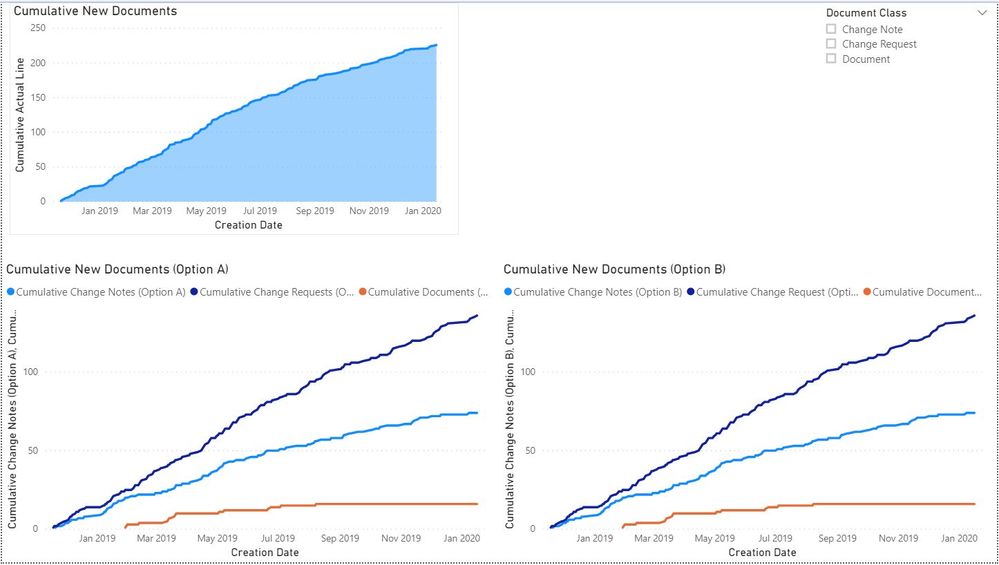
Cumulative Total, then broken down cumulative sub sections
Join us in Barcelona for FabCon and SQLCon, the Fabric, Power BI, SQL, and AI community event. Save €200 with code FABCMTY200.
Join Fabric Data Days 2026: 60 days of free live/on-demand sessions, challenges, study groups, and certification opportunities.
| User | Count |
|---|---|
| 22 | |
| 18 | |
| 18 | |
| 17 | |
| 13 |
| User | Count |
|---|---|
| 61 | |
| 53 | |
| 47 | |
| 40 | |
| 38 |