Join us at FabCon Atlanta from March 16 - 20, 2026, for the ultimate Fabric, Power BI, AI and SQL community-led event. Save $200 with code FABCOMM.
Register now!The Power BI Data Visualization World Championships is back! Get ahead of the game and start preparing now! Learn more
Hi there,
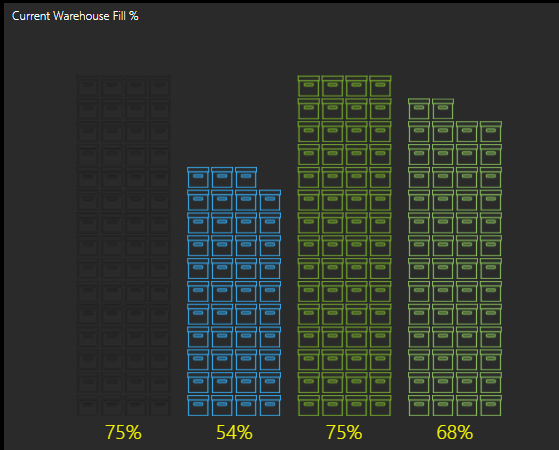
I'm trying to do something similar to the image attached with images increasing with percentage, but I can't seem to find out how to do it.
I can see on the templates on Synoptic Designer for Power BI it show's how to do e.g. a shop map where products are sold, but not anything on the % level with images increasing.
Does anybody know how this would work, or could point me to a guide that would be great?
Thanks in advance
Liam
Solved! Go to Solution.
You'll find Inforgraphic Designer custom visual more useful...
#37 Easily create infographics in Power BI with infographics desginer - Bing video
Proud to be a Super User!
You'll find Inforgraphic Designer custom visual more useful...
#37 Easily create infographics in Power BI with infographics desginer - Bing video
Proud to be a Super User!
The Power BI Data Visualization World Championships is back! Get ahead of the game and start preparing now!
| User | Count |
|---|---|
| 39 | |
| 37 | |
| 33 | |
| 32 | |
| 29 |
| User | Count |
|---|---|
| 133 | |
| 88 | |
| 85 | |
| 68 | |
| 64 |