FabCon is coming to Atlanta
Join us at FabCon Atlanta from March 16 - 20, 2026, for the ultimate Fabric, Power BI, AI and SQL community-led event. Save $200 with code FABCOMM.
Register now!- Power BI forums
- Get Help with Power BI
- Desktop
- Service
- Report Server
- Power Query
- Mobile Apps
- Developer
- DAX Commands and Tips
- Custom Visuals Development Discussion
- Health and Life Sciences
- Power BI Spanish forums
- Translated Spanish Desktop
- Training and Consulting
- Instructor Led Training
- Dashboard in a Day for Women, by Women
- Galleries
- Data Stories Gallery
- Themes Gallery
- Contests Gallery
- QuickViz Gallery
- Quick Measures Gallery
- Visual Calculations Gallery
- Notebook Gallery
- Translytical Task Flow Gallery
- TMDL Gallery
- R Script Showcase
- Webinars and Video Gallery
- Ideas
- Custom Visuals Ideas (read-only)
- Issues
- Issues
- Events
- Upcoming Events
The Power BI Data Visualization World Championships is back! Get ahead of the game and start preparing now! Learn more
- Power BI forums
- Forums
- Get Help with Power BI
- Desktop
- Re: Sync slicers with bookmarks
- Subscribe to RSS Feed
- Mark Topic as New
- Mark Topic as Read
- Float this Topic for Current User
- Bookmark
- Subscribe
- Printer Friendly Page


- Mark as New
- Bookmark
- Subscribe
- Mute
- Subscribe to RSS Feed
- Permalink
- Report Inappropriate Content
Sync slicers with bookmarks
Purpose: Synce slicer across Bookmarks.
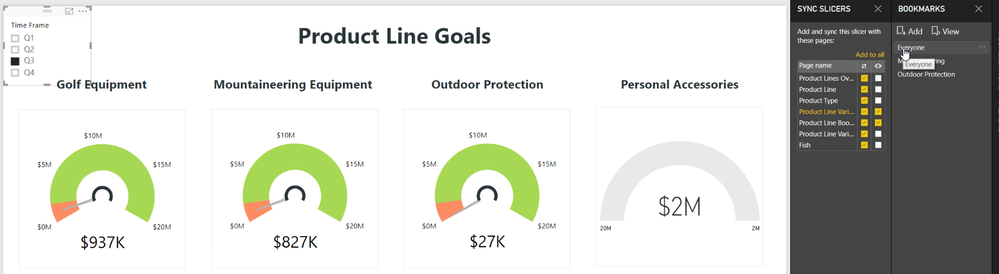
Background: I would like my date slicer to sync across bookmarks. In the below example I selected Q3 as my time frame in the "Everyone" bookmark. However, when I go to the "Mountaineering" bookmark my time frame selection is removed.
Can slicers sync across bookmarks and pages? Or only pages?

Solved! Go to Solution.


- Mark as New
- Bookmark
- Subscribe
- Mute
- Subscribe to RSS Feed
- Permalink
- Report Inappropriate Content
Slicers sync across pages, not bookmarks. That being said, it is possible that perhaps if you turn on selection controls that you may be able to achieve your desired result. My thinking is that perhaps you can save your bookmark without cross filters and then perhaps your synchronized slicers might work and not get their values removed by the bookmark.
Follow on LinkedIn
@ me in replies or I'll lose your thread!!!
Instead of a Kudo, please vote for this idea
Become an expert!: Enterprise DNA
External Tools: MSHGQM
YouTube Channel!: Microsoft Hates Greg
Latest book!: DAX For Humans
DAX is easy, CALCULATE makes DAX hard...
- Mark as New
- Bookmark
- Subscribe
- Mute
- Subscribe to RSS Feed
- Permalink
- Report Inappropriate Content
Hello @Anonymous,
As I understand it, you want to keep filters on Regions and Venues BUT you also want to keep your page filters which are different (in function of your choice : sub-rental, purchased or others).
My first idea is to think that even if you're creating bookmarks, you are still working on the same page (& same filters).
Did you try to apply your filter not on the page but on the object(s) ? For example, instead of applying this filters on page, apply them on your different objects (table, graph...). You'll need to repeat the action for each of your 3 pages and begin again the operation (select everything except your slicers, then update your bookmark).
Please, let me know if that helps,
- Mark as New
- Bookmark
- Subscribe
- Mute
- Subscribe to RSS Feed
- Permalink
- Report Inappropriate Content
Hi @Anonymous ,
Yes, that works well! Thank you so much!
@Anonymous ,
please refer to @Anonymous 's suggestion to fix the issue. It works for me. Let me know if you need help with.
Regards,
Jailene
- Mark as New
- Bookmark
- Subscribe
- Mute
- Subscribe to RSS Feed
- Permalink
- Report Inappropriate Content
Hi @Anonymous
What did you do for the page level filters? Can you please explain?
- Mark as New
- Bookmark
- Subscribe
- Mute
- Subscribe to RSS Feed
- Permalink
- Report Inappropriate Content
What if your page has many objects as in my case (I've 8 different objects) and to apply individual filters would be really cumbersome and what is client expects to have a filter which affects all the visuals in one go rather than applying individual filters?
Any thoughts?
- Mark as New
- Bookmark
- Subscribe
- Mute
- Subscribe to RSS Feed
- Permalink
- Report Inappropriate Content
@Anonymous ,
I don't think Power BI can achieve this function for now... I also try that which I believe is more effective, however it doesn't work...
- Mark as New
- Bookmark
- Subscribe
- Mute
- Subscribe to RSS Feed
- Permalink
- Report Inappropriate Content
Hi,
Did you find a solution for this with the filters pane? I'm also facing the same issue.
- Mark as New
- Bookmark
- Subscribe
- Mute
- Subscribe to RSS Feed
- Permalink
- Report Inappropriate Content
Thank you. This Works.

Helpful resources

Power BI Dataviz World Championships
The Power BI Data Visualization World Championships is back! Get ahead of the game and start preparing now!

Power BI Monthly Update - December 2025
Check out the December 2025 Power BI Holiday Recap!

FabCon Atlanta 2026
Join us at FabCon Atlanta, March 16-20, for the ultimate Fabric, Power BI, AI and SQL community-led event. Save $200 with code FABCOMM.

| User | Count |
|---|---|
| 39 | |
| 38 | |
| 36 | |
| 28 | |
| 28 |


| User | Count |
|---|---|
| 124 | |
| 88 | |
| 74 | |
| 66 | |
| 65 |


