cancel
Showing results for 
Search instead for 
Did you mean: 

Get Fabric Certified for FREE during Fabric Data Days. Don't miss your chance! Request now

Reply
Anonymous
Not applicable

Symmetric matrix to see how many components are in common for each pair of products

Hi all,


I have a table with Final products and Component relationship ( the real table contains 300.000+ rows for 500 products)


ProductComponent
Product 1Comp 1
Product 1Comp 2
Product 1Comp 3
Product 2Comp 4
Product 2Comp 2
Product 2Comp 3
Product 3Comp 1
Product 3Comp 6
Product 3Comp 2


I would like to obtain a Symetric matrix that show for each pair of Products how many components are in common.

Like this:

 Product 1Product 2Product 3
Product 1322
Product 2231
Product 3213


And also a Symetric matrix that show  how many unique components are needed for each pair of Products

Like this:

 Product 1Product 2Product 3
Product 1344
Product 2435
Product 3453


I am fairly new to DAX and ask if you have any suggestions for making these measures.


Thanks a lot!


1 ACCEPTED SOLUTION
Anonymous
Not applicable

Hi @Anonymous ,


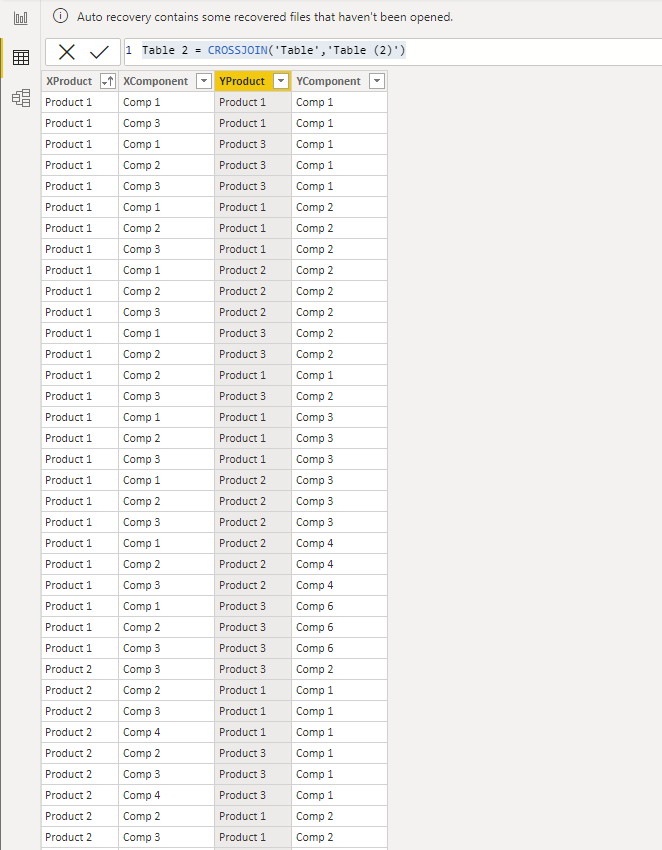
1.Duplicate the an original table, then use the CROSSJOIN function. When using this function, make sure that the column names of the two tables are different.

Table 2 = CROSSJOIN('Table','Table (2)')

Screenshot 2021-06-04 162443.png


2.Create two measures.

Measure = 
CALCULATE (
    COUNTROWS ( 'Table 2' ),
    FILTER ( 'Table 2', [XComponent] = [YComponent] )
)
Measure 2 = 
VAR _total =
    CALCULATE (
        COUNT ( 'Table'[XComponent] ),
        FILTER ( 'Table', 'Table'[XProduct] = MAX ( 'Table 2'[XProduct] ) )
    )
        + CALCULATE (
            COUNT ( 'Table'[XComponent] ),
            FILTER ( 'Table', 'Table'[XProduct] = MAX ( 'Table 2'[YProduct] ) )
        )
RETURN
    _total - [Measure]


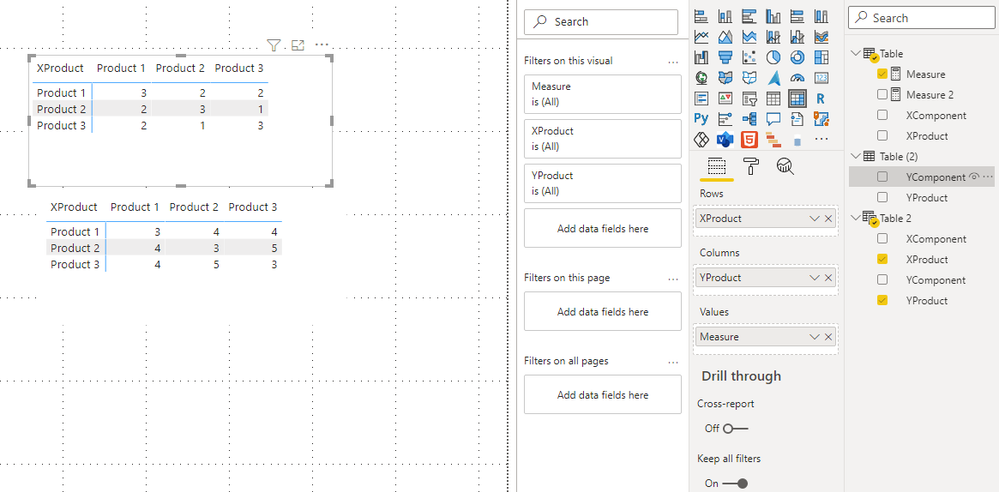
The result is this

Screenshot 2021-06-04 162604.png


Best Regards,

Stephen Tao


If this post helps, then please consider Accept it as the solution to help the other members find it more quickly.

View solution in original post

2 REPLIES 2
Anonymous
Not applicable

Hi @Anonymous ,


1.Duplicate the an original table, then use the CROSSJOIN function. When using this function, make sure that the column names of the two tables are different.

Table 2 = CROSSJOIN('Table','Table (2)')

Screenshot 2021-06-04 162443.png


2.Create two measures.

Measure = 
CALCULATE (
    COUNTROWS ( 'Table 2' ),
    FILTER ( 'Table 2', [XComponent] = [YComponent] )
)
Measure 2 = 
VAR _total =
    CALCULATE (
        COUNT ( 'Table'[XComponent] ),
        FILTER ( 'Table', 'Table'[XProduct] = MAX ( 'Table 2'[XProduct] ) )
    )
        + CALCULATE (
            COUNT ( 'Table'[XComponent] ),
            FILTER ( 'Table', 'Table'[XProduct] = MAX ( 'Table 2'[YProduct] ) )
        )
RETURN
    _total - [Measure]


The result is this

Screenshot 2021-06-04 162604.png


Best Regards,

Stephen Tao


If this post helps, then please consider Accept it as the solution to help the other members find it more quickly.

Anonymous
Not applicable

I tried to duplicate the table and use the following measure, it works with 10 test products but if I use the whole dataset 600+ products and 14000+ components it gets very slow and eventually fails due to memory limitations.

Component_product = 
VAR var1=
    CALCULATETABLE(
        DISTINCT(
            Test_table[Component]),
    REMOVEFILTERS(Test_table_1))

VAR var2=
    CALCULATETABLE(
        DISTINCT(
            Test_table_1[Component]),
    REMOVEFILTERS(Test_table))

RETURN
    VAR p1 = COUNTROWS(var1)
    VAR p2 = COUNTROWS(var2)
    VAR p1_p2 = COUNTROWS(DISTINCT(UNION(var1,var2)))
    RETURN
        DIVIDE(p1+p2-p1_p2,p1_p2)


Helpful resources

Announcements
November Power BI Update Carousel

Power BI Monthly Update - November 2025

Check out the November 2025 Power BI update to learn about new features.

Fabric Data Days Carousel

Fabric Data Days

Advance your Data & AI career with 50 days of live learning, contests, hands-on challenges, study groups & certifications and more!

FabCon Atlanta 2026 carousel

FabCon Atlanta 2026

Join us at FabCon Atlanta, March 16-20, for the ultimate Fabric, Power BI, AI and SQL community-led event. Save $200 with code FABCOMM.

Top Solution Authors
Top Kudoed Authors